Key takeaways about P2P payments
P2P stands for “peer-to-peer.”
P2P payments let you send money directly to another person, while keeping your bank account details private.
Popular P2P payment services include Cash App, PayPal, Venmo and Zelle.
You're generally protected if someone steals from your account — but usually not if a scammer tricks you into sending money yourself.
What is a P2P payment?
Peer-to-peer payments, or P2P payments, are a convenient way to send money directly to another person without having to exchange cash, checks or bank account details. P2P payment systems are often money transfer apps, like Venmo, PayPal and Cash App — and they require you to link a bank account or card to send money. But you don’t have to have a linked bank account to receive money.
However, keeping money in the app instead of transferring it out to a linked account comes with risks.
Here’s what to know about how P2P payments work, how to choose a service and how to use a service safely.
» Already have a P2P app in mind? Skip ahead to read more about a few popular providers
How P2P payments work
With P2P payments, you can quickly send or receive money. To send a payment, you’ll need the recipient’s email address or phone number; you can use one of those pieces of information to add someone as a contact within the app.
Sending money is free if you link a bank account or debit card. You’ll likely pay a fee of about 3% if you try to send money from a credit card.
P2P services make paying for services — like dogsitting or babysitting — or splitting bills with friends and family pretty painless.
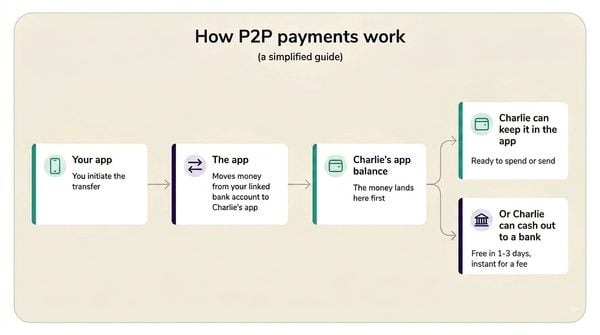
Say you’re out to dinner with your cousin Charlie and want to split the check. Charlie pays the bill using his card. You open the P2P app both you and Charlie use and pick Charlie from your contact list (or find him using his email or phone number), type the amount you want to send, approve the transfer and voilà — Charlie receives the money into his P2P app account.
He could leave the money in there or he could transfer it to his connected bank account. Here’s a visual to help you see the movement of money in a P2P app transfer:
» Want to explore your options? See the best ways to send money to an individual in the U.S. or abroad
Member FDIC

3.85%
$0
Member FDIC

3.75%
$0
Member FDIC

4.25% for 6mo
$0






How quickly do P2P payments post?
Money is usually available instantly. Once you receive a notice from your app that it has come in, it’s ready to use within the app.
If you choose to transfer your money out of the app, the transfer usually takes one to three business days to arrive in your linked bank account. Some providers offer instant transfers to the linked account, but for a fee (usually a percentage of the total transfer amount).
Fee to instantly transfer funds out to your bank account:
Zelle instant transfer fee: None. That’s because Zelle doesn’t have an intermediary “balance” or “wallet.” It’s a service within your bank account, so the money is instantly deposited in your bank account with any transfer.
Cash App instant transfer fee: 0.50% to 2.5% of the amount. The maximum fee is $75; you’ll know the exact fee before you choose to submit the transfer.
PayPal instant transfer fee: 1.75% of the amount transferred. The minimum fee is $0.25 and the maximum is $25.
Venmo instant transfer fee: 1.75% of the transfer amount. The minimum fee is $0.25 and the maximum is $25.
» Want to send money on social media apps? Read about social media money transfers
Which P2P payment service should you use?
P2P payment use is widespread. A 2025 survey by the Financial Health Network found that 68% of households used some form of P2P payment service in the last 12 months *. It’s very possible you’ll be using more than one P2P payment app in your life, depending on what your friends and family already use.
If you're the one choosing the payment service for your friends and family, check out a quick summary of some of the bigger apps below or read our more in-depth overview of top peer-to-peer payment apps.
*This research was funded by Block, the parent company of Cash App, but the researchers maintain their analysis is their own.
App | Best for | Highlights | Downsides |
|---|---|---|---|
Friends and family P2P and fintech extras. | Can spend Cash App balance with optional free debit card. | Pass-through Federal Deposit Insurance Corp. (FDIC) insurance is only available if you use more of the app’s services. | |
Online shopping, international money transfers to friends. |
|
| |
Venmo (owned by PayPal) | Splitting bills and social payments. |
| Pass-through FDIC insurance is only available if you use more of the app’s services. |
Sending money to people you already trust, fast. |
| If your bank or credit union doesn’t use Zelle, then you won’t have access to it. You can’t download it or sign up without a participating bank account. |

» See what Nerds prefer: Venmo or Cash App
Is your money insured in a P2P app?
Not automatically, not like it is in your bank account and maybe not at all.
P2P apps are not banks, so they cannot offer insurance from Federal Deposit Insurance Corp. (FDIC) or the equivalent insurance for credit unions. But they can offer what’s called pass-through FDIC insurance, where they partner with banks to insure your money. Pass-through insurance only kicks in if the partner bank fails, not the app. It doesn’t guarantee you’ll recover your money if the app company goes out of business (unlike at an insured bank or credit union, where you’re guaranteed to not lose your money up to $250,000 per account holder, account ownership type and institution).
If you’re a casual app user, you likely don’t have pass-through insurance because apps often require you to use more of their services to qualify for:
Cash App: You qualify by using its debit card or sponsoring a minor’s account.
Venmo: You qualify by using its debit card, direct deposit feature, Cash-a-Check feature or using Venmo to buy or receive cryptocurrency.
PayPal: You qualify by using PayPal’s debit card, direct deposit feature, or if you buy or receive cryptocurrency through the account.
It’s technically safest to transfer your P2P balance out to your linked bank account. Even if you qualify for pass-through insurance, that insurance only protects against the partner bank failing, not the app company.
Need a checking account to link? See NerdWallet’s picks for the best checking accounts.
Been rejected for a bank account because of your banking history? See our list of second-chance bank accounts.
Are P2P payments safe?
Encryption-wise, yes. Major P2P systems encrypt, or shield, your financial information.
But P2P payments are often used by scammers and that’s where your own precautions become important.
According to a Consumer Reports Survey from 2022 , 78% of people who have ever used a P2P service have never had an issue with the service. Of those who did have issues, the most common were:
sending money to the wrong person (6%),
sending money in what turned out to be a scam (6%) and
sending money to someone who never received it (6%).
Below, we outline steps you can take to protect yourself from experiencing these issues, but first it’s important to understand which P2P payments may be eligible to be recovered:
Authorized transfers are not recoverable: If you authorize a P2P transfer yourself, even if you were tricked into sending the money, you likely can’t get the money back. Per a federal regulation, banks and credit unions do not have to give you the money back.
Unauthorized transfers might be recoverable: If your phone was hacked or stolen, that’s different because you didn’t authorize the transfer. Under Regulation E,, you could report the theft to your institution and the bank or credit union would investigate and potentially reimburse you. But you have to report the unauthorized transfers promptly to get the most protection.
How to safely make and receive P2P payments
Here’s what you can do to help P2P payment services keep your money safe:
1. Pay and receive money only with people you know
Don’t pay strangers sight unseen with P2P. If you authorize a transfer, you have little recourse to get the money back. Payment apps usually have some procedures in place to help keep you from sending money to a scammer or to the wrong person. For example, Zelle transfers made through the Chase mobile app require you to read through P2P safety information and agree to take responsibility for the transfer. Venmo will prompt you to verify a recipient’s name or last four digits of a phone number before sending money to someone not in your contacts (though you can hit a button to bypass that if you choose).
2. Enter data carefully
If you mistype a recipient’s email address, phone number or name, the money could go to the wrong person. Double-check your recipient’s information before you send a payment.
If you do accidentally send money to the wrong person, contact them and request the money back. You can also report the mistake to the app and your bank but neither is legally obligated to get you your money back.
3. Use more authentication security: PINs, biometrics and multi-factor authentication
Many platforms let you create a PIN and require that you enter it to complete transactions. For even stronger protection, set up a PIN for unlocking your phone, too. Some devices and apps also let you set up biometric authentication, requiring your fingerprint or face to be identified before allowing you access, or multi-factor authentication, which requires at least two ways of verifying your identity before allowing you access.
4. Opt for a notification for every transaction
Some platforms do this automatically, but if yours doesn’t, check your settings for the option to get an email or text anytime there’s a transaction on your account.
» Recovering from a scam: How to get past being a victim of a financial scam
Who counts as a stranger?
Is it OK to use P2P payment apps to pay a business?
Yes. There are plenty of legitimate businesses that accept P2P apps like PayPal and Venmo as a form of payment. It’s common to pay a vendor at a farmers market with a P2P app, for example.
The consumer protection rules for paying a business are different than making a transfer to a friend. Purchase protection rules vary by app, but here at Venmo, for example:
If you use Venmo at checkout, whether with a Venmo debit card, the app (as long as you tell the app that you’re using it for a purchase, not a P2P transfer) or a store’s QR code, your purchase is protected. That means if something goes wrong — like your purchase doesn’t arrive or was damaged in shipping — you can appeal to the seller or the app for help resolving the issue or getting your money back.
PayPal, which owns Venmo, offers similar purchase protections.
But for large purchases or if there’s a chance you won’t be happy with the service or have a problem with the goods, a P2P app is not a good choice. In these cases, a credit card would be better because it has more powerful consumer protections.
Article sources
- 1.Federal Reserve Bank of St. Louis. Peer-to-Peer (P2P) Payment Services. Accessed Aug 15, 2025.
- 2.Financial Health Network. Peer-to-Peer Payments: Beyond Splitting the Bill. Accessed Aug 12, 2026.
- 3.Federal Trade Commission. Mobile Payment Apps: How To Avoid a Scam When You Use One. Accessed Jul 31, 2026.
- 4.Consumer Reports Survey Group. Peer-to-Peer Payment Services.
- 5.Board of Governors of the Federal Reserve System. Official Staff Commentary on Regulation E. Accessed Jul 31, 2026.