








In the summer of 2025, my husband, Justin, was a couple months out from opening a brewery in northern Michigan. I jumped on the opportunity to help him choose a POS system. After a lot of consideration and conversations with sales representatives, I chose Square.
As of September 2026, it's now been over a year. Although there have been some hiccups with Square, I still feel good about the decision.
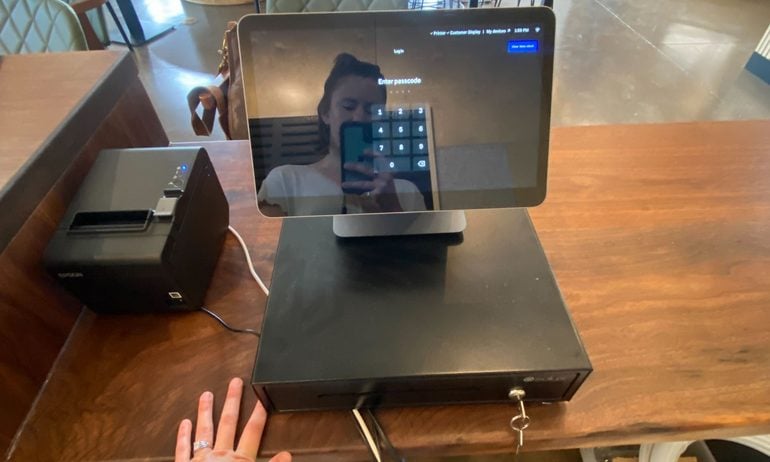
If you’re opening a new business and trying to choose a POS system, maybe my decision-making process can help you arrive at the right call.
Why Square?
As a small-business writer, I started with what I know: research. I looked into pricing, features and integrations for the best POS systems. Then, I took a few other factors into account.
Here’s a quick rundown of why Square fit the bill for Nocturnal Bloom Brewing:
Cost
This was my first time helping to run a business and make decisions for it. I didn't feel comfortable investing a lot of money in a POS system upfront, only to find out it’s not the right fit.
Instead, I wanted to feel like I made the right decision based on the facts I knew at the time. And the fact is, Square’s software plans and hardware equipment are less expensive than much of the competition.
That's still true, even after we had to upgrade from Square's Free plan to its $49-per-month Plus plan.
Trust
Square doesn’t require you to sign any contracts and is very transparent about its software and hardware pricing. This was a major trust signal for me.
Plus, it never felt like representatives were trying to “sell” us on anything when Justin or I spoke with them. What you see on the website is basically what you get, and I found that refreshing.
Industry-specific features
I knew we needed a POS system that would let us build a menu, which ruled out most retail products. In our case, a restaurant-specific option made the most sense. However, we didn't need the most complex restaurant-specific option.
Simplicity
I think that some restaurant-specific POS systems, such as Toast, may be overkill for operations like ours that don’t serve food. Square’s Free and Plus plans for restaurants seemed to strike the right balance without all the bells and whistles.
Integrations
Certain “built-in” integrations cost extra. I didn’t realize that until I started chatting with POS system representatives about the best fit for the brewery.
For instance, Toast charges an extra monthly fee to integrate with our accounting software, QuickBooks Online. (Square doesn’t.) Clover’s site suggests that integration costs extra, but a representative told me otherwise. This discrepancy gave me pause.
That said, even free integrations aren't always free. Sure, they may not require a monthly subscription fee. But you might have to pay to have your accountant make sure you set them up correctly. At least, that's what we did.
Choosing which information flows back and forth between Square POS, Square Payroll and QuickBooks Online isn't straightforward. It quickly turned into a mess of data. So, we asked our accountant to help fix it.
I don't think that's an uncommon scenario — whether you go with free or paid integrations. But it's something to be aware of and budget for. You don't want data redundancies or gaps. Spending a little extra to have a professional double-check your integration setup is worth it.
Familiarity
This certainly shouldn’t count for everything, but I’d be lying if I said it doesn’t matter. As a customer, I’m familiar with the Square brand. That made me think employees would be comfortable with it, too. And so far, I haven't heard any major complaints.
My one reservation with Square
All this being said, I hope the decision doesn’t come back to bite me. I’ve seen multiple commenters on Reddit claim that payment service providers (PSPs), like Square, unexpectedly shut down their accounts and hold their funds.
This is a danger with PSPs, because they lump funds from your card sales in with other businesses’ cash. That aggregation means PSPs have a low bar for potentially risky behaviors. That’s less of an issue with an individual merchant account provider, like Clover (or the third-party processors that work with it).
I don’t think it should be a problem as long as the brewery’s account doesn’t get flagged as “high risk.” I suggested the business refrain from selling CBD beverages for this reason. Although Square doesn’t list CBD products explicitly as “high-risk” items, some processors do.
A Square representative said Nocturnal Bloom could enroll in the company’s CBD program that outlines which products we can sell. But we’ll wait and see if enough customers request these beverages before moving forward.
Other POS systems I considered
The only other contender for the brewery — at least in my mind — was Clover. This is mainly because it would’ve allowed Nocturnal Bloom to work with a local payment processing company.
Square only lets you process payments through its in-house service. Its paid plan rates are competitive, but they’re also flat. You pay the same amount no matter which card someone uses to pay in-person.
The local processor uses interchange-plus pricing. Those rates are based on interchange fees, which vary by card. That structure can be more cost-effective for higher-volume businesses. As an added bonus, the local processor could also address issues on site (like if our system went down).
After doing the math, though, I realized that having an interchange-plus processor may not result in huge savings for our business. That's because, at the time, Justin estimated the average ticket price at the brewery would be relatively low (under $100). That's held true thus far.
Processing rates aside, Clover’s hardware is also significantly more expensive than Square’s options. All in all, the potential long-term savings didn’t seem worth it, and I went with my gut.
What I’ve learned so far using Square
Researching POS systems’ features and pricing as a small-business writer is one thing. Using a particular system in real life is another. I quickly learned this while creating Nocturnal Bloom’s menu within Square.
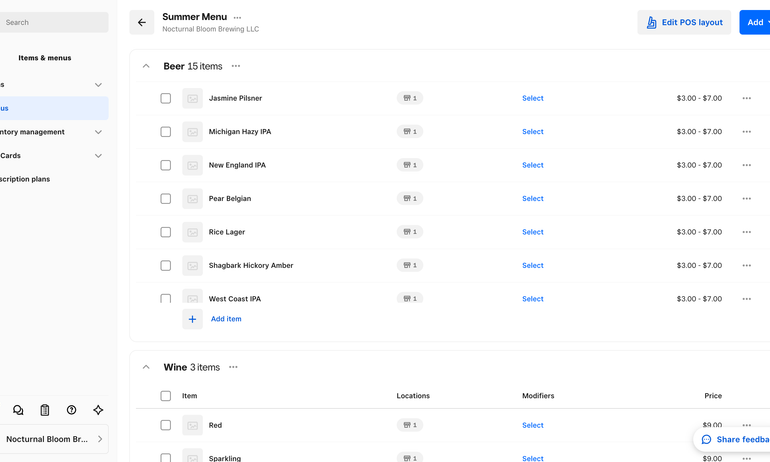
Overall, the process was intuitive, but I ran into some issues new users should be aware of:
You can’t create a menu from scratch on the Square Register. You need to sign into the Square Dashboard via its mobile app or a web browser and build it there instead.
The first menu I created didn’t save. This was frustrating to say the least. I’m not sure if this was a glitch on Square’s part or my Wi-Fi was acting up.
Categorization caused errors. When adding existing items to a category (a grouping of items that shows up in reports), I repeatedly received this notification: “Something went wrong. Please try saving again.” To avoid this, I’d suggest creating just a small portion of the menu, signing out and then signing in again to make sure it saved before you continue.