




 Default
 Learn more
Sortly is ideal for tracking inventory for free from within a mobile app. Available for both iOS and Android, it’s easy to use, lets you attach photos to items and includes a built-in barcode scanning feature. While it stands out for its mobile features, it’s not the only inventory management software with a mobile app. Zoho Inventory also has strong mobile features.
Sort by:
- Default
- NerdWallet rating (high to low)
- Starting at (low to high)
Zoho Inventory
Best for Overall free inventory software

Starting at
$0
Additional pricing tiers (per month): $39, $99, $159, $299.
Promotion
14-day free trial
on Zoho Inventory's website
Pros
- Integrates with one Shopify store, Zoho Books and QuickBooks.
- Includes invoice customization, shipping labels, backorders and item bundling.
- Mobile app available for iOS and Android.
- Customer support available via email.
- No item limits.
Cons
- Limited to one user and 50 sales orders per month in the free plan.
- Must upgrade for customization and automation tools.
- No in-depth reporting in the free plan.
Zoho Inventory tops our list because its free plan covers the basics. That includes invoicing, creating purchase orders, running simple inventory reports and bundling multiple items together into a single product. And unlike many of its competitors, it doesn’t cap how many items you can manage.
We also like that Zoho Inventory integrates seamlessly with the rest of Zoho’s software ecosystem. The company has in-house solutions for project management, payroll and accounting, among other types of software. And most of them offer free plans like Zoho Inventory does.
Pros
- Integrates with one Shopify store, Zoho Books and QuickBooks.
- Includes invoice customization, shipping labels, backorders and item bundling.
- Mobile app available for iOS and Android.
- Customer support available via email.
- No item limits.
Cons
- Limited to one user and 50 sales orders per month in the free plan.
- Must upgrade for customization and automation tools.
- No in-depth reporting in the free plan.
Zoho Inventory tops our list because its free plan covers the basics. That includes invoicing, creating purchase orders, running simple inventory reports and bundling multiple items together into a single product. And unlike many of its competitors, it doesn’t cap how many items you can manage.
We also like that Zoho Inventory integrates seamlessly with the rest of Zoho’s software ecosystem. The company has in-house solutions for project management, payroll and accounting, among other types of software. And most of them offer free plans like Zoho Inventory does.
Square POS (inventory feature)
Best for Free retail inventory software

Starting at
$0
Free plan; $49 Plus plan; $149 Premium plan.
Promotion
30-day free trial
on Square's website
Pros
- Integrates with accounting software and in-house POS system.
- Includes low stock alerts.
- No item limits.
- Weekday live chat and phone support.
- Mobile app available for iOS and Android.
Cons
- Must upgrade for bundling capabilities and inventory counting tools.
- Free plan doesn’t include inventory reports.
When it comes to POS systems, Square has one of the most feature-packed free plans out there. Its inventory management features are more focused on cataloging items as opposed to closely tracking them. But the fact that it includes low-stock alerts helps make up for that. That might be all very small retailers need.
Square’s paid POS plans have more options. Those include inventory and cost of goods sold reports, stock counting and purchase order management.
Pros
- Integrates with accounting software and in-house POS system.
- Includes low stock alerts.
- No item limits.
- Weekday live chat and phone support.
- Mobile app available for iOS and Android.
Cons
- Must upgrade for bundling capabilities and inventory counting tools.
- Free plan doesn’t include inventory reports.
When it comes to POS systems, Square has one of the most feature-packed free plans out there. Its inventory management features are more focused on cataloging items as opposed to closely tracking them. But the fact that it includes low-stock alerts helps make up for that. That might be all very small retailers need.
Square’s paid POS plans have more options. Those include inventory and cost of goods sold reports, stock counting and purchase order management.
Sortly
Best for Free inventory app

Starting at
$0
Additional pricing tiers (per month): $49, $149, $299, custom.
Promotion
14-day free trial
Pros
- Includes in-app barcode scanner for checking items in and out.
- Has inventory summary reports.
- Mobile app organizes inventory counts by item photo to make them easier to read.
- Available for iOS and Android.
Cons
- Only supports one user in the free plan.
- Free plan caps items at 100.
- Must upgrade to Premium plan ($149 per month, billed annually) to integrate with QuickBooks Online and get low-stock alerts.
Sortly stands out as a top free mobile inventory app option for a couple of reasons. One is its visually appealing layout. It displays inventory counts by item photo instead of creating long lists. The other is its built-in barcode scanner. You can take stock of items by scanning them with your smartphone — no third-party scanners required.
That said, you need to upgrade to a paid plan to access important features. Those include the QuickBooks integration, low-stock alerts and custom barcode generation.
Pros
- Includes in-app barcode scanner for checking items in and out.
- Has inventory summary reports.
- Mobile app organizes inventory counts by item photo to make them easier to read.
- Available for iOS and Android.
Cons
- Only supports one user in the free plan.
- Free plan caps items at 100.
- Must upgrade to Premium plan ($149 per month, billed annually) to integrate with QuickBooks Online and get low-stock alerts.
Sortly stands out as a top free mobile inventory app option for a couple of reasons. One is its visually appealing layout. It displays inventory counts by item photo instead of creating long lists. The other is its built-in barcode scanner. You can take stock of items by scanning them with your smartphone — no third-party scanners required.
That said, you need to upgrade to a paid plan to access important features. Those include the QuickBooks integration, low-stock alerts and custom barcode generation.
SalesBinder
Best for Tracking inventory across multiple locations

Starting at
$0
Additional pricing tiers (per month): $9, $19, $49, $99, $199, $299.
Promotion
30-day free trial
Pros
- Includes purchase/sales orders, shipment tracking, reports and barcoding.
- Supports unlimited locations.
- Mobile app available for iOS.
- Customer support available via email.
Cons
- Free plan is limited to one user account.
- Less digital storage space for items in the free plan.
- Must subscribe to $19-per-month Bronze plan to integrate with one software product.
SalesBinder’s free plan has more features than your typical free inventory management software. One of those is the ability to manage inventory across multiple locations. In fact, you’ll find the same inventory tracking capabilities across all of the company’s plans. The only major differences are the number of users, integrations and digital storage space.
Pros
- Includes purchase/sales orders, shipment tracking, reports and barcoding.
- Supports unlimited locations.
- Mobile app available for iOS.
- Customer support available via email.
Cons
- Free plan is limited to one user account.
- Less digital storage space for items in the free plan.
- Must subscribe to $19-per-month Bronze plan to integrate with one software product.
SalesBinder’s free plan has more features than your typical free inventory management software. One of those is the ability to manage inventory across multiple locations. In fact, you’ll find the same inventory tracking capabilities across all of the company’s plans. The only major differences are the number of users, integrations and digital storage space.
Stockpile by Canvus
Best for Free inventory tracker with unlimited items and users

Starting at
$0
Free.
Promotion
N/A
Pros
- Unlimited users, items and locations.
- Includes inventory tracking basics, like the ability to enter sales returns and record inventory transfers.
Cons
- Customer support limited to online request forms.
- No integrations, barcode scanning or automation features.
- No mobile app.
Stockpile by Canvus is a great alternative to keeping track of inventory with spreadsheets. Plus it supports an unlimited number of users, locations and items. And unlike competitors, its software is entirely free — there are no paid plans. It’s a solid option for businesses that manually manage their inventory otherwise.
The “forever free” product is more bare bones than most alternatives, though. For example, it doesn’t integrate with accounting or e-commerce software. And it doesn’t automate any aspects of the inventory tracking or replenishing process.
Pros
- Unlimited users, items and locations.
- Includes inventory tracking basics, like the ability to enter sales returns and record inventory transfers.
Cons
- Customer support limited to online request forms.
- No integrations, barcode scanning or automation features.
- No mobile app.
Stockpile by Canvus is a great alternative to keeping track of inventory with spreadsheets. Plus it supports an unlimited number of users, locations and items. And unlike competitors, its software is entirely free — there are no paid plans. It’s a solid option for businesses that manually manage their inventory otherwise.
The “forever free” product is more bare bones than most alternatives, though. For example, it doesn’t integrate with accounting or e-commerce software. And it doesn’t automate any aspects of the inventory tracking or replenishing process.
Backbar
Best for Free bar and restaurant inventory management

Starting at
$0
Additional pricing tiers per location (per month): $99, $149.
Promotion
One-month free trial
of the Essential or Professional plan.
Pros
- Free plan includes order reminders, an inventory summary report, POS integrations and drink costing tools.
- Made specifically for bars and restaurants.
- Doesn’t cap how many users you can add.
- Mobile app for iOS and Android.
- Customer support available via email.
Cons
- Free plan only supports one location.
- Must upgrade to a paid plan for additional inventory reports and unlimited recipe building tools.
- Free plan report history is limited to six months.
Keeping track of perishables — like ingredients for drinks and food — is its own specific form of inventory management. Backbar is made for this. And its free plan has a decent number of features, including unlimited users, POS integrations (Toast, Square, Clover) and order reminders. You can upgrade to a paid plan to access recipe costing and reports on product trends and usage.
Pros
- Free plan includes order reminders, an inventory summary report, POS integrations and drink costing tools.
- Made specifically for bars and restaurants.
- Doesn’t cap how many users you can add.
- Mobile app for iOS and Android.
- Customer support available via email.
Cons
- Free plan only supports one location.
- Must upgrade to a paid plan for additional inventory reports and unlimited recipe building tools.
- Free plan report history is limited to six months.
Keeping track of perishables — like ingredients for drinks and food — is its own specific form of inventory management. Backbar is made for this. And its free plan has a decent number of features, including unlimited users, POS integrations (Toast, Square, Clover) and order reminders. You can upgrade to a paid plan to access recipe costing and reports on product trends and usage.
Odoo
Best for Free warehouse inventory management

Starting at
$0
Additional pricing tiers per user (per month): $38.90, $76.20.
Promotion
Monthly discount
for the first 12 months.
Pros
- Supports unlimited users.
- Integrates with in-house solutions for accounting, e-commerce and human resources.
- Open-source model encourages regular testing and improvement of the software.
- Includes reporting, tracking and forecasting tools.
- Mobile app for iOS and Android.
Cons
- Must upgrade to a paid plan to access additional modules for invoicing and purchase order automation.
Odoo’s inventory app helps warehouses communicate with vendors, forecast inventory, pack items and track item locations. These features are more advanced than those of most competitors.
That said, there’s a catch. You’ll need to upgrade to a paid plan to access any related capabilities. Think invoicing and quality control tools. Additionally, it’s open-source software, which can be difficult to use. Its user interface is often more complex and comes with a learning curve.
Pros
- Supports unlimited users.
- Integrates with in-house solutions for accounting, e-commerce and human resources.
- Open-source model encourages regular testing and improvement of the software.
- Includes reporting, tracking and forecasting tools.
- Mobile app for iOS and Android.
Cons
- Must upgrade to a paid plan to access additional modules for invoicing and purchase order automation.
Odoo’s inventory app helps warehouses communicate with vendors, forecast inventory, pack items and track item locations. These features are more advanced than those of most competitors.
That said, there’s a catch. You’ll need to upgrade to a paid plan to access any related capabilities. Think invoicing and quality control tools. Additionally, it’s open-source software, which can be difficult to use. Its user interface is often more complex and comes with a learning curve.
 Jump to
How we select the best free inventory software
What features does the best free inventory software have?
What does free inventory software’s user interface look like?
Who is free inventory management software best for?
Pros and cons of free inventory management software
How to choose the best free inventory management software
Table of Contents
- How we select the best free inventory software
- What features does the best free inventory software have?
- What does free inventory software’s user interface look like?
- Who is free inventory management software best for?
- Pros and cons of free inventory management software
- How to choose the best free inventory management software
How we select the best free inventory software
Our writers and editors have evaluated more than 20 free inventory software products. Those include standalone solutions as well as POS and accounting software programs with built-in inventory tracking features.
To make our list of the best free inventory software, a product needed to have a permanent $0-per-month plan. From there, we looked for the following key features on a product's free plan. We chose options with a combination of these. None had all. (Sometimes, you get what you pay for.) Explore our top overall inventory management software picks for more robust options.
- Software integrations. Your POS system should communicate sales to your inventory management system. You should also sync it with your accounting software so that it can determine your business’s valuation.
- A mobile app. You won’t always be sitting in front of a computer when you’re counting inventory or you receive a sales order. This is where a mobile app comes in handy. Most of our picks have apps for both iOS and Android devices.
- Barcode scanning. This helps streamline the stock counting process.
- Low-stock alerts or reorder points. The last thing you want to do is run out of popular items. Inventory management software often flags when items hit a certain threshold and it’s time to reorder them.
- Purchase order management tools. Replenishing your inventory levels involves sending purchase orders to vendors. Free software often lets you create purchase orders, but you typically need to opt for a paid plan to automate the process.
Some products, like Stockpile by Canvus, have an especially limited feature set. We still included it because it supports things its competitors do not, like unlimited items, users and locations.
» MORE: Best barcode label printers
What features does the best free inventory software have?
We prioritized the following features to find the best free inventory software programs. Checkmark which ones you need to find the right product for your business.
» MORE: SKU vs. UPC
What does free inventory software’s user interface look like?
Click on product names below to see screenshots of their user interface.
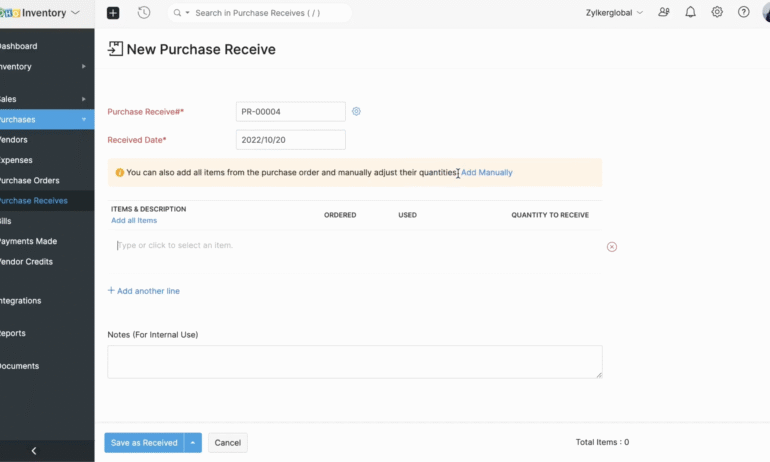
Easily convert purchase orders to received items to automatically increase stock numbers. You can then click a button to convert the purchase order received to a bill to ensure the increased stock is also reflected in your accounting.
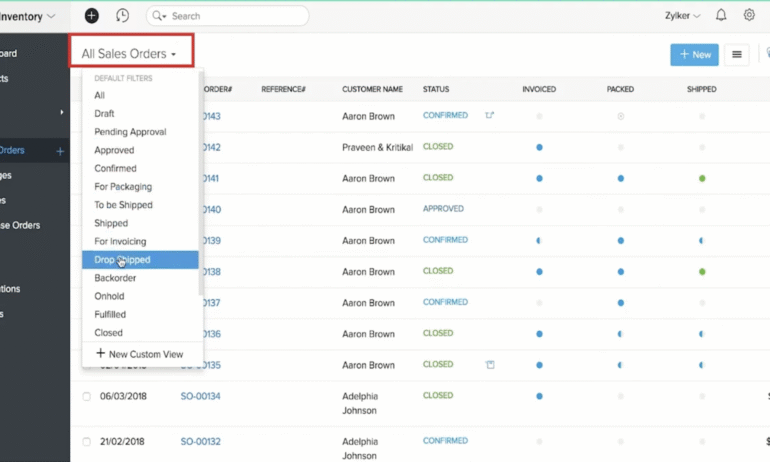
Creating an order for a drop shipment is as easy as a few button clicks. You can even select whether to dropship an entire sales order or only particular items within the order.
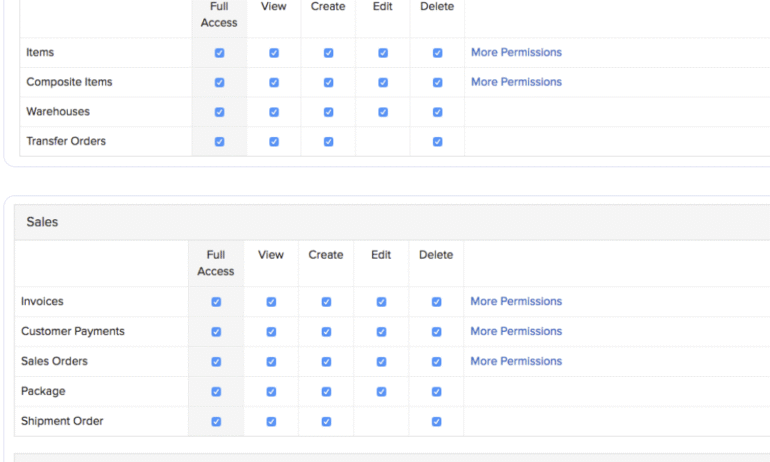
If you choose to upgrade to a paid plan and therefore have more than one user with access to the inventory software, you can easily set roles and permission levels for each user.
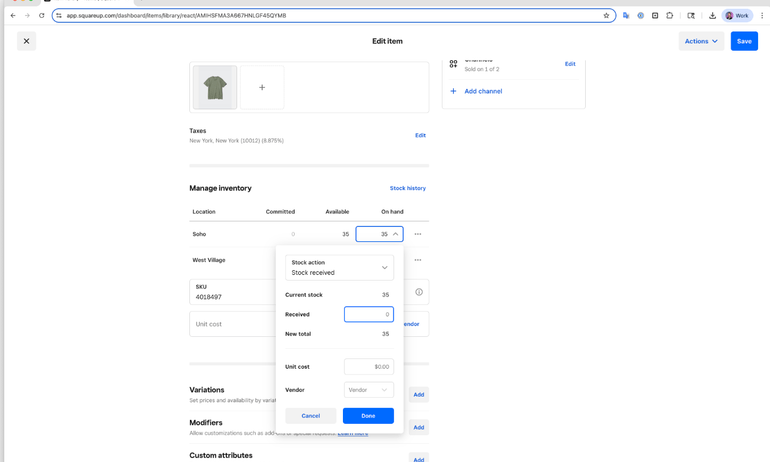
With Square’s simple and intuitive interface, updating stock counts becomes an efficient process. Use your device’s camera or a compatible barcode scanner to select an item, then simply key in the total quantity.
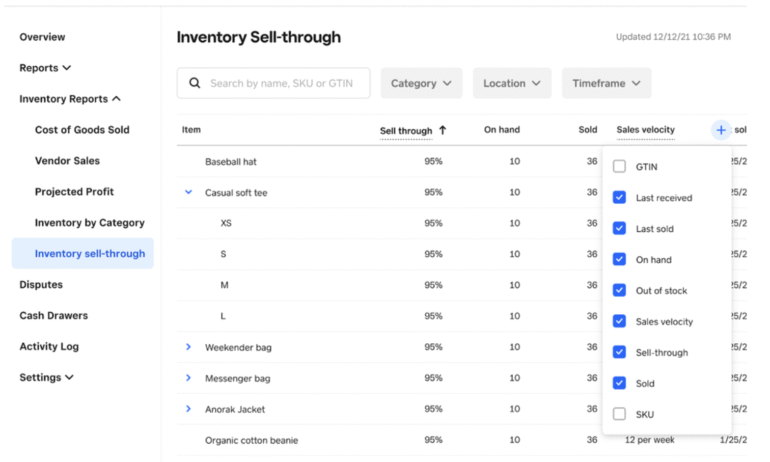
Square’s customizable inventory reports let you filter by category, date range and location. You can even search and run a report on one specific item.
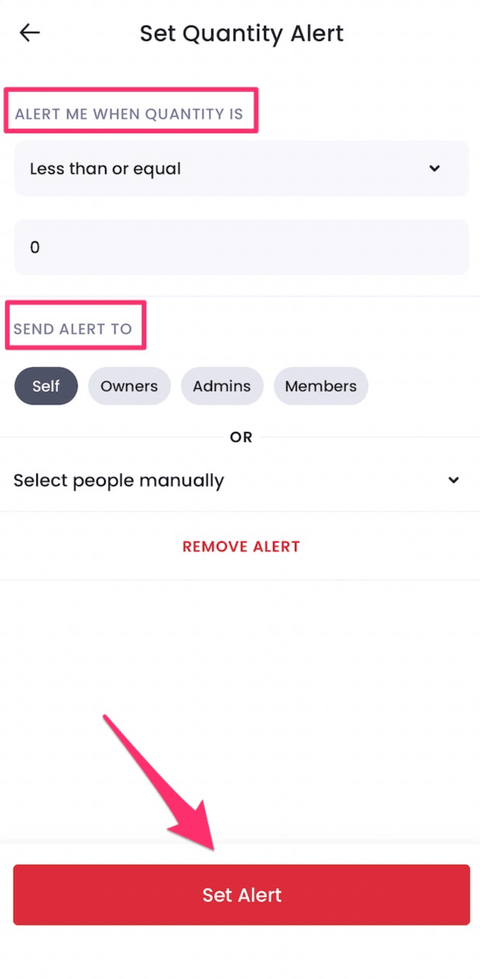
Quickly and easily set stock re-order alerts within the Sortly mobile app.
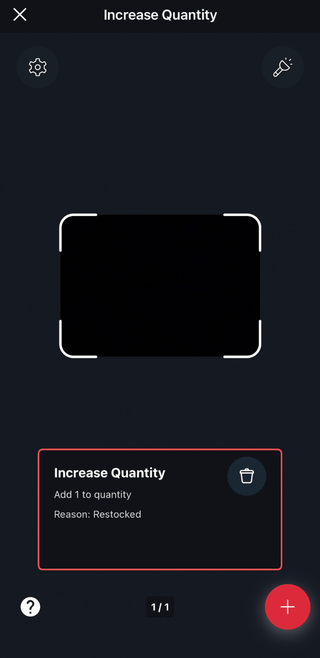
A Quick Action tool within the app allows you to associate a task you frequently repeat, such as adjusting stock quantities, with an item barcode. Use the camera on your phone to scan the barcode and automatically perform the action you’ve associated with it.
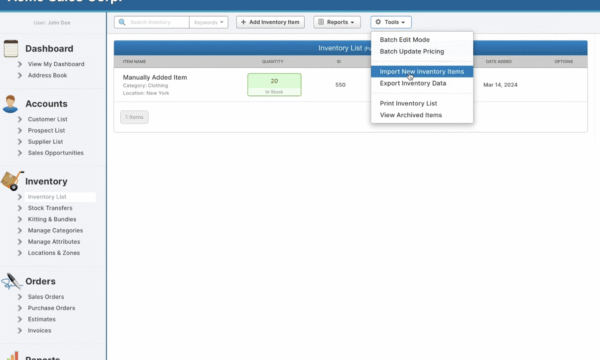
You can easily import a list of items or customers with a .csv file. SalesBinder’s software will automatically recognize and categorize much of the data from the file to save you time and effort.
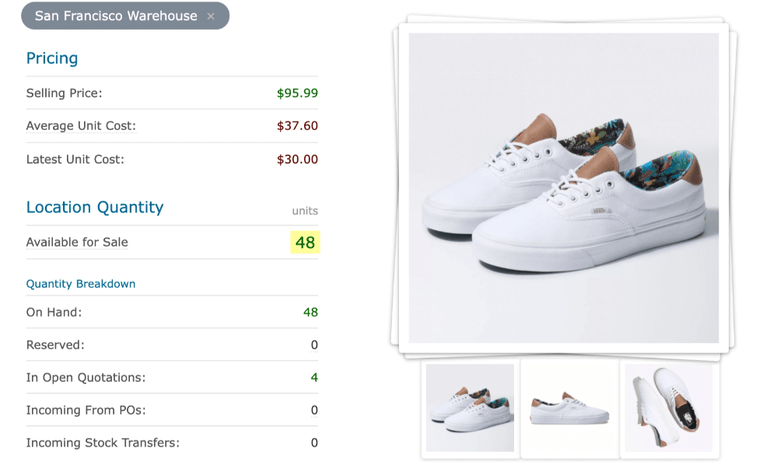
Clicking on an item in your inventory list will open an item details page that shows you useful quantity and revenue information at a glance. The activity feed provides a record of all actions associated with a particular item.
In Stockpile, you can add new inventory items by manually filling in a number of fields or import a full list of inventory by uploading a .csv file.

Backbar makes it simple to add and manage vendor information. You can track delivery days and times and save vendor contact information for easy reference.

Doing an inventory count in Backbar is also easy and intuitive. The software’s clean layout makes it simple to scroll your inventory list by location and update case and unit counts. Multiple employees can be logged in running inventory counts simultaneously, and the counts update in real-time.

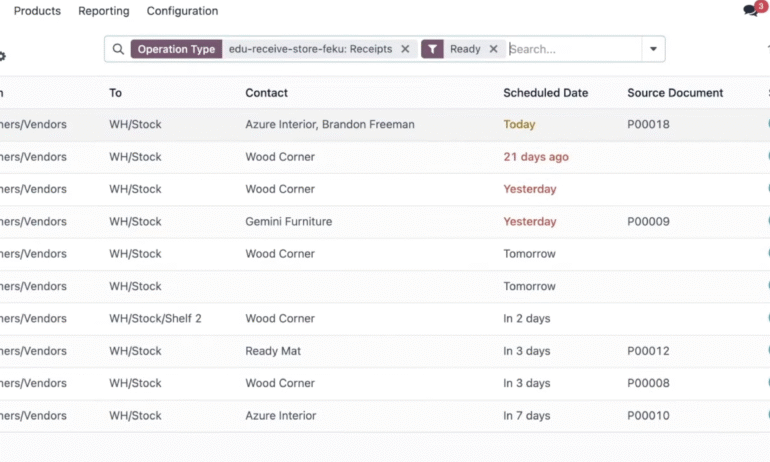
One click through from Odoo’s inventory dashboard will take you into a detailed view of your warehouse delivery orders, where you can dig into the details of orders that are experiencing issues and delays.
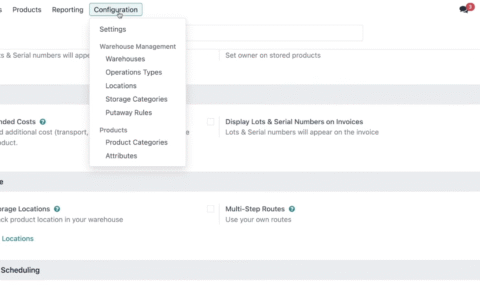
Another useful feature in Odoo’s inventory app is warehouse configuration, which allows you to set the required steps to take for each vendor for both incoming and outgoing shipments.
Who is free inventory management software best for?
Free software can do the trick if you only need to track how sales reduce your inventory levels. It’ll often let you know when it’s time to reorder items too. This can be sufficient for small retailers and other micro businesses with a single location.
However, it won’t necessarily make your inventory tracking process much more efficient. For example, free software doesn’t usually give you access to automation features or cost of goods sold reporting. And it won’t typically help you figure out the ideal amount of inventory to order. You’ll need to subscribe to paid software for those capabilities.
Pros and cons of free inventory management software
Free inventory management software can save you money. But it still has its drawbacks. Here are the main benefits and disadvantages of using it.
Pros
Cost effective.
Low barrier to entry.
Good fit for very small retail businesses.
Cons
Doesn’t usually include in-depth reporting.
Often caps number of users, purchase orders, sales orders or items.
Isn’t a long-term solution for most businesses.
How to choose the best free inventory management software
Follow these steps to find the right free inventory software for your business.
1. Create a list of must-have features
Some common free inventory management software features include purchase order creation, basic inventory tracking, low-stock alerts, inventory summary reports and barcode scanning. Decide which are most critical to your business. Few products check all the boxes.
You’ll also want to seek out industry-specific features. If you combine multiple items to create one product, for example, you’ll need bundling capabilities.
2. Make sure it integrates with your other software products
If your inventory software doesn’t sync with your POS and accounting software, you’re going to have to deal with manual data entry. For many businesses, this defeats the purpose. These integrations let you accurately determine your business’s valuation and adjust inventory when sales come in.
3. Confirm that it’s scalable
Most businesses will likely end up subscribing to a paid inventory software plan as they grow. The products you consider should be able to accommodate this next chapter. Switching solutions and having to set up an entirely new inventory system is tedious work.
Frequently Asked Questions
When choosing free inventory software, keep an eye out for integrations. Your inventory software should sync with all of your sales channels so that you can centralize your data and track inventory counts both online and offline. Basic features like barcode scanning, reports and low stock alerts are also helpful tools that can save you time and ensure you always have enough inventory on hand.
The best free inventory management software for you will depend on what features you need. Do you want to be able to scan items with a handheld device? In that case, a product with a capable mobile app is a must. The software should accommodate enough users, items and locations to cover the entire scope of your business’s operations, too. And don’t forget to make sure it integrates with your existing accounting or POS software.
NerdWallet ranks Zoho Inventory as the best free option because you can use it to send invoice and purchase orders, run inventory reports, access dropshipping options, combine multiple items into a kit, integrate sales channels and more. The variety of payment gateway options is a plus, too.

