I’ve always researched flights the old-fashioned way. Since I’m not loyal to any airline, that meant checking ticket prices on Google Flights about three to five months out from my trip and comparing rates every few weeks for a better deal.
But this strategy relies on too many variables to be effective — I had to actually remember to keep checking rates, and conveniently be at my desktop (out of personal preference). Although it’s embarrassing to admit, I never leveraged Google Flights alerts to do this heavy lifting for me.
Early next year, I’m planning a weekend getaway in the U.S., so this seemed like a great time to test Google Flights alerts. I wanted to see how much flight-research work I could actually hand over to this tool. I tested a few domestic destinations — and a few international destinations, for fun. Here’s what I did and what I found.
» Learn more: A quick guide to Google Flights

By signing up, you will receive newsletters and promotional content and agree to our Terms of Use and acknowledge the data practices in our Privacy Policy. You may unsubscribe at any time.
How I set up my Google Flights price-alert experiment
Google Flights is Google’s online flight search tool. The tool lets you quickly search for plane tickets, check price history and track prices for specific flights. It also enables you to create an alert for a desired trip route and notifies you when a flight's price changes, whether it increases or decreases. All prices it shows include taxes and fees.
Setting up Google Flights alerts was very straightforward. Google Flights’ interface is similar to other travel sites. Enter your preferred trip details to get a list of available flights and pricing.
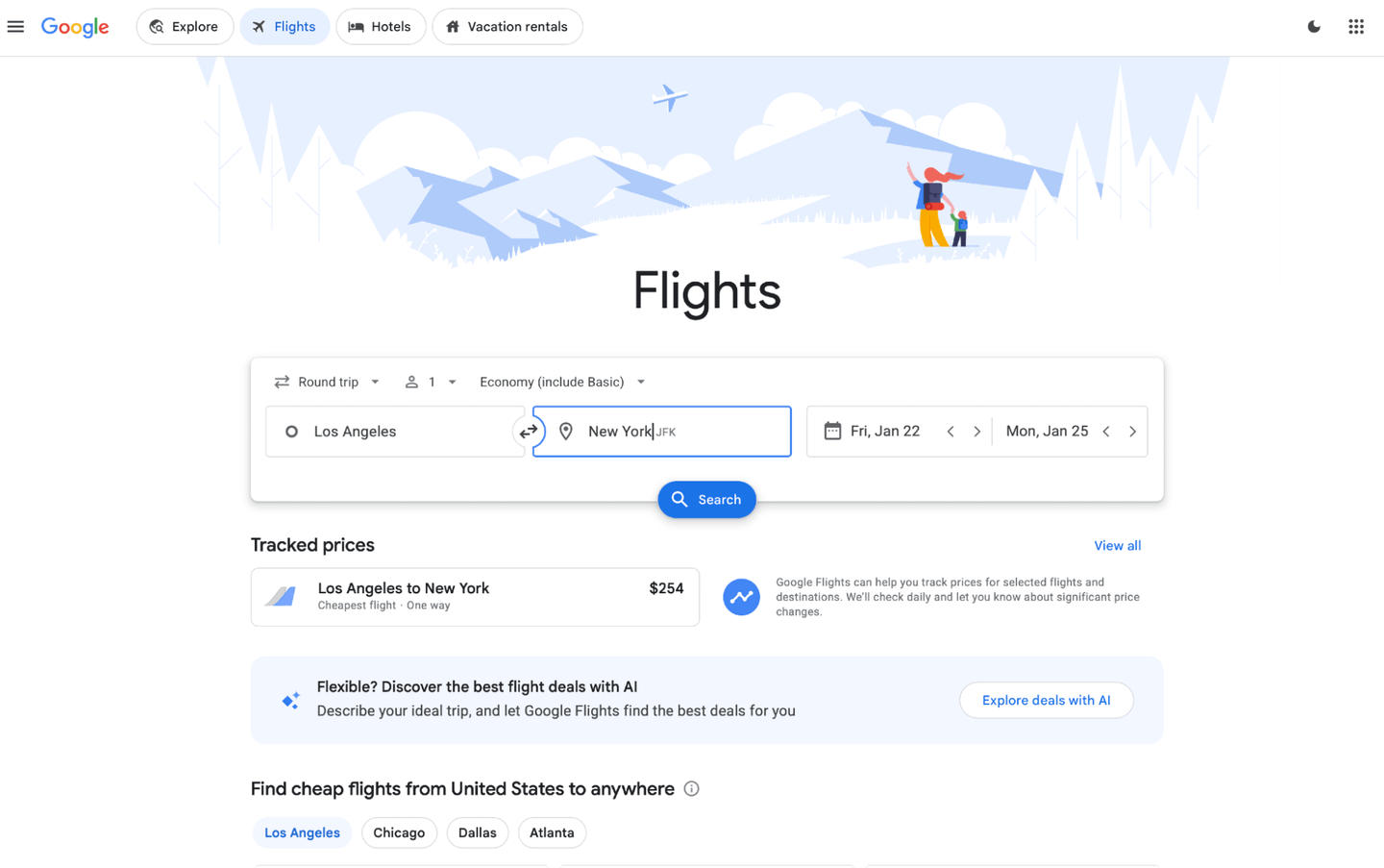
For all of the destinations I tracked, I used the following travel details:
Travel dates: 01/22/2027–01/25/2027.
1 adult passenger.
Nonstop.
Round-trip.
Economy (basic).
Departing: Los Angeles (LAX).
I intentionally chose dates that didn’t overlap, or butt against, a major travel holiday. When I ran each flight search, I got a list of flight options and current round-trip pricing. To see the lowest prices — that didn’t compromise convenience or ease of booking — I paid attention to the cheapest fare under Google Flights’ “best flights” view.
Since I wanted to track all available flights for specific dates but was flexible about departure and arrival time, I toggled the “Track prices” switch at the flight-search level to receive ongoing price-change email alerts based on my flight details.
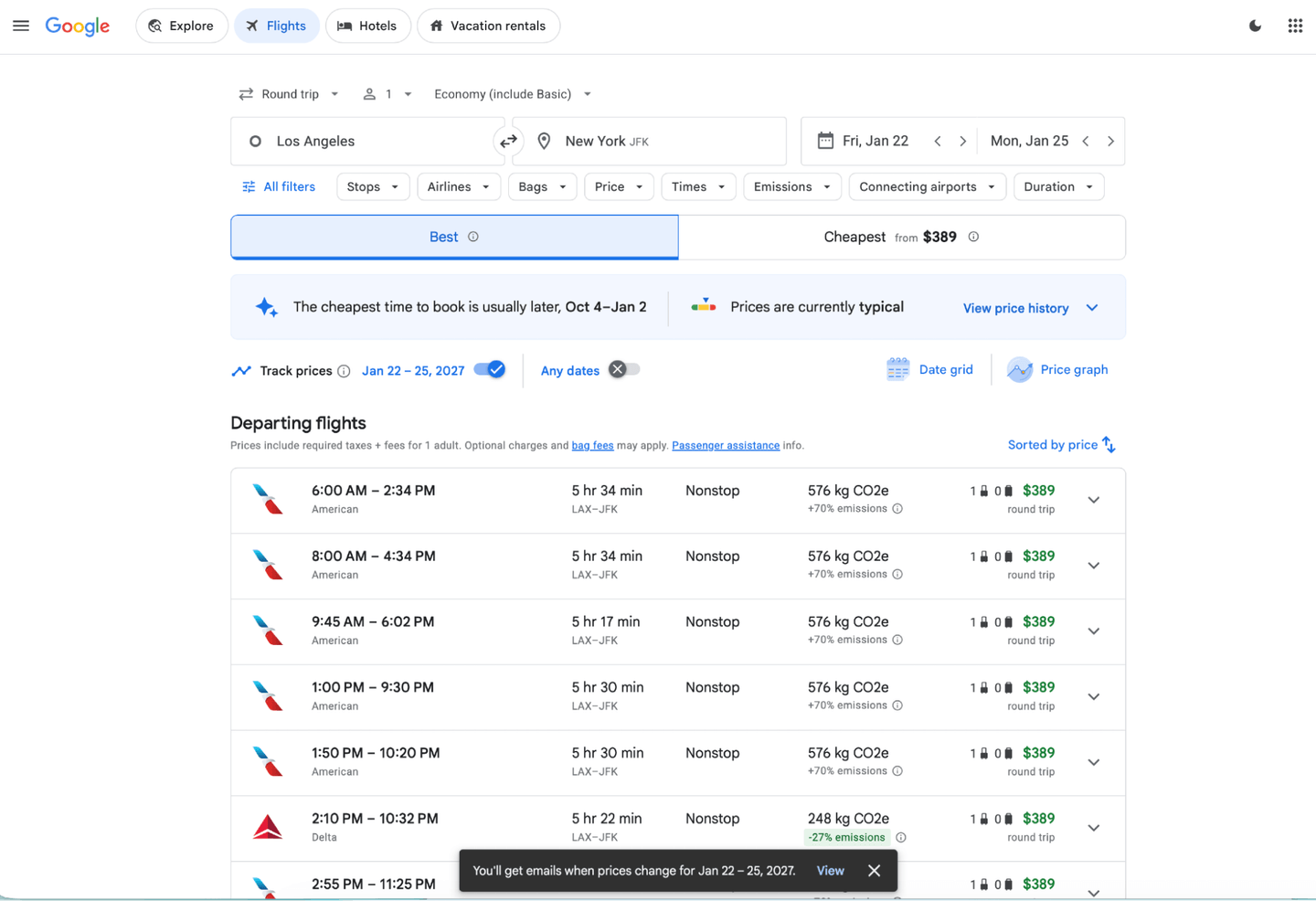
If your travel dates are flexible, you could select “Any dates” to broaden price-tracking data. And if you have a certain flight in mind, you can even set price-change alerts for that specific flight.
Just select your desired flight, and toggle “Track prices” from the “Selected Flights” view.
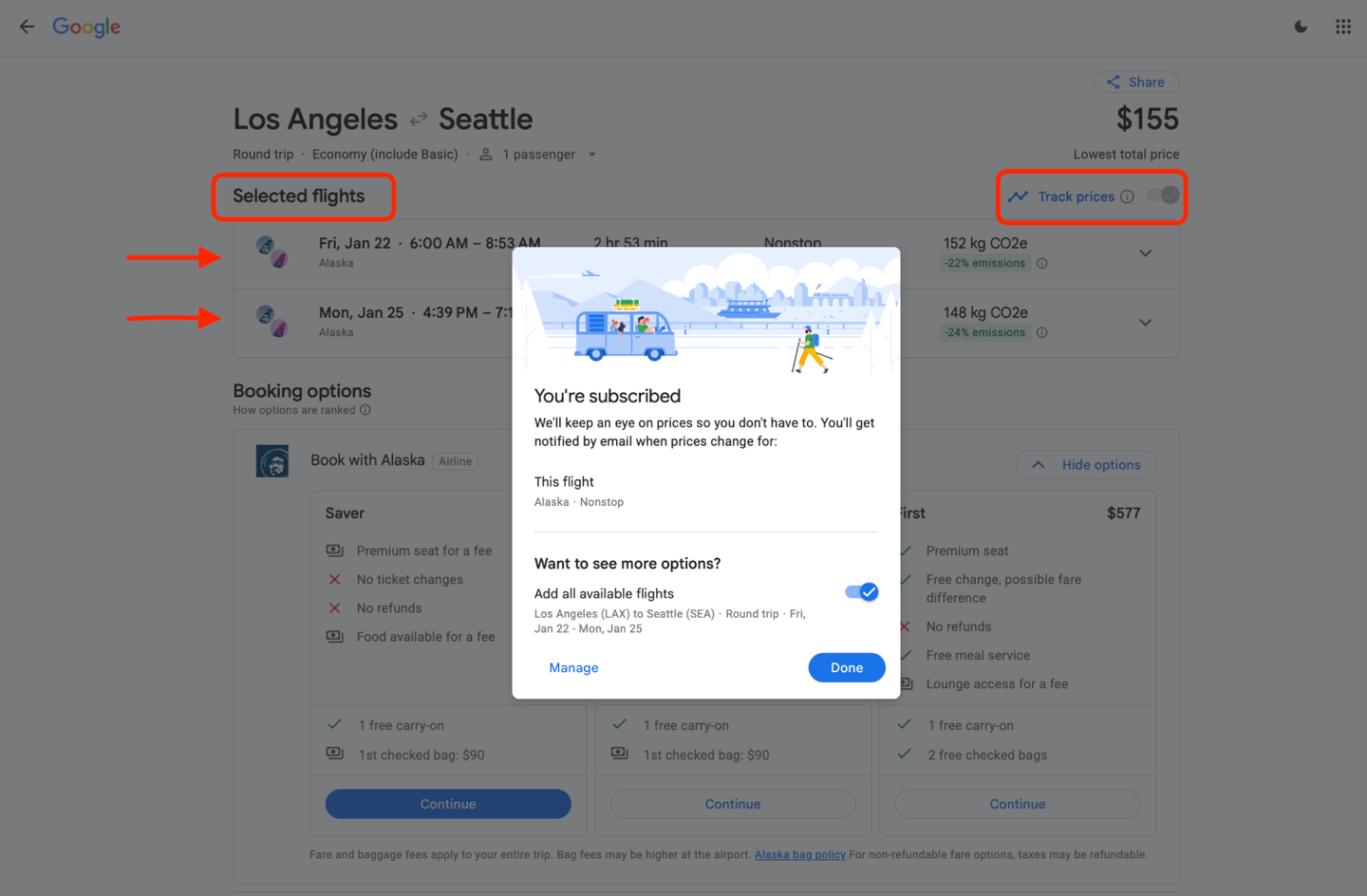
Out of curiosity, I also looked up a few international flights out of LAX using dates a bit further out. Setting up Google Flights alerts for international trips involved the same steps.
In total, I created 10 price alerts — five domestic and five international destinations. To see, modify or delete any of my flight alerts, I logged into Google Flights (using my Google account login). Then, I found the “Tracked Flight Prices” page by going to the hamburger menu at the upper-left of the page.
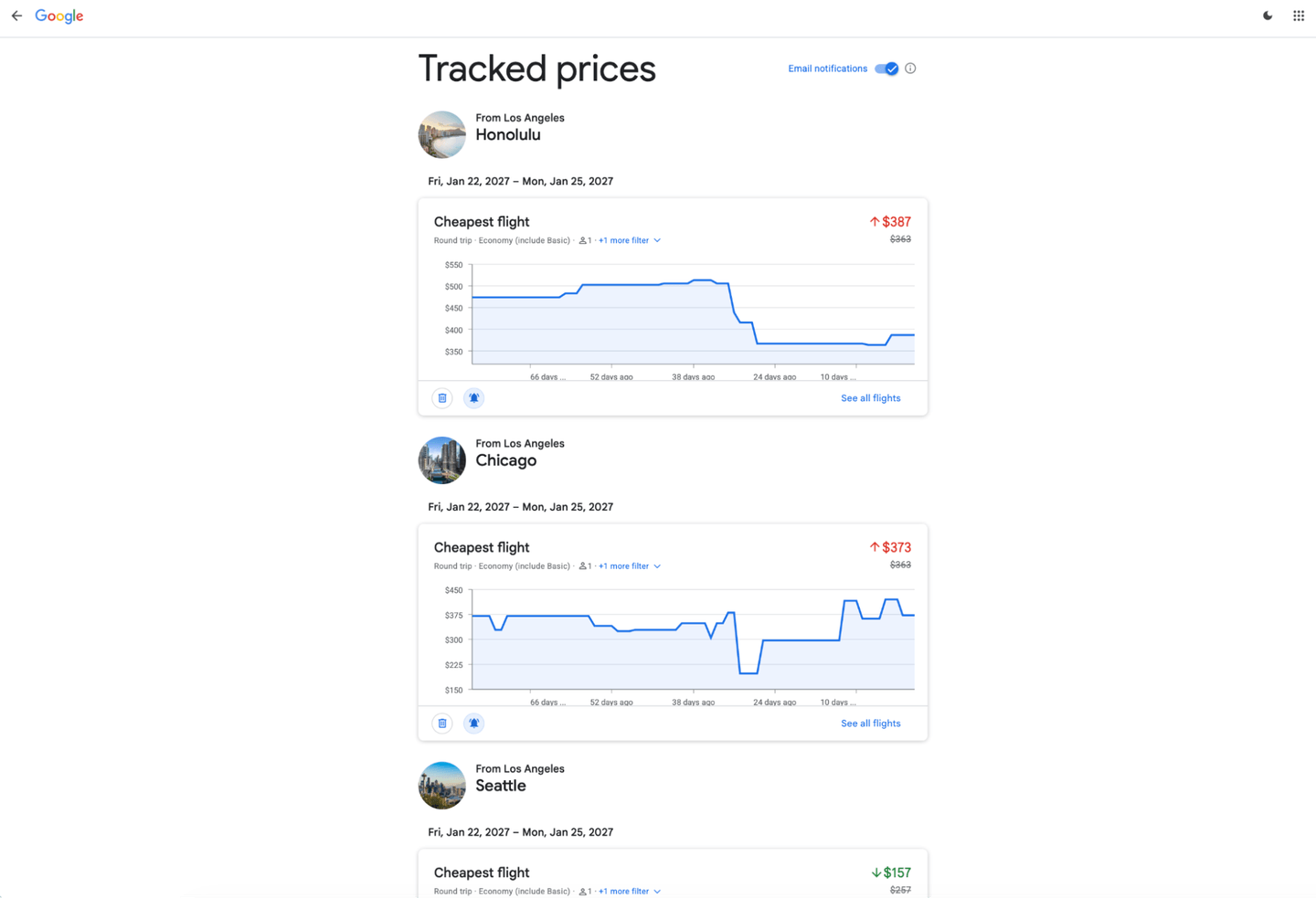
Now that the alerts were set, I could intentionally forget about flight research until I received a convenient update from Google Flights in my inbox. That was my hope, anyway.
Here’s what happened to the flights I tracked
Google Flights says that its flight prices are updated about once every 24 hours. Going into this experiment, I assumed my inbox would be flooded daily with the 10 price alerts that I created. At the very least, I expected to get one price alert per day, but there were days I didn’t get any.
The first email alert — for a flight from LAX to Seattle (SEA) — came the next day. It said the round-trip flight price decreased from $257 to $157.
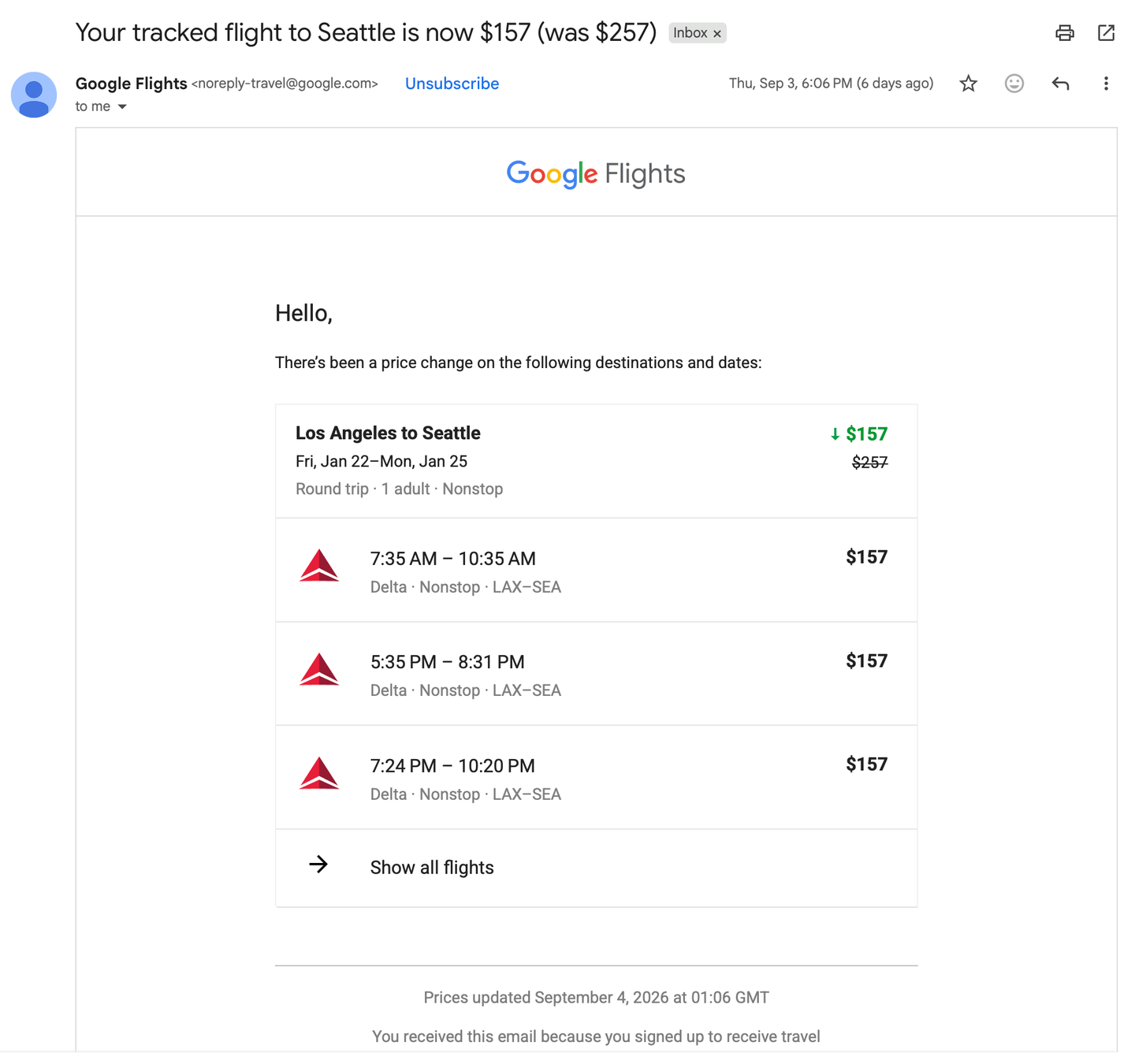
A $100 drop was significant, and if I'm being honest, I would’ve never manually checked flight prices that soon. Although the price decrease was impressive, I wasn’t ready to buy a ticket just yet.
A week later, the price rebounded to $257. Interestingly, Google Flights didn’t alert me to that change. I only learned the price increased after manually looking at the Tracked Flight data from my alerts dashboard. I finally received the email alert about the price change a few hours later.
I can see this price-change delay being frustrating for some users. For example, say a traveler who received a morning price drop alert couldn’t get to actually buying the tickets until later that evening after work. They might log in only to find that the price had already increased, but the price-change alert hadn't been released yet.
Technically, Google doesn’t guarantee that you’ll get price changes in real-time, or even every instance a price shifts. Instead, it says you can get email updates when the flight or route prices you’re tracking change “significantly.”
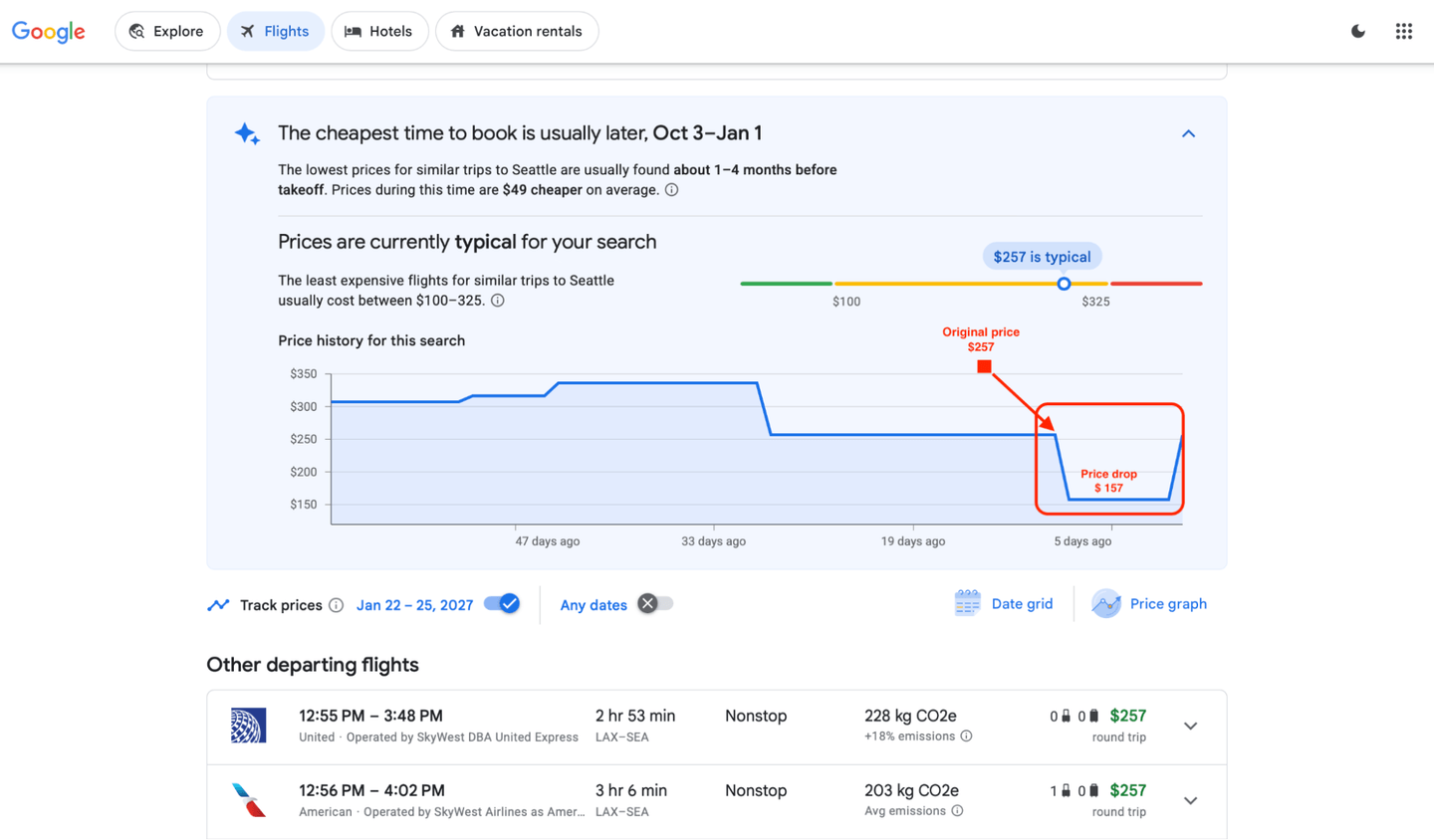
That said, on the flights page, there’s a nifty drop-down that lets you view price history, which is useful if you’re trying to track prices over a longer period.
Other routes I tracked didn’t reveal major price swings. For example, a price alert for a flight to New York (JFK) flagged a price increase of $10 while an alert to Miami (MIA) said that the flight price increased by $20.
The biggest price change I saw
Overall, I tracked flight and route prices for about a month. The domestic flight that had the biggest drop was from LAX to Chicago (ORD). When I first tracked that trip, the price was $421; after days of tracking and multiple price fluctuations, the price dropped to $217. That’s a 48% decrease and one that I might’ve never caught if I hadn’t set up the alert.
Among international flights, the most impressive price change I saw was from LAX to Tokyo (HND). For international flights, I set round-trip dates to early April, and prices were at $2,135. Just eight days later, the price dropped to $1,516, about a 29% drop.
What Google Flights alerts were actually useful for
If you’re hoping to uncover an incredible steal with Google Flights alerts, you might be disappointed. But there are practical uses for these alerts.
One less manual step. The biggest benefit I saw — immediately from day one — was that Google Flights alerts saved me time from manually rerunning the same searches. The alternative of entering all of your trip details and flight preferences gets tedious after the third or fourth time.
More consistent monitoring. Even if alerts aren’t sent in real time, Google Flights ran them more consistently than I could’ve on my own. Instead of relying on memory, willpower and available time to redo each search, Google Flights kept eyes on the flight prices for me.
A price baseline. Knowing what the initial price was when I started the search, and then receiving price-change updates, gave me a clearer reference point to decide whether an updated price was a good deal.
Easier price-lurking. If you’re tracking multiple flights or routes, tracking all of those prices independently can get complicated. Google Flights alerts and its tracked flights dashboard made it easy to get a high-level view of how prices changed after I first searched flights, and then monitor them conveniently in one place.
Final thoughts on Google Flights alerts
My experience using Google Flights alerts proved to me that it was worth the few extra seconds to set up. It’s a great way to compare prices over time and jump at a big price drop without continuously rerunning your flight search on your own.
Whether you’re just window shopping or are ready to book immediately, it’s a free feature and creating the alerts is uncomplicated. The biggest caveat is that you won’t get price alerts in real time, but instead, relatively soon after a notable price change.
How to maximize your rewards
You want a travel credit card that prioritizes what’s important to you. Here are some of the best travel credit cards of 2026:
Flexibility, point transfers and a large bonus: Chase Sapphire Preferred® Card
No annual fee: Wells Fargo Autograph® Card
Flat-rate travel rewards: Capital One Venture Rewards Credit Card
Bonus travel rewards and high-end perks: Chase Sapphire Reserve®
Luxury perks: American Express Platinum Card®
Business travelers: Ink Business Preferred® Credit Card