




Investing information disclaimer
The investing information provided on this page is for educational purposes only. NerdWallet, Inc. does not offer advisory or brokerage services, nor does it recommend or advise investors to buy or sell particular stocks, securities or other investments.
As more people embrace the convenience of cashlessness and contactless payment, tech companies have made it easier to send and receive money instantaneously from a smartphone. Cash App, one of these services, offers some unique functions compared with other money transfer options, including options for savings and investing.
Read on to learn more about Cash App and its features, benefits and possible drawbacks.
ALSO CONSIDER: PayPal || Venmo || Zelle || Apple Pay Cash
What is Cash App?
Cash App is a peer-to-peer money transfer service and nonbank financial platform that allows users to send and receive money, use an optional debit card, invest in stocks and Bitcoin, and file taxes for free, among other perks. Cash App can help you send your share of utilities to your roommates, pay friends back for coffee, split the cost of a trip or any other money-sending task you want to accomplish with other Cash App users.
Cash App includes services such as:
- Money transfers: Cash App users can send money to others on the app by using funds in their Cash App account or directly from a linked bank account.
- Cash App Card: This debit card lets users make purchases using the funds in their Cash App account. (See our review.)
- Cash App Savings: A savings feature connected to the Cash App Card.
- Cash App Investing: Users ages 13 and up can invest money in stocks using a separate account balance.
- Bitcoin: Users can buy and sell Bitcoin.
- Cash App Taxes: Free tax filing.
Note that Cash App is a financial services platform from Block Inc., not a bank.
» COMPARE: See NerdWallet's top peer-to-peer payment apps
How does Cash App work?
Cash App works on your smartphone (though you can do some functions through a web browser). To use Cash App, you need to sign up for an account. You can do that through a browser or by downloading the app to your smartphone. Once you have an account, connect a funding source (such as a bank account or debit card) and you’re ready to send and receive money with people you know and trust, and explore the app’s other services.
» Skip ahead to read more about Cash App Investing, Cash App Taxes or Cash App Savings.
How to add money to Cash App
To use Cash App to send payments, you need a bank account, debit card, credit card or prepaid card. You load money on Cash App by tapping the Money tab in the app’s home screen, tapping “Add Cash” and inputting how much cash you’d like to add from your linked account.
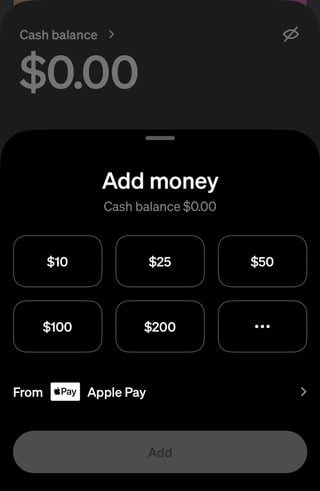
You’ll then need to confirm the transaction, such as by entering your PIN for the app or by using a biometric ID (fingerprint or face scan).
Cash App Card
Optional free debit card. The “Cash App Card” allows users to make transactions with their Cash App balance, such as purchases and ATM withdrawals. The card is issued by Sutton Bank and is unique to a user’s Cash App account. It isn’t connected to a personal bank account or another debit card.
ATM withdrawals: If you have the Cash App Card, you can use it to make withdrawals at an ATM. Withdrawals are $2.50 each (plus ATM operator fees) at all ATMs, regardless of being in or out of network. It is unusual and rare for a bank or nonbank platform to charge for in-network ATM withdrawals. Free in-network ATM withdrawals are available to customers who earn Cash App Green status.
Money-saving offers when using the debit card. Users who have the Cash App Card can choose offers in their account to save money on a purchase with a particular vendor such as a restaurant or coffee shop. Up to three offers are allowed to be active at a time, but you can swap offers as often as you want.
What is green status on Cash App (or “Cash App Green”)?
Cash App provides some free banking services, but to get all the benefits of Cash App, customers must earn Cash App Green status. This premium tier is available to customers who either spend at least $500 with Cash App Card (or Cash App Pay) or deposit at least $300 in direct deposits monthly.
The following benefits are for Cash App Green customers: Free in-network ATM withdrawals, free overdraft coverage, the highest savings rate through Cash App Savings, among other perks.
Cash App fees
No fees on most basic services. Cash App doesn’t charge monthly fees, fees to send or receive money (unless you’re sending from a credit card) or inactivity fees.
Fee for using a credit card. Cash App charges 3% of the transaction to send money via linked credit card. This is a fairly standard fee compared with other money transfer apps; Venmo, for example, also charges 3% to send money with a linked credit card. To avoid this fee altogether, use your linked bank account or the funds in your Cash App account to send money.
Fee for instant deposits of Cash App funds to your bank account. You’ll pay 0.50% to 2.50% to have your funds transferred immediately. There’s no fee to deposit your Cash App funds to your linked account with a standard transfer, which takes one to three business days.
Cash App limits
Cash App Card spending limits. The maximum that can be spent on your Cash App Card is $7,000 per transaction and per day and $10,000 per week. The maximum that can be spent per month is $25,000.
Cash App Card withdrawal limits. The maximum amount that can be withdrawn at an ATM or store register cash-back transaction is $1,000 per transaction, $1,000 per day and $1,000 per week.
Cash App age limits. People 13 years and older can use the app, and a 2026 program will allow Cash App to kids as young as 6. Cash App users 17 and younger must have an adult sponsor their account in order to use some features, including a debit card.
» Check out these banking apps for kids and teens
How to send money with Cash App
You’ll be able to use your linked bank account, debit card or other funding source to send money to other Cash App users as well as to transfer money from your Cash App account into your bank account. This is similar to services like Venmo and PayPal, which also allow you to link a bank account to send money; you can also hold any received funds in the app until you’re ready to withdraw them. Be sure to only send money to people you know and trust.
» Want a great checking account? Consider NerdWallet's Best Online Checking Accounts
To send a payment on the app:
- Open the Cash App mobile app to the Payments ("$") tab.
- Enter the amount you want to send.
- Tap “Pay.”
- Enter the recipient's name, email address, phone number or “$Cashtag” (another person’s username in the app).
- Enter a note about why you're sending the payment (e.g. sending "June rent" to your roommate).
- Tap “Pay.”
How to receive or deposit money with Cash App
To view the details of a received payment, tap the clock icon to open your “Activity” tab. You’ll also see the total amount of your Cash App balance at the bottom left of the app home screen.
Cash App Card customers can also fill out a form to get your paycheck directly deposited into your Cash App account and deposit physical cash into your account at participating retailers for a small fee.
» ALSO CONSIDER: NerdWallet's review of Zelle money transfer
How to withdraw money from Cash App
Online transfers: You can cash out your app balance and have the funds transferred to a bank or debit card linked to your Cash App account.
ATM withdrawals: Cash App Card users can take out money at ATMs nationwide. Cash App charges a fee per withdrawal except for Cash App Green customers.
Cash App benefits: What makes it different from other P2P apps
Cash App Savings. The Cash App savings feature, which isn’t technically a savings account, doesn’t charge a fee. You must have a Cash App Card and an opening deposit of at least $1. The account offers a competitive savings rate of 3.25% as long as you meet a few other requirements: In addition to having a Cash App Card, you must be at least 18 years old and have Cash App Green status. If the requirements aren’t met, the account earns 1.50%.
» Learn more about Cash App’s high-yield savings account
Afterpay in Cash App. You can pay for purchase over time using an installment loan program called Afterpay within Cash App.
Cash App Investing. Cash App offers the ability to invest. The app allows users to buy stock in specific companies with as little or as much money as they want to invest. Stocks can be purchased with the funds in your Cash App account; if you don’t have enough funds in the app, then the remaining amount will be taken from your linked bank account.
Cash App Taxes. The app offers a free tax-filing service that they guarantee to be completely accurate. If you choose to have your refund deposited to your Cash App account, you could receive your return up to five days faster than you would with a bank account deposit. (Refer to the FDIC insurance information for Cash App funds.)
» Prepping for April 15? See NerdWallet’s guide to how to file taxes
Bitcoin compatible. Cash App users can buy and sell Bitcoin, but Cash App might charge a fee, which you’ll see before you complete the transaction. Depending on how quickly you choose to receive deposits of Bitcoin you withdraw, you may be charged a fee for withdrawals, too.
» ALSO SEE: Our guide to Bitcoin for beginners
Cash App drawbacks: What to know
Your funds aren’t automatically FDIC-insured. You must have a Cash App Card or a sponsored — where an eligible parent or guardian sponsors an account for a minor — in order to be eligible for Federal Deposit Insurance Corp. insurance coverage. If you don’t have either of those, the money in your cash app balance is not insured and it’s a good idea to transfer your funds to your FDIC-insured bank.
Fees may apply. Cash App charges 3% of the transaction amount when you send money using a linked credit card, which is similar to what other money transfer apps charge. Immediate transfers to your bank account also cost a fee. (Refer to the Cash App fees information above for more details.)
Cash App disclosures
"Teens aged 13 to 17 can join with approval from eligible parent or guardian. To view the eligibility requirements for sponsoring a teen, please visit the Sponsored Accounts section of the Cash App ."
"Cash App will pass through a portion of the interest paid on your savings balance held in an account for the benefit of Cash App customers at Wells Fargo Bank, N.A., Member FDIC. To earn the highest interest rate on your Cash App savings balance, you need to (a) have a Cash App Card or sponsor one or more sponsored accounts and receive at least $300 in paycheck direct deposits each month; or (b) have a sponsored account with sponsor approval to earn interest. Exceptions may apply. Savings yield rate is subject to change."
"Brokerage services provided by Cash App Investing LLC, member FINRA / SIPC, subsidiary of Block, Inc. See our BrokerCheck. Bitcoin services are not licensable activity in all U.S. states and territories. Block, Inc. operates in New York as Block of Delaware and is licensed to engage in virtual currency business activity by the New York State Department of Financial Services. Investing and bitcoin are non-deposit, non-bank products that are not FDIC insured and involve risk, including monetary loss. Cash App Investing does not trade bitcoin and Block, Inc. is not a member of FINRA or SIPC. For additional information, see the Bitcoin and Cash App Investing disclosures. Additional fees for securities may apply such as regulatory fees and fees to transfer securities externally. Please see our House Rules for more information. Fractional shares investing may involve additional risks such as non-transferability. For additional information regarding the unique risks and limitations of fractional shares, please see the Investing Customer Account Agreement."
Frequently Asked Questions
What is Cash App?
Cash App is a peer-to-peer money transfer service that lets users send and receive money. Cash App also lets users perform some functions as they would at a bank, giving users the option to have a debit card — called a “Cash App Card” — that allows them to make purchases using the funds in their Cash App account. Cash App Card users can also choose to save money in a high-yield savings subaccount. General Cash App users can also invest their money in stocks and buy and sell Bitcoin with the app.
How does Cash App work?
Cash App is a mobile application, so to use it to its full extent, you’ll need to download the app to your mobile phone. You can open an account using a web browser, though, and perform some functions. You'll need to link your account to your bank account or another external funding source. To pay someone or request a payment through Cash App, you must enter the other person’s $Cashtag, email address or phone number after you tap “Pay” or “Request.”
Is Cash App safe?
Cash App is safe to use to send and receive money to and from people you know. Information you send on the app is encrypted, and the app uses fraud detection technology.
You can help keep your Cash App use safe by following best practices, including using it to send and receive money to friends and family only. Other precautions you can take include turning on the security feature that requires your passcode, fingerprint or face recognition to make a Cash App payment and enabling email or text notifications so you’re alerted of every Cash App payment. (Learn more about how to avoid peer-to-peer payment app scams.)
Keep in mind that the money in your Cash App account won’t be eligible for federal insurance unless you have a Cash App Card or a sponsored account, so you may want to avoid keeping a large Cash App balance if that’s the case.
Do I need a bank account for Cash App?
No, you don’t need to have a bank account to use Cash App. The app also lets you link a debit, credit or prepaid card.
AD
Member FDIC
Forbright Bank Growth Savings 
APY
3.85%
Min. balance for APY
$0
Member FDIC
Varo Savings Account 
APY
5.00%
Min. balance for APY
$0
Member FDIC
E*TRADE Premium Savings 
APY
4.00% for 6mo
Min. balance for APY
$0