


Medicare.gov is the official website for Medicare, the U.S. government health care program for seniors and those living with certain disabilities. Medicare.gov is especially helpful for comparing plans, finding providers, getting claims paperwork and learning about costs and policies. Here’s how you can use it.
Determine Medicare eligibility
If you’re just getting started, Medicare.gov’s eligibility calculator is a good first step. There, you can figure out whether you qualify for Medicare and when you can sign up. If your initial enrollment period — the period that starts before your 65th birthday — has already elapsed, you can also get information about the next general enrollment period.
The website’s premium calculator is another helpful tool. You can calculate the premiums you’d pay on Medicare Part B, since those can vary based on income and any late enrollment penalties. The results will also tell you if you’re eligible for premium-free Part A (most people are), or if you need to buy it.
» MORE: When does Medicare start?
Shopping for Medicare plans? We have you covered.

- $0 plan availability80% (Above average)
- Members in high-quality plansHigh (85% to 100%)
- Member satisfactionAbove average

- $0 plan availability78% (Above average)
- Members in high-quality plansMedium (50% to 84%)
- Member satisfactionAbove average
Create a Medicare.gov login
You’re not required to make a Medicare.gov account to use Medicare services, but doing so has its advantages. A Medicare.gov login allows you to review claims, order replacement Medicare cards and even pay your Part B premiums (if you're enrolled in Original Medicare), among other things.
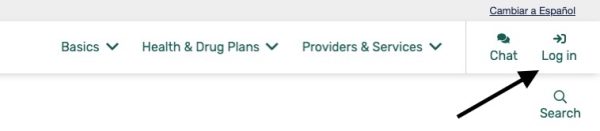
To create a Medicare.gov account, select “Log in” in the upper right corner of Medicare.gov.
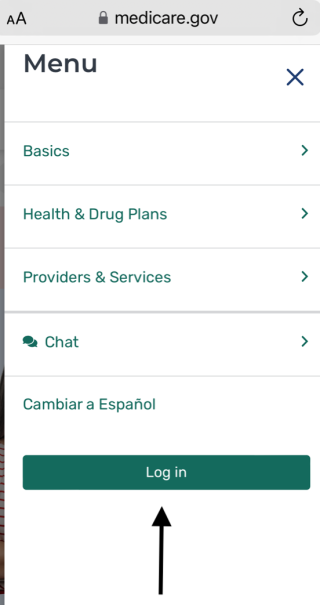
From a mobile device, select the "Menu" button in the upper right corner of Medicare.gov, then select "Log in."
Select "create an account now" and provide the following information:
Medicare number (this is the number on your red, white and blue government-issued Medicare card).
Part A coverage start date (or Part B start date, if you don't have Part A).
Mailing address.
Date of birth.
Email address (optional).
What happened to the MyMedicare.gov account?
MyMedicare.gov now redirects to Medicare.gov. You can use Medicare.gov to create a secure Medicare account, which allows you to collect more personalized information and keep track of your providers and claims.
Sign up for plans
You can compare and sign up for Medicare Advantage plans and Medicare Part D plans (which cover prescription drugs) on Medicare.gov. The website's comparison tool includes Medicare star ratings for each plan and information about costs, deductibles and limits.
Not all types of plans are listed, however. While you can view price ranges for Medigap plans — which provide supplemental coverage to Original Medicare — you can’t enroll through Medicare.gov for those. You’ll have to contact those insurers directly.
Find Medicare providers
Medicare.gov also offers tools to search for and compare Medicare providers, including:
Physicians.
Hospitals.
Nursing homes.
Home health services.
Hospice agencies.
Inpatient rehabilitation facilities.
Long-term care hospitals.
Dialysis facilities.
Medical supplies and equipment.
For those with Original Medicare or Original Medicare with Medigap, this is a handy way to find care near you or size up your options. If you have Medicare Advantage, turn to your insurer for information about providers before booking any appointments; with these plans, you generally need to get care within a certain network.
Get paperwork for claims or appeals
You generally won’t have to file claims to get expenses covered with Original Medicare — providers are required to do that. And if you have a Medicare Advantage plan, in general, there’s no need to file claims; Medicare pays those private insurers directly.
But in some cases, providers might not file claims until very late. And if they file more than 12 months after services were provided, Medicare can’t pay. (You can check the status of claims by logging onto your Medicare.gov account.) You might want to file a claim if this deadline is approaching — for example, if it’s 11 months after you received services and a claim has yet to be filed. While you can’t actually file the claim online, you can find the forms you need to print out on Medicare.gov.
The website also provides paperwork and instructions for filing appeals, which you can file when Medicare or your plan denies coverage for a certain service, item or drug and you disagree with the decision. The process for this varies based on what kind of coverage you have. If the appeal is successful, the decision will be overturned.
What Medicare covers
Medicare covers a lot of things — but not everything. Find out where Medicare stands in the following areas: