

TaxAct Review 2026: Pricing, Features & Ease of Use
Many, or all, of the products featured on this page are from our advertising partners who compensate us when you take certain actions on our website or click to take an action on their website. However, this does not influence our evaluations. Our opinions are our own. Here is a list of our partners and here's how we make money.






TaxAct is less well known among tax software providers, but it offers quality online software that generally costs less than TurboTax or H&R Block.
It may not be as fancy in some ways, but you can add screen-sharing access with a tax pro, and the data-entry process is similar to other providers.
How much does TaxAct cost?
TaxAct's free version
TaxAct offers a free version that lets you file Form 1040 and some popular tax credits, but it can’t handle many common forms, which means it probably won’t work for you if you plan to itemize deductions or report investment income.
One advantage of TaxAct’s free version is that you can easily get access to human tax help (for a fee) through their Xpert Assist program. This differs from some other tax software that might prompt you to upgrade to a paid tier if you want tax help.
One con of TaxAct’s free version? “Free” isn’t necessarily free: filing a state return carries a charge. This is in contrast to the other tax providers we review, which all offer a free state return if you qualify for a free federal return.
 | |
FREE | $0 + $44.99 per state filed. For dependents and simple filers who need help with college expenses, unemployment or retirement income. |
TaxAct’s paid packages
For those with more complicated tax situations — for example, if you sold your home, earned investment income, or own a small business — TaxAct offers three paid packages to choose from.
| |
PAID PACKAGES | Deluxe $52.99 + $59.99 per state filed. This option is ideal for homeowners and those who need to consider child care expenses or certain deductions, credits and adjustments. Premier $89.99 + $62.99 per state filed. Premier is good for investors who need to report capital gains and losses and those who have sold a home or own a rental property. Self-Employed $104.99 + $62.99 per state filed. This tier is good for freelancers, contractors and small-business owners. Includes access to Schedule C and Schedule F. Access to tax pro support requires upgrading to Xpert Assist for $45. Promotion: NerdWallet users get 20% off federal and state filing costs. |
One note about prices: Providers frequently change them. Prices are accurate as of March 2 and are based on the information provided on TaxAct's website. Discounted services and packages may be available toward the beginning of the tax filing season, but these markdowns tend to be replaced with surge pricing closer to the tax filing deadline. You can verify the latest price by clicking through to TaxAct’s site.
How we nerd out testing DIY tax software 🤓
Our reviewers — who are writers and editors on NerdWallet’s content team — do hands-on testing of every online DIY tax program featured in our analysis. By using these programs ourselves, we can provide detailed insights into the user experience.
We evaluate each tax software based on specific features and the actual experience of filing taxes using those features. This includes but is not limited to analyzing navigation, ease of accessing help, available import options and the quality of contextual guidance provided to users.
To ensure fairness and eliminate bias, our team collaborates to compare user experiences across products. Scoring is based on clearly defined criteria, which are weighted equally in the overall score. This approach ensures a balanced and reliable assessment of each tax software product.
Transparency: What's clear — and what's not
As a customer, few things are more frustrating than having to dig for basic information about pricing and product features. Being able to understand what you need — and how much it will cost — should be table stakes. This year, we evaluated each provider on specific aspects of transparency, including how easy it was to compare product offerings before signing up, how easy it was to downgrade or upgrade packages once using the software and how intrusive upselling was throughout the filing experience.
Product comparison
Finding which TaxAct package best suits your needs is easy. The homepage of TaxAct’s website lines up all of its offerings side-by-side, including details like which tax situation each package covers, pricing of the tiers and how much it costs to add on a state return. This is a nice touch in comparison with some other tax providers that aren’t as upfront about which packages they offer and how much they cost.
Upselling
I found TaxAct to advertise optional add-ons more frequently than I’d prefer (roughly 10 times throughout the filing process). However, I appreciated that these pop-ups weren’t interruptive most of the time — they were usually just a banner at the bottom of the screen that you didn’t have to interact with to move on. When a full-screen advertisement to upgrade or purchase an additional service did appear, there was always a clear option to decline.
Downgrading and upgrading
One way TaxAct falls behind the other tax providers we review? It doesn't allow you to downgrade your package once you’ve selected one. This can be frustrating if you’ve chosen a pricier package than you intended to, as you’ll need to start from scratch to file your return. The FTC took action against H&R Block for similar practices, and the provider had to modify its interface to make downgrading simpler.
As for upgrading, if you enter information that isn’t supported in the tier you're currently working in, you’ll get a pop-up that tells you which package you need to upgrade to. You can choose between upgrading through the pop-up or waiting until later in the filing process.
What it's like to use
How it works
You’ll start the filing process by uploading your tax documents, including any W-2s, 1099s and your previous tax return. You can also skip this step and head right into filling out personal information and a basic questionnaire.
Questions are phrased simply, and tax jargon is kept at a minimum. This makes the process of filing your taxes generally seamless. You simply answer questions and your return gets filled in behind the scenes.
Like with other tax software, you’ll answer questions about your income, deductions and credits.
What it looks like
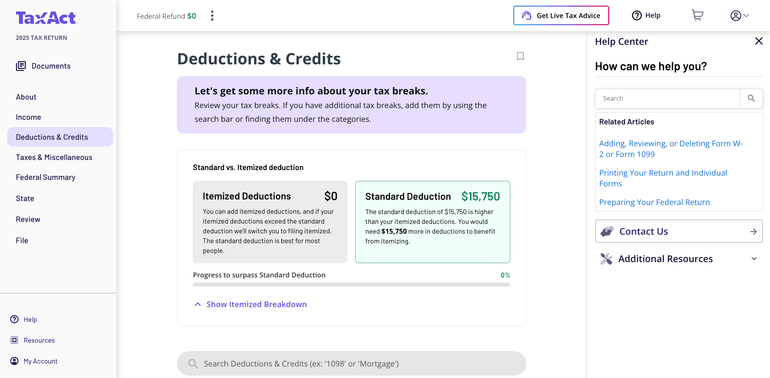
TaxAct has a similar look and feel to competitors’ products, with an interview process guiding you through it. You’re able to easily skip around, which is a nice bonus if you need to work on your return out of order.
Embedded links throughout offer tips, explainers and other resources, and the help center links to a searchable knowledge base. However, I was disappointed with the quality of the contextual help at times. For instance, I came across information about the child tax credit that had been outdated since July.
A shopping cart icon at the top tells you which package you’re buying and whether you’ve also selected add-ons. I appreciated being able to check my total bill at any time, rather than only at the end of the filing process.
Notable features and tools
You can switch from another provider: TaxAct will import last year’s return from TurboTax or H&R Block via a PDF of your 1040 return.
Auto-import of certain tax documents: You can import your W-2 from the institution managing the W2 (such as the payroll company) if it's partnered with TaxAct, upload a file or photo of your W-2, or key it in manually. TaxAct partners with over a dozen financial institutions to give filers the option to directly import a variety of 1099 forms. You also have the option to upload 1099-B information from your broker if you have it in a CSV file.
Donation calculator: The Deluxe, Premier and Self-Employed packages all feature TaxAct’s Donation Assistant, which is helpful for quickly finding the deduction value of donated clothes, household items and other objects.
Platform mobility: You can work on your tax return from multiple devices, meaning if you start your return on your laptop and want to finish it on your tablet, you’re able to do so. New this tax season, TaxAct also re-launched its mobile app after previously discontinuing it in 2023.
Ways to get human tax help
Xpert Assist
All DIY filers can get tax advice from a pro through Xpert Assist. The add-on starts at $45 and grants you the ability to contact TaxAct's U.S.-based tax pros as many times as needed throughout your filing process.
To use Xpert Assist, you can either chat with an expert or book a call with one. When talking with the expert, you can share your screen. TaxAct says its tax pros are CPAs, enrolled agents or lawyers.
Xpert Full Service
If you prefer to be more hands-off with the filing process, TaxAct's Xpert Full Service offering may be a good fit. With Xpert Full Service, most of the heavy lifting is done by a tax pro, who will prepare, sign and file your return on your behalf. All you need to do is provide your documents, review your completed return and sign it. The service starts at $149 and includes one state return.
What the Nerds think 🤓

Bella Avila, Content management specialist
"If you’re like me and doing your taxes is a bit more complicated than filling out a simple 1040, you’ll want to consider which provider can support all the forms you need while giving you the best price. In my opinion, TaxAct is one of the most competitive providers in the game in terms of paid packages.
On the other hand, if you qualify for free filing but need some extra guidance along the way, TaxAct is one of the few providers that offers a la carte human tax help. Some others make you upgrade to a paid tier for access to a tax pro — not only upping the price of your package but also your state return."
Customer support options
Here's a look at the various ways you can find answers and get guidance when filing your return with TaxAct.
General guidance: Searchable knowledge base.
Tech support: Free tech support by phone for all filers, with weekend and after-hours support during the tax filing season.
Help if you get audited
Getting audited is scary, so it’s important to know what kind of support you’re getting from your tax software. First, be sure you know the difference between “support” and “defense.” With most providers, audit support (or “assistance”) typically means guidance about what to expect and how to prepare — that’s it. Audit defense, on the other hand, gets you full representation before the IRS from a tax professional.
TaxAct encourages filers to reach out to its customer service team for free audit assistance. Customers can also buy audit defense from ProtectionPlus for $49.99. Coverage includes three years of audit services for this year’s return, and TaxAct says the product will guide you through the audit process, handle IRS and state correspondence on your behalf, help with tax debt and provide tax fraud assistance. TaxAct says that if there is an issue with its calculations, it will pay up to $100,000 to cover audit and legal costs.
Ways to receive your refund
No matter how you file, you can choose between several ways to receive your refund:
A direct deposit to a bank account is the fastest option. You can also have it loaded onto an American Express Serve prepaid debit card or used to buy U.S. savings bonds.
You also have the option of paying for the software out of your refund — but there’s a $54.99 charge to do that.
As of Sept. 30, 2025, the IRS no longer sends refunds in the form of paper checks. The agency will instead use electronic methods to deliver refunds this filing season. While direct deposit is the most popular refund method, TaxAct’s alternative methods may be useful for taxpayers without access to a bank account.
How TaxAct stacks up
Promotion: NerdWallet users get 20% off federal and state filing costs. | |
Promotion: NerdWallet users receive 20% off federal filing costs. | |
Promotion: NerdWallet users can save up to an additional 10% on TurboTax. | |
Promotion: NerdWallet users receive 20% off federal filing costs on Classic, Premium, and Self-Employed packages with the code "Nerd20". |



These star ratings are based on a tax provider's free tier score. For more detailed scoring, see the full product details above. Providers frequently change pricing. You can verify the latest price by clicking through to each provider's site.
Bottom line: Is TaxAct right for you?
Across the board, TaxAct’s offerings are less expensive than similar products from competing providers. That’s a nice score — especially for filers who value function over form and want affordable human help if necessary.
» How does TaxAct stack up against the competition? TaxAct vs. TurboTax
Methodology
NerdWallet’s comprehensive review process evaluates and ranks the largest online tax software providers. Our aim is to provide an independent assessment of available software to help arm you with information to make sound, informed judgements on which ones will best meet your needs. We adhere to strict guidelines for editorial integrity.
We collect data directly from providers, do first-hand testing and observe provider demonstrations. Our process starts by sending detailed questions to providers. The questions are structured to equally elicit both favorable and unfavorable responses. They are not designed or prepared to produce any predetermined results. The provider’s answers, combined with our specialists’ hands-on research, make up our proprietary assessment process that scores each provider’s performance.
The final output produces star ratings from poor (1 star) to excellent (5 stars). Ratings are rounded to the nearest half-star. For more details about the categories considered when rating tax software and our process, read our full methodology.
DIVE EVEN DEEPER IN TAX SOFTWARE