




Filter by:
 No monthly fee option
- No PCI compliance fee
- No termination fee
- No setup fee
- Retail-specific tools
- Restaurant-specific tools
- Staff management tools
- Loyalty programs
- Mobile card readers
- Online ordering (no extra monthly fee)
Sort by:
- Default
- NerdWallet rating (high to low)
- Monthly fee (low to high)
Showing 0 of 8 results
Helcim Card Reader
Best for Interchange-plus pricing

Payment processing fees
In-person:
0.4% + $0.08
Online: 0.5% + $0.25
Online: 0.5% + $0.25
Plus interchange
Monthly fee
$0
 Learn more
on Helcim's website
Pros
- No long-term contracts or termination fees.
- Offers volume discounts when monthly credit card volume surpasses $50,000.
- Interchange-plus processing rates help high-volume businesses save money.
- Has a touchscreen.
Cons
- Processing rates may increase if monthly transaction volume drops.
- No full POS register options to pair with.
If you’re looking for an alternative to flat-rate payment processors, consider Helcim. Businesses pay each transaction’s interchange fee, which is set by card networks, on top of Helcim’s set margin. That means your business saves when a customer uses a card with low interchange rates.
Helcim’s card reader costs $199 upfront. You can use it to accept chip and contactless payments. It can also store cards on file, enable surcharging and email receipts to customers. In terms of battery life, the card reader should last a full business day. Helcim recommends charging it each night.
Pros
- No long-term contracts or termination fees.
- Offers volume discounts when monthly credit card volume surpasses $50,000.
- Interchange-plus processing rates help high-volume businesses save money.
- Has a touchscreen.
Cons
- Processing rates may increase if monthly transaction volume drops.
- No full POS register options to pair with.
If you’re looking for an alternative to flat-rate payment processors, consider Helcim. Businesses pay each transaction’s interchange fee, which is set by card networks, on top of Helcim’s set margin. That means your business saves when a customer uses a card with low interchange rates.
Helcim’s card reader costs $199 upfront. You can use it to accept chip and contactless payments. It can also store cards on file, enable surcharging and email receipts to customers. In terms of battery life, the card reader should last a full business day. Helcim recommends charging it each night.
Square Reader
Best for Cheap mobile card reader

Payment processing fees
In-person:
2.6% + $0.15
Online: 3.3% + $0.30
Online: 3.3% + $0.30
Monthly fee
$0
Free plan; $49 Plus plan; $149 Premium plan.
on Square's website
Pros
- No long-term contracts or termination fees.
- Compact design can fit in the palm of your hand.
- Square Reader for magstripe is free.
- Magstripe reader doesn’t have to be charged.
Cons
- Free Square Reader only lets you swipe cards; must purchase upgraded Square Reader to accept contactless and chip payments.
- Free plan processing rates are more expensive than competitors.
Square’s low-cost selection of mobile card readers sets it apart from other providers. You can choose between a free magstripe reader or a $59 tap and chip reader. The optional card reader dock costs an extra $39.
If you opt for the free reader, just plug it into your phone to get started. If you have the contactless reader, you can pair it with the Square app via Bluetooth. Just know that it takes about two hours to charge (the magstripe reader doesn’t need to be charged). The company also sells a variety of POS terminals and register accessories.
Square has POS software plans for retailers, service providers and food and beverage businesses. A free POS software plan is available, but it comes with higher processing fees. For example, it charges 2.6% plus 15 cents per in-person transaction versus the Plus plan’s 2.5% plus 15 cents.
Pros
- No long-term contracts or termination fees.
- Compact design can fit in the palm of your hand.
- Square Reader for magstripe is free.
- Magstripe reader doesn’t have to be charged.
Cons
- Free Square Reader only lets you swipe cards; must purchase upgraded Square Reader to accept contactless and chip payments.
- Free plan processing rates are more expensive than competitors.
Square’s low-cost selection of mobile card readers sets it apart from other providers. You can choose between a free magstripe reader or a $59 tap and chip reader. The optional card reader dock costs an extra $39.
If you opt for the free reader, just plug it into your phone to get started. If you have the contactless reader, you can pair it with the Square app via Bluetooth. Just know that it takes about two hours to charge (the magstripe reader doesn’t need to be charged). The company also sells a variety of POS terminals and register accessories.
Square has POS software plans for retailers, service providers and food and beverage businesses. A free POS software plan is available, but it comes with higher processing fees. For example, it charges 2.6% plus 15 cents per in-person transaction versus the Plus plan’s 2.5% plus 15 cents.
Clover Go
Best for Using third-party payment processors

Payment processing fees
In-person:
2.6% + $0.10
Online: 3.5% + $0.10
Online: 3.5% + $0.10
Monthly fee
$0
Starter plan; $29.95 Essentials plan.
on Clover's website
Pros
- Compact design can fit in the palm of your hand.
- Can purchase from third-party payment processors.
- Uses passcodes for employees.
- 24/7 phone support.
Cons
- Expensive.
- Promotions require a three-year contract.
For a card reader without a screen, the Clover Go is expensive at $199. But its payment flexibility could make it worth the cost. Unlike other POS providers, Clover doesn’t require you to use its in-house payment processing. So, you may be able to find a third-party processor that offers lower rates. Just make sure to purchase the Clover Go reader directly from that processor. That way, it’ll be programmed correctly.
Clover’s card reader can accept chip, swipe and contactless payments. It takes about two-and-a-half hours to charge. To get started, just pair the reader with the Clover Go app.
As an added bonus, the company offers several industry-specific POS software plans. That includes options for retail, quick- and full-service restaurants and a variety of service-based businesses. There are also POS registers and terminals.
Pros
- Compact design can fit in the palm of your hand.
- Can purchase from third-party payment processors.
- Uses passcodes for employees.
- 24/7 phone support.
Cons
- Expensive.
- Promotions require a three-year contract.
For a card reader without a screen, the Clover Go is expensive at $199. But its payment flexibility could make it worth the cost. Unlike other POS providers, Clover doesn’t require you to use its in-house payment processing. So, you may be able to find a third-party processor that offers lower rates. Just make sure to purchase the Clover Go reader directly from that processor. That way, it’ll be programmed correctly.
Clover’s card reader can accept chip, swipe and contactless payments. It takes about two-and-a-half hours to charge. To get started, just pair the reader with the Clover Go app.
As an added bonus, the company offers several industry-specific POS software plans. That includes options for retail, quick- and full-service restaurants and a variety of service-based businesses. There are also POS registers and terminals.
SumUp Plus
Best for Compact card reader with a screen

Payment processing fees
In-person:
2.6% + $0.10
Online: 3.5% + $0.15
Online: 3.5% + $0.15
Monthly fee
$0
for card readers only; $99 for Connect Lite plan; $199 for Connect Plus plan; $289 for Connect Pro plan.
on SumUp's website
Pros
- Has a screen and keypad, but is still compact.
- Can complete more than 500 transactions before having to recharge.
- Free POS plan doesn’t require a long-term contract.
Cons
- Has less robust POS software features than other card readers.
- Must sign an annual contract if you opt for the full POS system.
Unlike some of its competitors, the SumUp Plus card reader includes a small screen. This is useful because it lets customers know their total and when it’s time to pay. The card reader also has a touchscreen keypad for manually keying in credit card numbers.
One of the SumUp Plus reader’s other perks is its low cost. For $54, businesses can accept chip, swipe and contactless payments from just about anywhere. And it’s compatible with SumUp’s free POS Lite software. This gives you access to tools for inventory tracking and reporting. However, you’ll have to subscribe to SumUp’s paid plans to integrate with accounting programs (which we recommend doing).
Pros
- Has a screen and keypad, but is still compact.
- Can complete more than 500 transactions before having to recharge.
- Free POS plan doesn’t require a long-term contract.
Cons
- Has less robust POS software features than other card readers.
- Must sign an annual contract if you opt for the full POS system.
Unlike some of its competitors, the SumUp Plus card reader includes a small screen. This is useful because it lets customers know their total and when it’s time to pay. The card reader also has a touchscreen keypad for manually keying in credit card numbers.
One of the SumUp Plus reader’s other perks is its low cost. For $54, businesses can accept chip, swipe and contactless payments from just about anywhere. And it’s compatible with SumUp’s free POS Lite software. This gives you access to tools for inventory tracking and reporting. However, you’ll have to subscribe to SumUp’s paid plans to integrate with accounting programs (which we recommend doing).
PayPal POS Terminal
Best for Accepting PayPal and Venmo

Payment processing fees
In-person:
2.29% + $0.09
Online: 3.49% + $0.09
Online: 3.49% + $0.09
Monthly fee
$0
Pros
- Lower in-person processing rates than competitors.
- Accepts PayPal, Venmo and QR code payments.
- Can pay extra for built-in barcode scanner and receipt printer.
- No long-term contracts or termination fees.
- Has a touchscreen.
Cons
- Limited accounting and payroll integrations.
- Online payment processing rates can be difficult to navigate.
The PayPal POS Terminal is a good choice for businesses that need to accept alternative payment methods, like PayPal and Venmo. It also lets customers pay with Google Pay, Apple Pay and Samsung Pay. And at $199, it’s cheaper than lots of other terminals.
The terminal only lasts 4-6 hours if you’re using it intensively. That said, it takes just around an hour and a half to fully charge, which isn’t bad.
As an added bonus, PayPal has some of the lowest in-person payment processing rates we’ve seen. It charges 2.29% plus 9 cents per purchase. Competitors often charge 2.6% plus 10 cents or more. PayPal also has free POS software that includes sales tracking and inventory management.
Pros
- Lower in-person processing rates than competitors.
- Accepts PayPal, Venmo and QR code payments.
- Can pay extra for built-in barcode scanner and receipt printer.
- No long-term contracts or termination fees.
- Has a touchscreen.
Cons
- Limited accounting and payroll integrations.
- Online payment processing rates can be difficult to navigate.
The PayPal POS Terminal is a good choice for businesses that need to accept alternative payment methods, like PayPal and Venmo. It also lets customers pay with Google Pay, Apple Pay and Samsung Pay. And at $199, it’s cheaper than lots of other terminals.
The terminal only lasts 4-6 hours if you’re using it intensively. That said, it takes just around an hour and a half to fully charge, which isn’t bad.
As an added bonus, PayPal has some of the lowest in-person payment processing rates we’ve seen. It charges 2.29% plus 9 cents per purchase. Competitors often charge 2.6% plus 10 cents or more. PayPal also has free POS software that includes sales tracking and inventory management.
Square Terminal
Best for Low-cost handheld terminal
Payment processing fees
In-person:
2.6% + $0.15
Online: 3.3% + $0.30
Online: 3.3% + $0.30
Monthly fee
$0
Free plan; $49 Plus plan; $149 Premium plan.
on Square's website
Pros
- Displays transaction details on a touchscreen.
- Includes a built-in receipt printer.
- No long-term contracts or termination fees.
Cons
- Can take over four hours to charge.
- Free plan payment processing fees can be steep.
Handheld terminals, like this one from Square, are a step up from many mobile card readers. That’s because they incorporate a screen and extra capabilities, like receipt printing. The terminal also accepts chip, swipe and contactless payments.
At $299, the Square Terminal isn't the cheapest option around. But it's still much less than other alternatives, especially if you're in the food service industry. Coupled with the company’s free POS software, this option makes sense for a lot of businesses. It’s especially useful as an addition to Square’s countertop register. That way, you can take orders with it to shorten long lines.
Pros
- Displays transaction details on a touchscreen.
- Includes a built-in receipt printer.
- No long-term contracts or termination fees.
Cons
- Can take over four hours to charge.
- Free plan payment processing fees can be steep.
Handheld terminals, like this one from Square, are a step up from many mobile card readers. That’s because they incorporate a screen and extra capabilities, like receipt printing. The terminal also accepts chip, swipe and contactless payments.
At $299, the Square Terminal isn't the cheapest option around. But it's still much less than other alternatives, especially if you're in the food service industry. Coupled with the company’s free POS software, this option makes sense for a lot of businesses. It’s especially useful as an addition to Square’s countertop register. That way, you can take orders with it to shorten long lines.
Toast Go 3
Best for Restaurants

Payment processing fees
2.49% + $0.15
if you buy hardware upfront; 3.09% + $0.15 for pay-as-you-go option.
Monthly fee
$0
Starter Kit; $69 Point of Sale plan; custom Build Your Own plan.
Pros
- Designed specifically for restaurants.
- Can opt for higher processing fees to cover the cost of the device.
- Lets you ask customers for feedback on their experience.
- 24/7 phone and web messaging support.
- Has a touchscreen.
Cons
- Requires a two-year contract and charges early termination fees.
- Charges setup fee, and offline mode includes hidden cost of backup router.
Toast's products are made specifically for businesses in the restaurant industry. The Go 3 lets employees take orders and cash customers out tableside. This helps boost efficiency and reduce wait times.
Toast’s handheld terminal accepts chip, swipe and contactless payments. And its battery lasts 24-plus hours, which is impressive. It has a large touchscreen, but it’s slender enough to fit in an apron pocket.
That said, the Go 3 is expensive. The Starter Kit alone costs $1,032.20. Or, you can opt for higher processing rates and $0 down. If you choose that route, rates range from 3.09% to 3.69% plus 15 cents per transaction. If you pay for hardware upfront, you’ll pay 2.49% plus 15 cents per transaction.
Pros
- Designed specifically for restaurants.
- Can opt for higher processing fees to cover the cost of the device.
- Lets you ask customers for feedback on their experience.
- 24/7 phone and web messaging support.
- Has a touchscreen.
Cons
- Requires a two-year contract and charges early termination fees.
- Charges setup fee, and offline mode includes hidden cost of backup router.
Toast's products are made specifically for businesses in the restaurant industry. The Go 3 lets employees take orders and cash customers out tableside. This helps boost efficiency and reduce wait times.
Toast’s handheld terminal accepts chip, swipe and contactless payments. And its battery lasts 24-plus hours, which is impressive. It has a large touchscreen, but it’s slender enough to fit in an apron pocket.
That said, the Go 3 is expensive. The Starter Kit alone costs $1,032.20. Or, you can opt for higher processing rates and $0 down. If you choose that route, rates range from 3.09% to 3.69% plus 15 cents per transaction. If you pay for hardware upfront, you’ll pay 2.49% plus 15 cents per transaction.
Clover Flex
Best for Scanning barcodes
Payment processing fees
In-person:
2.6% + $0.10
Online: 3.5% + $0.10
Online: 3.5% + $0.10
Monthly fee
$0
and up.
on Clover's website
Pros
- Includes built-in receipt printer and barcode scanner.
- 24/7 phone support.
- Can purchase from third-party payment processors.
- Has a touchscreen.
Cons
- Promotions require a three-year contract.
The Clover Flex is a small but powerful handheld credit card terminal. Unlike many of its competitors, you can use it to scan barcodes too. This is especially useful for retail shops or food and beverage businesses that need to take inventory on a regular basis.
The Clover Flex costs $749. Its battery lasts for about eight hours, and it accepts tap, dip and swipe payments.
Pros
- Includes built-in receipt printer and barcode scanner.
- 24/7 phone support.
- Can purchase from third-party payment processors.
- Has a touchscreen.
Cons
- Promotions require a three-year contract.
The Clover Flex is a small but powerful handheld credit card terminal. Unlike many of its competitors, you can use it to scan barcodes too. This is especially useful for retail shops or food and beverage businesses that need to take inventory on a regular basis.
The Clover Flex costs $749. Its battery lasts for about eight hours, and it accepts tap, dip and swipe payments.
 Jump to
What do the best card readers look like?
What features do the best card readers offer?
How we select the best credit card readers
What is a credit card reader?
What are the different types of credit card readers?
How much does a credit card reader cost?
How to choose the best credit card reader for your small business
Looking for more credit card reader options?
The list above focuses on portable credit card readers. But there are also more built-out options available. These include full countertop POS systems and other POS terminals.
Here are some top picks from a handful of categories:
- Clover Mini: This small countertop POS system with a built-in card reader costs $849. It’s ideal for businesses that take most of their orders at the counter and need a solution with a small footprint. Read our full Clover review.
- Square Stand: The Square Stand costs $149. It comes with a built-in card reader. You just need to pair it with an iPad and download Square’s POS software. It’s a good solution for small brick-and-mortar or pop-up businesses. You can use it at the counter or carry it around. Read our full Square review.
- Lightspeed Stand: The Lightspeed Stand costs $169. Retail businesses that need detailed inventory tracking abilities will benefit most from it. Read our full Lightspeed Retail review.
- Clover Station Solo: The Station Solo register costs $1,799. The stationary countertop system has a built-in card reader. And you can pair it with other hardware, like a cash drawer and tabletop receipt printer. Read our full Clover review.
Small businesses that experience long lines and accept tips may want a customer-facing screen. Mainly, that’s because it can help speed things along. These screens offer gratuity options and built-in readers that let customers tap or dip cards themselves.
- Square Register: Square’s fully integrated countertop POS system costs $799-$899, depending on which generation you choose. It boasts two screens: one for the employee and one for the customer to show transaction details. Read our full Square review.
- Clover Station Duo: This register costs $1,899. It’s primarily designed for retail stores, restaurant environments and service businesses. Basically, it offers the same features as the Station Solo, but with a customer-facing screen. Unlike the Square Register, it also includes a cash drawer. Read our full Clover review.
Table of contents
What do the best card readers look like?
Some credit card readers fit in the palm of your hand. Others barely fit in your pocket. Click on each product to see a photo of it. This should give you a better idea of how each of our top picks look.
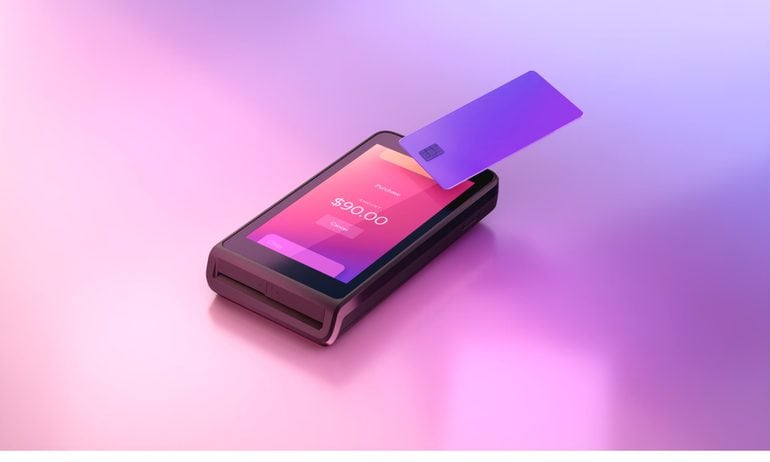
Image courtesy of Helcim.
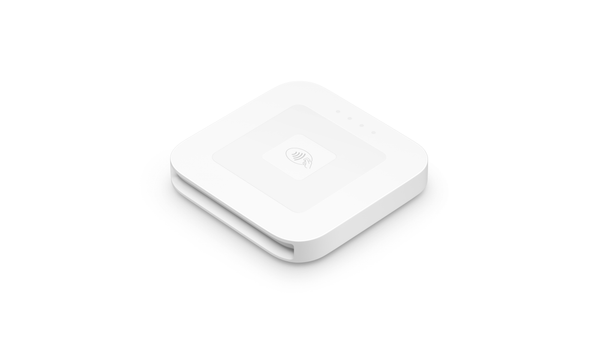
Image courtesy of Square.
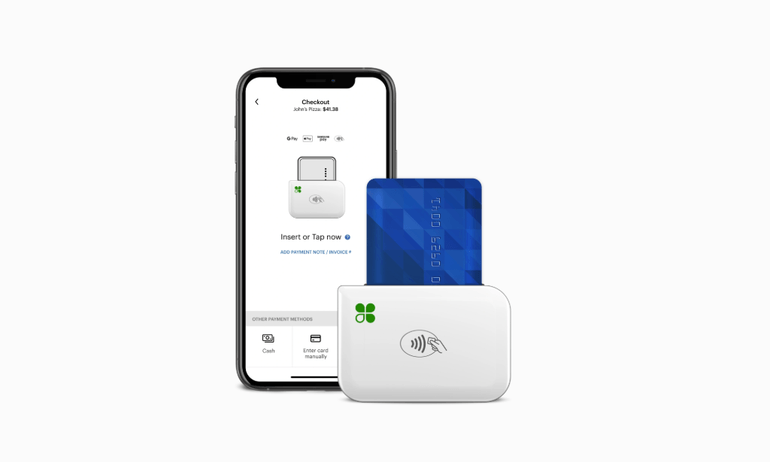
Image courtesy of Clover.
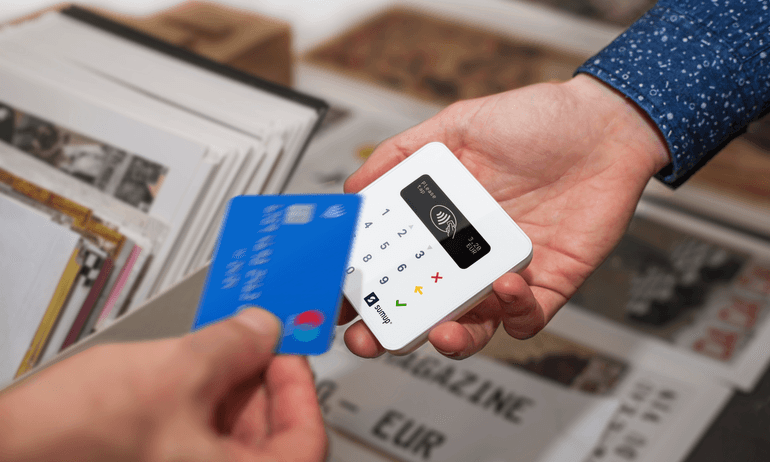
Image courtesy of SumUp.
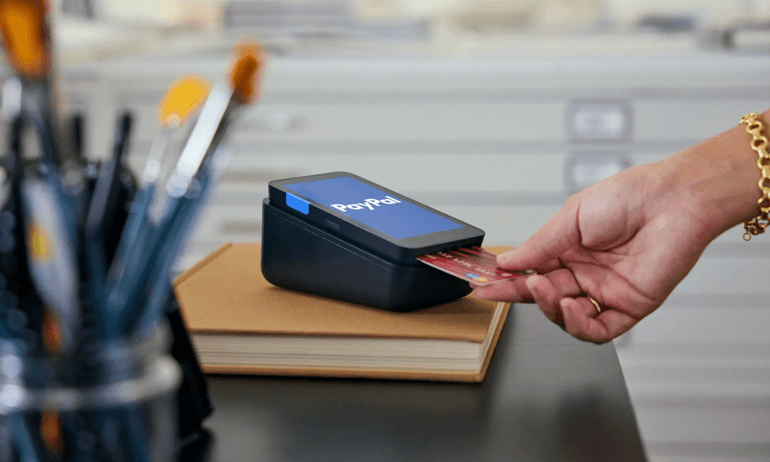
Image courtesy of PayPal POS.
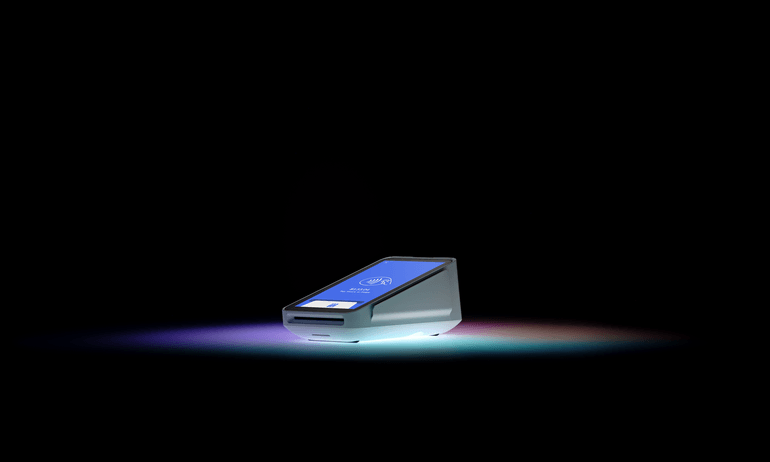
Image courtesy of Square.
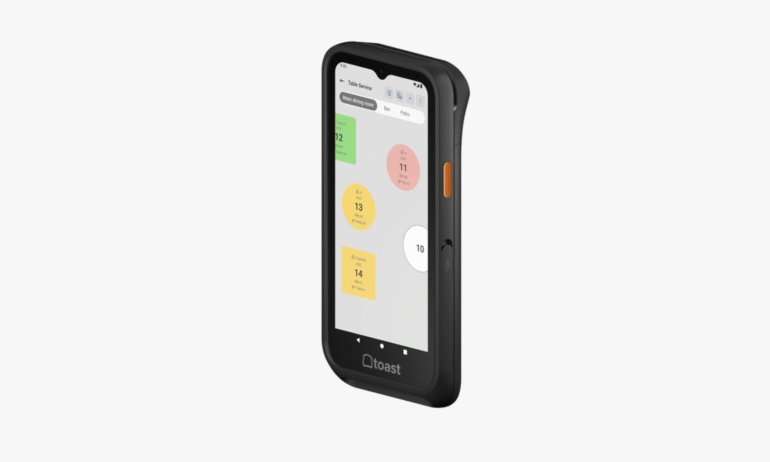
Courtesy of Toast.
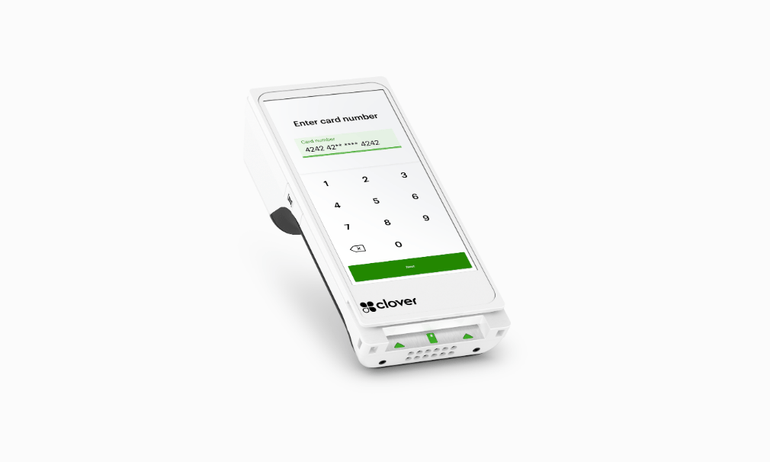
Image courtesy of Clover.
What features do the best card readers offer?
Making a list of must-haves can help you narrow down your card reader options. To get you started, here’s a look at differentiating features and which card readers have them.
Free POS software | Receipt printer | Barcode scanner | Touch screen | Battery life | |
|---|---|---|---|---|---|
Helcim Card Reader | ✔️ | X | X | ✔️ | 1 business day. |
Square Reader | ✔️ | X | X | X | 1 business day. |
Clover Go | ✔️ (but with fewer features than competitors) | X | X | X | 130 contactless transactions. |
SumUp Plus | ✔️ | X | X | X | 500+ transactions. |
PayPal POS Terminal | ✔️ | Add-on. | Add-on. | ✔️ | 12 hours. |
Square Terminal | ✔️ | ✔️ | X | ✔️ | 1 business day. |
Toast Go 3 | X (unless you opt for higher processing rates) | X | ✔️ | ✔️ | 24+ hours. |
Clover Flex | ✔️ (but with fewer features than competitors) | ✔️ | ✔️ | ✔️ | 8 hours. |
How we select the best credit card readers
Our writers and editors have evaluated hardware from more than 25 POS systems. Most of them sell their own credit card readers. To make our list, credit card readers need to check the following boxes:
- Portability. The main advantage of credit card readers is that you can use them just about anywhere. Our top picks are all handheld. Some are small enough to fit in your pocket. Others have large screens but are compact enough to carry around. That said, most of the providers we list also sell stationary POS hardware. This provides additional versatility for brick-and-mortar businesses.
- Free POS software options. All of the credit card readers we list have free POS software plans. This can help minimize your business’s recurring monthly costs. And you can still run reports and track sales.
- Contactless payments. How often do you swipe your credit card anymore? Not often. All of the readers we selected let customers tap their cards or digital wallets to pay. This ensures your business is keeping up with the times and moving lines along.
What is a credit card reader?
A credit card reader is a device businesses use to accept credit card payments in person. It could be at a store, tableside or at a pop-up event. The customer interacts with it by tapping, dipping or swiping their credit or debit card. Then, the reader detects and transmits the card’s data (e.g., account number, authorization code, cardholder name) to complete the transaction.
Most card readers connect to your smartphone or tablet via Bluetooth. Others need to be plugged into a more built-out POS register, smartphone or tablet. Regardless, they’ll need to be paired with a mobile app or built-in POS software to record your business’s sales.
What are the different types of credit card readers?
POS hardware, including card readers, come in several different forms. Here are the main types of card readers small businesses use:
- Mobile card readers. You usually pair these handheld, portable card readers with smartphones. This lets your business accept payments on the go.
- Handheld terminals. This type of card reader incorporates a screen and additional POS features. This allows you to take orders tableside, print receipts or scan barcodes.
- Countertop readers. These sit on a counter but have a smaller footprint than a full POS register. Usually, they’re best for small brick-and-mortar businesses with limited countertop space.
- Full registers. These systems are stationary and can be paired with other hardware accessories. Examples include a cash drawer or a receipt printer. Registers may also have a customer-facing screen to speed up the checkout process.
» MORE: Best mobile POS systems
How much does a credit card reader cost?
Simple card readers for iPhone or Android devices typically cost anywhere from around $60 to $200 upfront. Square is one of the only providers that offers a free magstripe reader.
Here’s a look at how much different card reader options cost:
Reader | Price |
|---|---|
Mobile card readers | |
Square Reader (magstripe only) | $0 |
SumUp Plus | $54 |
Square Reader (tap and chip) | $59 |
Clover Go | $199 |
Handheld terminals | |
Helcim Card Reader | $199 |
PayPal POS Terminal | $199 |
Square Terminal | $299 |
Clover Flex | $749 |
Toast Go 3 | $1,032.20 |
Countertop readers | |
Clover Mini | $849 |
Full registers | |
Square Register | $799-$899 |
Clover Station Solo | $1,799 |
Clover Station Duo | $1,899 |
But hardware costs aren’t the only fees involved. You also need to factor in credit card processing fees. Those are usually in the ballpark of 2.6% plus 10 cents per transaction.
And while lots of providers, like Square and Helcim, have free POS software, not all providers do. Paid plans commonly range from $30 to more than $100 per month.
How to choose the best credit card reader for your small business
If you’re already using a POS system or payment processor, we recommend using one of their card readers. Working with two different payment providers can be expensive and time consuming.
If you haven’t chosen a payment provider yet, follow these steps:
- Set a budget for upfront and recurring costs. Consider a provider’s monthly POS software, hardware and payment processing costs. Simple mobile card readers shouldn’t cost more than $200. More complex terminals may cost upwards of $300. Those are just the upfront costs, though. POS software and payment processing fees are recurring. If you need additional functionality, like employee management tools or inventory tracking, expect to pay a monthly software fee around $50 or more.
- Consider where you’ll use the card reader. Some card readers are made to pair with your smartphone. Examples include the Clover Go and the Square Reader. These are great for businesses that make sales on the go. Others, like the Square Terminal, can sit on a countertop. These are ideal for brick-and-mortar businesses.
- Make a list of must-have features. Do you need a card reader that also prints receipts or scans barcodes? More functionality comes with a higher price tag. But if it can help you work more efficiently, it’s often worth it.
- Confirm it integrates with your accounting software. Your credit card reader’s POS software should sync with your accounting program. This ensures all of your transactions flow seamlessly into your books. Otherwise, you may be stuck manually entering transactions. This process is time consuming and more prone to human error.
» MORE: Best mobile payment apps
Methodology
NerdWallet independently reviews point-of-sale (POS) system providers before determining our top picks. We collect the data for our software ratings from products’ public-facing websites and from company representatives. Our editorial team reviews information on a regular basis for consistency and accuracy.
We also periodically update our scoring system to reflect changing industry norms and business needs. For instance, in 2026, we added a payroll integration category to our POS systems rubric. It’s important that POS systems can sync up with payroll software to minimize manual data entry and keep track of employee hours.
NerdWallet’s POS system provider ratings reward companies whose products and services are priced well and work in a variety of payment scenarios, among other criteria.
Ratings are based on weighted averages of scores in several categories, including cost, system capabilities, contract requirements, customer service, integrations and add-ons. Learn more about how we rate POS system providers.
These ratings are a guide, but services, hardware and pricing can vary widely from business to business and provider to provider. We encourage you to shop around and compare several providers.
NerdWallet does not receive compensation for any reviews. Read our editorial guidelines.


