SumUp Review: Checks Off the Basics, But Plans Can Be Costly
SumUp’s free POS Lite plan has most of the features retailers and service-based businesses need. But its paid plans not only cost more than competitors — they also require a contract.
Hillary Crawford writes about small-business software at NerdWallet and is certified in QuickBooks Online and web design. Her previous roles include news writer and associate West Coast editor at Bustle Digital Group, where she helped shape news and tech coverage. She's appeared on Cheddar News and also worked as a policy contributor for GenFKD. Hillary earned a bachelor's degree with high honors in political science from the University of Michigan.
Email: <a href="mailto:hcrawford@nerdwallet.com">hcrawford@nerdwallet.com</a>.
Hillary Crawford writes about small-business software at NerdWallet and is certified in QuickBooks Online and web design. Her previous roles include news writer and associate West Coast editor at Bustle Digital Group, where she helped shape news and tech coverage. She's appeared on Cheddar News and also worked as a policy contributor for GenFKD. Hillary earned a bachelor's degree with high honors in political science from the University of Michigan.
Email: <a href="mailto:hcrawford@nerdwallet.com">hcrawford@nerdwallet.com</a>.
Ryan Lane is an editor on the small-business team and a NerdWallet authority on student loans. He spent more than a decade as a writer and editor for student loan guarantor American Student Assistance and was a managing editor for publisher Cell Press. Ryan’s work has been featured by The Associated Press, USA Today and MarketWatch, and he previously co-authored the U.S. News & World Report Student Loan Ranger blog. Email: <a href="mailto:rlane@nerdwallet.com”">rlane@nerdwallet.com</a>.
Ryan Lane is an editor on the small-business team and a NerdWallet authority on student loans. He spent more than a decade as a writer and editor for student loan guarantor American Student Assistance and was a managing editor for publisher Cell Press. Ryan’s work has been featured by The Associated Press, USA Today and MarketWatch, and he previously co-authored the U.S. News & World Report Student Loan Ranger blog. Email: <a href="mailto:rlane@nerdwallet.com”">rlane@nerdwallet.com</a>.
NerdWallet's content is
fact-checked for accuracy, timeliness, and relevance by humans.
It undergoes a thorough review process involving writers and editors to ensure
the information is as clear and complete as possible. Learn more by checking
our
Editorial Guidelines.
Content was accurate at the time of publication.
250+ small-business products reviewed and rated by our team of experts.
80+ years of combined experience covering small business and personal finance.
75+ categories of best business software selections.
NerdWallet's small-business software content, including ratings, recommendations and reviews, is overseen by a team of writers and editors who specialize in business software, including payment processing, accounting and payroll. Their work has appeared in The Associated Press, The Washington Post, Nasdaq, Entrepreneur, ABC News, Yahoo Finance and other national and local media outlets. Each writer and editor follows NerdWallet's strict guidelines for editorial integrity to ensure accuracy and fairness in our coverage.
You're our first priority.
Every time.
We believe everyone should be able to make financial decisions with
confidence. While we don’t cover every company or financial product on
the market, we work hard to share a wide range of offers and objective
editorial perspectives.
So how do we make money? Our partners compensate us for
advertisements that appear on our site or when you click to or take an
action on their website. This compensation helps us provide tools and
services - like free credit score access and monitoring. With the
exception of mortgage, home equity and other home-lending products or
services, partner compensation is one of several factors that may
affect which products we highlight and where they appear on our site.
Other factors include your credit profile, product availability and
proprietary website methodologies.
However, these factors do not influence our editors’ opinions or ratings, which are based on independent research and analysis. Our partners cannot
pay us to guarantee favorable reviews. Here is a list of our partners.
Hillary Crawford writes about small-business software at NerdWallet and is certified in QuickBooks Online and web design. Her previous roles include news writer and associate West Coast editor at Bustle Digital Group, where she helped shape news and tech coverage. She's appeared on Cheddar News and also worked as a policy contributor for GenFKD. Hillary earned a bachelor's degree with high honors in political science from the University of Michigan.
Email: <a href="mailto:hcrawford@nerdwallet.com">hcrawford@nerdwallet.com</a>.
Hillary Crawford writes about small-business software at NerdWallet and is certified in QuickBooks Online and web design. Her previous roles include news writer and associate West Coast editor at Bustle Digital Group, where she helped shape news and tech coverage. She's appeared on Cheddar News and also worked as a policy contributor for GenFKD. Hillary earned a bachelor's degree with high honors in political science from the University of Michigan.
Email: <a href="mailto:hcrawford@nerdwallet.com">hcrawford@nerdwallet.com</a>.
Ryan Lane is an editor on the small-business team and a NerdWallet authority on student loans. He spent more than a decade as a writer and editor for student loan guarantor American Student Assistance and was a managing editor for publisher Cell Press. Ryan’s work has been featured by The Associated Press, USA Today and MarketWatch, and he previously co-authored the U.S. News & World Report Student Loan Ranger blog. Email: <a href="mailto:rlane@nerdwallet.com”">rlane@nerdwallet.com</a>.
Ryan Lane is an editor on the small-business team and a NerdWallet authority on student loans. He spent more than a decade as a writer and editor for student loan guarantor American Student Assistance and was a managing editor for publisher Cell Press. Ryan’s work has been featured by The Associated Press, USA Today and MarketWatch, and he previously co-authored the U.S. News & World Report Student Loan Ranger blog. Email: <a href="mailto:rlane@nerdwallet.com”">rlane@nerdwallet.com</a>.
NerdWallet's content is
fact-checked for accuracy, timeliness, and relevance by humans.
It undergoes a thorough review process involving writers and editors to ensure
the information is as clear and complete as possible. Learn more by checking
our
Editorial Guidelines.
Content was accurate at the time of publication.
250+ small-business products reviewed and rated by our team of experts.
80+ years of combined experience covering small business and personal finance.
75+ categories of best business software selections.
NerdWallet's small-business software content, including ratings, recommendations and reviews, is overseen by a team of writers and editors who specialize in business software, including payment processing, accounting and payroll. Their work has appeared in The Associated Press, The Washington Post, Nasdaq, Entrepreneur, ABC News, Yahoo Finance and other national and local media outlets. Each writer and editor follows NerdWallet's strict guidelines for editorial integrity to ensure accuracy and fairness in our coverage.
You're our first priority.
Every time.
We believe everyone should be able to make financial decisions with
confidence. While we don’t cover every company or financial product on
the market, we work hard to share a wide range of offers and objective
editorial perspectives.
So how do we make money? Our partners compensate us for
advertisements that appear on our site or when you click to or take an
action on their website. This compensation helps us provide tools and
services - like free credit score access and monitoring. With the
exception of mortgage, home equity and other home-lending products or
services, partner compensation is one of several factors that may
affect which products we highlight and where they appear on our site.
Other factors include your credit profile, product availability and
proprietary website methodologies.
However, these factors do not influence our editors’ opinions or ratings, which are based on independent research and analysis. Our partners cannot
pay us to guarantee favorable reviews. Here is a list of our partners.
Many or all of the products on this page are from partners who compensate us
when you click to or take an action on their website, but this does not
influence our evaluations or ratings. Our opinions are our own.
SumUp
The bottom line:
SumUp stands out for its automated marketing tools, free POS plan and sleek hardware. It can be a good choice for small businesses outside of the food industry. But if you need more than the basics, I’d look for alternatives with less expensive POS software plans.
Software details
Payment processing fees
In-person: 2.6% + $0.10
Online: 3.5% + $0.15
Monthly fee
$0
for card readers only; $99 for Connect Lite plan; $199 for Connect Plus plan; $289 for Connect Pro plan.
Pros & Cons
Pros
Free POS plan available.
All plans include inventory management.
Email/SMS marketing and customer reward program in paid plans.
Cons
Paid plans require a 12-month subscription, plus setup fee.
Limited integrations outside of QuickBooks; no accounting integrations in free plan.
Online ordering costs an extra $19 per month.
Card readers and terminals don’t have offline mode.
NerdWallet’s ratings are determined by our editorial team. The scoring formula takes into account the type of software being reviewed (such as accounting, point of sale, invoicing or payroll) and the software’s range of features, cost, integrations, customer support and more.
NerdWallet’s ratings are determined by our editorial team. The scoring formula takes into account the type of software being reviewed (such as accounting, point of sale, invoicing or payroll) and the software’s range of features, cost, integrations, customer support and more.
NerdWallet’s ratings are determined by our editorial team. The scoring formula takes into account the type of software being reviewed (such as accounting, point of sale, invoicing or payroll) and the software’s range of features, cost, integrations, customer support and more.
NerdWallet’s ratings are determined by our editorial team. The scoring formula takes into account the type of software being reviewed (such as accounting, point of sale, invoicing or payroll) and the software’s range of features, cost, integrations, customer support and more.
Square: Better for online ordering. All of Square’s plans come with online ordering capabilities — no additional monthly fees involved. This isn’t the case for any of SumUp’s plans. Even if you subscribe to the most expensive one, you have to pay an extra $19 per month to accept orders online. Read our full Square review.
Clover: Better industry-specific features. Clover has six different sets of POS plans: two for restaurants, one for retail, one for professional services, one for personal services and one for home and field services. You’ll find industry-specific features, like table mapping, remote order firing, appointment management and payroll integrations. SumUp doesn’t offer different plans for each industry. Instead it takes more of a one-size-fits-all approach. Read our full Clover review.
Helcim: Better for high-volume businesses. Helcim uses interchange-plus pricing. That means you pay less when customers use a card with low interchange fees. This is especially cost-effective for high-volume businesses. SumUp charges a flat percentage regardless of what credit card a customer uses. Read our full Helcim review.
Full review
SumUp is a payment service provider headquartered in London. Founded in 2012, SumUp now operates in more than 30 countries.
More than 4 million businesses around the world use SumUp. Yet it isn’t a huge name in the U.S. payments space. It seems like the company is trying to change that.
For instance, it launched an all-in-one POS terminal here in November 2025. In April 2026, it expanded its U.S.-based offering to include new in-app business insights and reporting tools.
Will SumUp succeed? I see a lot to like. Its U.S. product has a free POS plan, inexpensive card reader and competitive processing rates. However, there’s no overlooking that SumUp falls short in some aspects versus the best payment processing companies.
Unlike many of its competitors, SumUp requires long-term contracts for its paid POS plans. It also charges extra for online ordering and lacks some industry-specific features. This makes it difficult to think of a situation where I’d use SumUp over a more flexible product, like Square or Clover. But a few scenarios come to mind.
SumUp has some of the cheapest in-person processing rates (2.6% plus 10 cents) on the market. Square, for comparison’s sake, charges 2.6% plus 15 cents. SumUp also has attractive and affordable hardware options. Its handheld terminal, for example, is $249. Clover’s is $749.
Industry-specific capabilities aside, SumUp’s POS software is feature-rich too. All of its paid plans have floor management, profit tracking and individual employee PIN logins. Its higher-tier Connect Plus and Pro plans feature SMS and email marketing.
These features won’t cut it for some businesses. Restaurants, for example, may need additional tools, like reservation management. However, SumUp’s offerings can be more than enough for small retailers and service-based businesses. Just be ready to pay upward of $99 per month if you’d like to accept payments online. A representative told me that adding extra hardware devices can make monthly pricing even higher.
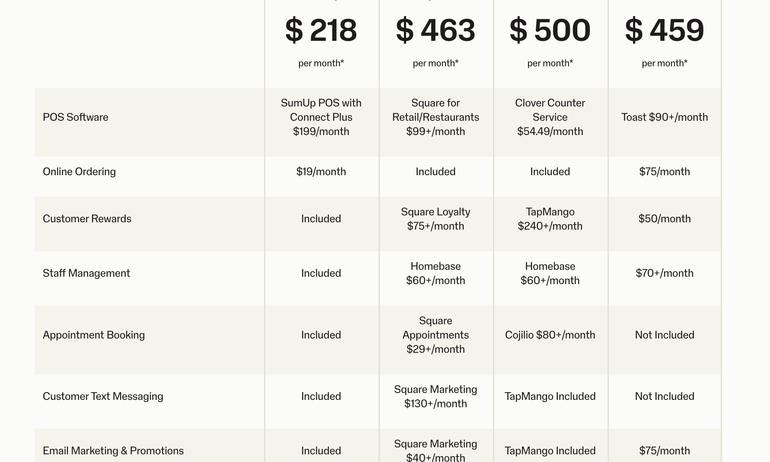
Square’s most expensive plans, in comparison, are $49 and $149 per month. SumUp’s website includes a Square comparison table (see below) that makes it look like the latter is pricier. But its fees for Square are outdated. (For example, Square's paid plans include marketing tools. They’re not a $130 add-on.)
SumUp is best for:
✔️ Small retailers.
✔️ Service-based businesses.
✔️ Automated marketing.
SumUp overview
Payment processing model
Flat-rate.
Payment processing fees
2.6% plus 10 cents for in-person transactions.
2.90% plus 15 cents for online invoice transactions.
3.5% plus 15 cents for card-not-present transactions and non-invoice online transactions.
Monthly fee
$0 for the POS Lite plan.
$49 for the POS Plus plan.
$99 and up for the SumUp POS plan.
$199 for the POS plan with Connect Plus.
$289 for the POS plan with Connect Pro.
Hardware cost
$54 for SumUp Plus card reader.
$64 for SumUp Plus cradle bundle.
$99 for Solo touchscreen.
$169 for SumUp Solo Printer Bundle.
$249 for handheld terminal.
$499 for POS Lite and Solo Bundle.
SumUp POS is quote-based.
Contract length
Paid POS plans require a 12-month contract.
Customer service
Phone support for POS systems available every day from 9 a.m. to 9 p.m. EST.
SumUp’s free POS Lite plan features sales performance monitoring, inventory management and reporting. It’s not the most robust set of capabilities I’ve seen for a free plan (that honor belongs to Square). But SumUp’s processing fees are lower than some $0-per-month competitors, which helps make up for it.
It’s also sufficient for businesses that only need a card reader to accept payments. SumUp offers multiple portable payment options. Its card readers range from $54 to $99, and there’s a handheld terminal available for $249.
Plus, both of its card readers include a keypad. This lets customers see how much they’re paying and allows you to key in their credit card info if necessary. Competitors, like Square, charge about the same price for mobile readers, but they don’t have keypads.
On the downside, SumUp’s free plan doesn’t include accounting integrations. Be prepared to pay extra for this or manually import transactions.
Automated marketing tools
If you keep putting marketing tasks on the back burner, SumUp’s Connect plans might be able to help. They give you access to automated marketing tools, plus AI messaging assistance.
The system automatically sends promotions, messages and rewards, so you don’t have to time them out. You can also tell the system how often it should check in with customers. For example, you might have it follow up after customers visit your store a certain number of times.
Once SumUp sends the messages, it tracks which ones were successful. This gives you the data you need to target the correct customers and build smarter marketing campaigns.
Where SumUp falls short
Long-term contracts
SumUp’s paid POS plans require a 12-month contract. This isn’t ideal, and it’s not the norm for many of SumUp’s competitors. Helcim and Square, for example, don’t have long-term contracts. Instead, they’re month to month.
Those POS systems do have other ways to lock you in. For instance, you don’t want to fork over $900 for a Square Register then change processors a couple months later. But at least you could resell that hardware.
With SumUp, you’re stuck with your investment. And the fact that its full-feature POS plans are so expensive (starting at $99 per month) makes this situation even tougher. It means you’re committing to paying close to $1,200 — or more — whether you like SumUp or not.
A SumUp spokesperson told me the processor doesn’t charge fees if you cancel early. But you’ll still pay the balance left on your contract. Contracts also auto-renew, the spokesperson said.
SumUp does advertise a “money back guarantee” on its website. I asked the spokesperson to clarify how this policy works.
POS Lite subscribers have a 30-day window to receive their hardware expenses back if they’re not satisfied. Businesses that subscribe to SumUp POS with Connect Plus or Pro will get money back if their revenue isn’t greater than the first year’s subscription cost. The refund in that case would be the difference between those two figures.
Confusing POS pricing and descriptions
SumUp’s website has contradictory information on POS plan pricing and which features each plan includes. This throws a wrench into the decision-making process. It makes it difficult to figure out what plan is right for you and how much you should expect to pay.
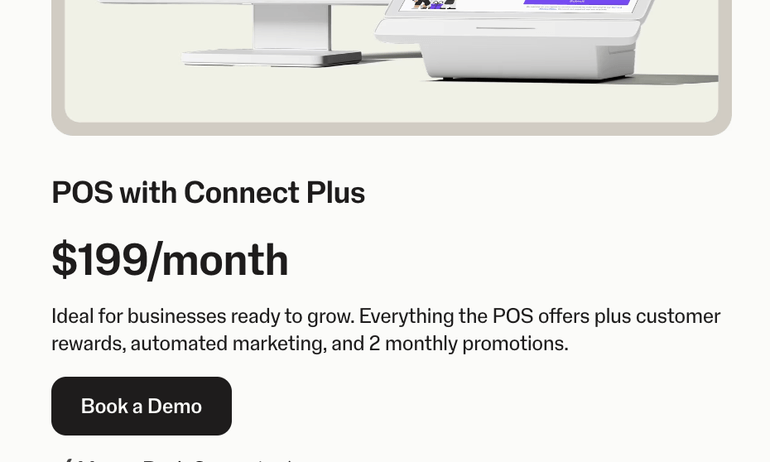
For example, one of its pages lists two separate prices for the same plan. In one spot, it says SumUp POS with Connect Plus is $199 per month. Right above it, the page says Connect Plus is $269 per month.
Two other pages list different feature sets for the SumUp POS plan. One says it includes SMS and email promotions, plus customer rewards. Another suggests you need to subscribe to Connect Plus or Pro to access those.
I reached out to SumUp for clarification on each plan’s pricing and features. A representative said, “Connect Plus and Connect Pro are marketing/loyalty upgrade tiers layered on top of the base POS plan, not separate feature sets.”
In other words, the POS plan that starts at $99 per month does include customer rewards. But you have to upgrade to Connect Plus or Pro for marketing tools.
What small-business owners think of SumUp
I checked online forums like Reddit and reviews from sites like TrustPilot, G2, the App Store and Google Play to gauge how users feel about SumUp. Most comments come from users in other regions, like the U.K. I tried to focus more on feedback from users in the U.S., since that’s where NerdWallet readers likely are. This limited the number of reviews I’m working with.
I used an AI tool to help analyze this small slice of feedback. Here are the trends I spotted.
👍 Easy to use
Online commenters say they appreciate how simple it is to set up SumUp. For the most part, these remarks come from people mentioning card readers. My guess is that they’re using the free Lite POS plan. That one comes with self-guided setup instructions online.
Business owners using more complex systems, like SumUp POS, receive dedicated installation support. However, it costs an extra $199.
👎 Customer support
Multiple users criticize the quality of SumUp’s customer support. They say it’s difficult to reach the correct person to resolve your issue. This can impact how quickly you’re able to troubleshoot problems.
Unfortunately, this isn’t atypical for POS system providers and payment processors. Online commenters are often unsatisfied with most products’ customer support.
I can’t speak to the quality of SumUp’s customer service. But I will give it credit for at least having solid phone hours: 9 a.m. to 9 p.m. EST seven days a week. For comparison, Square matches those hours on weekdays, but it lacks a weekend call center. On top of that, its free plan only includes phone support for the first 90 days.
SumUp also has a line just for card readers, albeit with less availability (Monday through Friday from 10 a.m. to 7 p.m.). I haven’t seen this approach from other providers. In theory, it should get you help faster. In practice, it could explain why callers get kicked from rep to rep.
If a problem does arise, I’d suggest reaching out to SumUp both on the phone and via email. You can see which channel receives a quicker response, so that you know the best course of action for the future.
How we evaluated SumUp
NerdWallet’s writers and editors independently review POS systems, like SumUp, by analyzing more than 30 data points. To evaluate SumUp, I collected data from its public-facing website, help articles and company representatives.
I also looked through individual reviews and feedback on sites like Trustpilot, the App Store, Google Play and Reddit. Then, I used AI tools to help spot larger trends within those comments.
Since our team cannot verify each user’s individual experience, we don’t incorporate user reviews in our star ratings. For more information on how we score POS systems, see our full methodology.
Methodology
NerdWallet independently reviews point-of-sale (POS) system providers before determining our top picks. We collect the data for our software ratings from products’ public-facing websites and from company representatives. Our editorial team reviews information on a regular basis for consistency and accuracy.
We also periodically update our scoring system to reflect changing industry norms and business needs. For instance, in 2026, we added a payroll integration category to our POS systems rubric. It’s important that POS systems can sync up with payroll software to minimize manual data entry and keep track of employee hours.
NerdWallet’s POS system provider ratings reward companies whose products and services are priced well and work in a variety of payment scenarios, among other criteria.
Ratings are based on weighted averages of scores in several categories, including cost, system capabilities, contract requirements, customer service and integrations and add-ons. Learn more about how we rate POS system providers.
These ratings are a guide, but services, hardware and pricing can vary widely from business to business and provider to provider. We encourage you to shop around and compare several providers.
NerdWallet does not receive compensation for any reviews. Read our editorial guidelines.