





How does LawPay work?
LawPay is a payment processor for law firms that want to accept credit cards and eChecks in person, online or through email. It costs $20 per month, plus fees per transaction. LawPay is best for firms that want online payments, QR codes and integration with other software.
LawPay fees
Monthly fee | $20. |
Free version | No. |
Contract | None. |
Standard cards | 1.95% processing plus 20 cents per transaction. |
Specialty cards (corporate, rewards) | 2.95% processing plus 20 cents per transaction. |
American Express | 3.5% processing plus 20 cents per transaction. |
eChecks | 0% processing plus $2 flat per transaction. |
Custom pricing available | Yes. |
LawPay pros and cons
Pros:
- Ease of client use. LawPay provides a payment link to put on invoices, emails and your website so clients can pay quickly and easily.
- Can use QR codes. This allows clients to pay you directly from their phones, which may get you paid faster. You can display the QR code at reception or your desk so clients can even pay before they leave.
- Scheduled payments. You can schedule charges to clients’ cards so you’re paid automatically.
- Mobile app (iOS and Android). Allows you to accept payments from your phone. You can enter payment details manually or use LawPay’s card reader.
- eCheck capabilities. If the client doesn’t want to pay with a card, you can take a check electronically.
Cons:
- No free version.
- No in-person training (but online sessions are available).
- No access without a virtual private network, or VPN, if you’re outside the U.S., Canada or Australia.
Starting Small: A newsletter to get your business off the ground
Subscribe for grant opportunities, product recommendations and no-nonsense advice from the Nerds.
Key decision-making factors
Customer service. LawPay offers unlimited phone support and email support from “certified payment specialists.”
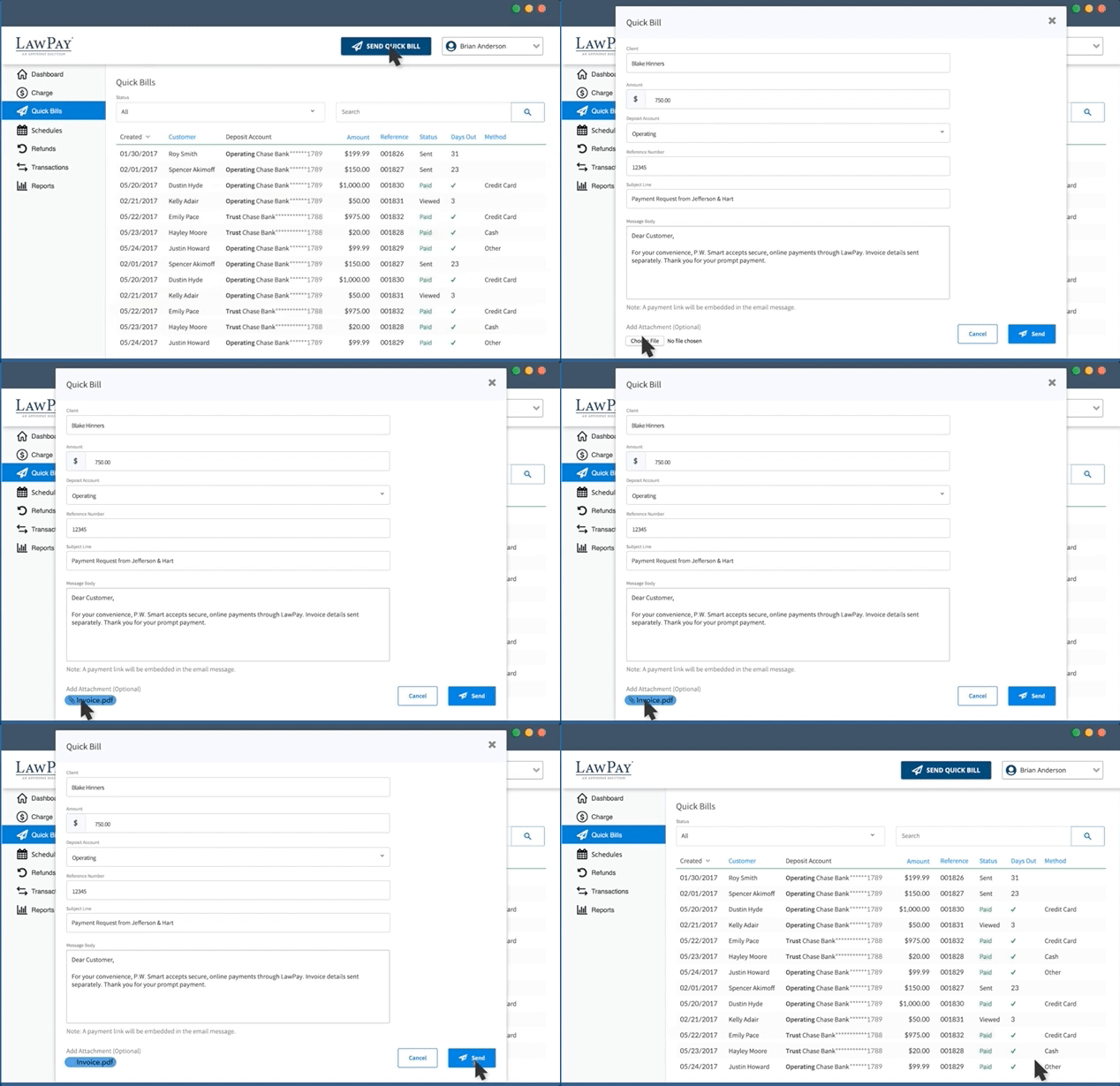
Sending payment requests. LawPay has a feature called Quick Bill, which sends payment requests to clients. Clients can pay online, and the software tracks who has seen your requests, as well as who has paid or not paid.
Tracking payments. You can schedule payments in advance and make refunds. You can also customize the dashboard to run reports to manage your cash flow. When someone completes a Quick Bill, you get notified through email.
Integrations. Integrates with more than 30 popular law-firm management software packages, such as Clio, FindLaw, Juris, Smokeball and Thomson Reuters. Tabs3 Software is a featured partner.
IOLTA accounts. LawPay doesn’t debit Interest on Lawyer Trust Accounts, or IOLTAs, which are accounts lawyers use to hold client funds.
Reporting. LawPay reports show data for the past 30, 90 or 365 days, as well as month-to-date and year-to-date information.
Who should use LawPay?
LawPay is best suited for business owners who:
- Operate law firms.
- Want to process card payments and eChecks.
- Also want a QR code that customers can use to pay invoices.
- Need good integration with other software law firms use.
LawPay alternatives
Stripe
Pros: Stripe accepts a wide range of currencies (over 135), and it has several tools to help small businesses create customized checkout experiences. It offers 24/7 live chat and phone support, as well as email and chat support.
Cons: If you’re not a tech-savvy business owner, you may have trouble using Stripe’s application programming interface, or API, and tools. Also, Stripe has a variety of products — each with its own fees, integrations and customization capabilities — which may overwhelm time-constrained small-business shoppers.
» MORE: Read what we think of Stripe
Square
Pros: Square charges the same fee for in-person card transactions regardless of which card the customer uses, and there are no monthly fees. Some prices are listed on the site, and Square has a handy calculator on its website that can help you estimate what your business will pay. Also, Square has an online knowledge base and community. You can get support through email (with a possible two-day turnaround), chat and Twitter. There is phone support, though the company makes no promises of speedy results.
Cons: Firms that have more than $250,000 in card transactions per year don’t necessarily get the same rates as everyone else. They have to call and get a quote. Also, Square supports card payments in relatively few countries, which could be a problem for firms doing business overseas.
» MORE: Here's what we think of Square
PayPal
Pros: Owners who want something simple to set up may appreciate PayPal Payments Standard, as it’s specifically designed to make integration simple for nonprogrammers. Also, PayPal accepts about two dozen currencies and offers phone support from 8 a.m. to 8 p.m. Central time, Monday through Friday. It also has text support, an online community and a resolution center for transaction or account issues.
Cons: PayPal's fees can be more expensive than Stripe or Square on a per-transaction basis. Firms keen on detailed customization might find PayPal’s copy-and-paste approach to integration a detraction.
Monthly fees | |
Stripe |
|
PayPal |
Optional add-ons:
|
Square |
|
Transaction fees | |
Stripe |
|
PayPal |
|
Square |
|