Hillary Crawford writes about small-business software at NerdWallet and is certified in QuickBooks Online and web design. Her previous roles include news writer and associate West Coast editor at Bustle Digital Group, where she helped shape news and tech coverage. She's appeared on Cheddar News and also worked as a policy contributor for GenFKD. Hillary earned a bachelor's degree with high honors in political science from the University of Michigan.
Email: <a href="mailto:hcrawford@nerdwallet.com">hcrawford@nerdwallet.com</a>.
Hillary Crawford writes about small-business software at NerdWallet and is certified in QuickBooks Online and web design. Her previous roles include news writer and associate West Coast editor at Bustle Digital Group, where she helped shape news and tech coverage. She's appeared on Cheddar News and also worked as a policy contributor for GenFKD. Hillary earned a bachelor's degree with high honors in political science from the University of Michigan.
Email: <a href="mailto:hcrawford@nerdwallet.com">hcrawford@nerdwallet.com</a>.
Ryan Lane is an editor on the small-business team and a NerdWallet authority on student loans. He spent more than a decade as a writer and editor for student loan guarantor American Student Assistance and was a managing editor for publisher Cell Press. Ryan’s work has been featured by The Associated Press, USA Today and MarketWatch, and he previously co-authored the U.S. News & World Report Student Loan Ranger blog. Email: <a href="mailto:rlane@nerdwallet.com”">rlane@nerdwallet.com</a>.
Ryan Lane is an editor on the small-business team and a NerdWallet authority on student loans. He spent more than a decade as a writer and editor for student loan guarantor American Student Assistance and was a managing editor for publisher Cell Press. Ryan’s work has been featured by The Associated Press, USA Today and MarketWatch, and he previously co-authored the U.S. News & World Report Student Loan Ranger blog. Email: <a href="mailto:rlane@nerdwallet.com”">rlane@nerdwallet.com</a>.
NerdWallet's content is
fact-checked for accuracy, timeliness, and relevance by humans.
It undergoes a thorough review process involving writers and editors to ensure
the information is as clear and complete as possible. Learn more by checking
our
Editorial Guidelines.
Content was accurate at the time of publication.
250+ small-business products reviewed and rated by our team of experts.
80+ years of combined experience covering small business and personal finance.
75+ categories of best business software selections.
NerdWallet's small-business software content, including ratings, recommendations and reviews, is overseen by a team of writers and editors who specialize in business software, including payroll, accounting and payment processing. Their work has appeared in The Associated Press, The Washington Post, Nasdaq, Entrepreneur, ABC News, Yahoo Finance and other national and local media outlets. Each writer and editor follows NerdWallet's strict guidelines for editorial integrity to ensure accuracy and fairness in our coverage.
You're our first priority.
Every time.
We believe everyone should be able to make financial decisions with
confidence. While we don’t cover every company or financial product on
the market, we work hard to share a wide range of offers and objective
editorial perspectives.
So how do we make money? Our partners compensate us for
advertisements that appear on our site or when you click to or take an
action on their website. This compensation helps us provide tools and
services - like free credit score access and monitoring. With the
exception of mortgage, home equity and other home-lending products or
services, partner compensation is one of several factors that may
affect which products we highlight and where they appear on our site.
Other factors include your credit profile, product availability and
proprietary website methodologies.
However, these factors do not influence our editors’ opinions or ratings, which are based on independent research and analysis. Our partners cannot
pay us to guarantee favorable reviews. Here is a list of our partners.
Hillary Crawford writes about small-business software at NerdWallet and is certified in QuickBooks Online and web design. Her previous roles include news writer and associate West Coast editor at Bustle Digital Group, where she helped shape news and tech coverage. She's appeared on Cheddar News and also worked as a policy contributor for GenFKD. Hillary earned a bachelor's degree with high honors in political science from the University of Michigan.
Email: <a href="mailto:hcrawford@nerdwallet.com">hcrawford@nerdwallet.com</a>.
Hillary Crawford writes about small-business software at NerdWallet and is certified in QuickBooks Online and web design. Her previous roles include news writer and associate West Coast editor at Bustle Digital Group, where she helped shape news and tech coverage. She's appeared on Cheddar News and also worked as a policy contributor for GenFKD. Hillary earned a bachelor's degree with high honors in political science from the University of Michigan.
Email: <a href="mailto:hcrawford@nerdwallet.com">hcrawford@nerdwallet.com</a>.
Ryan Lane is an editor on the small-business team and a NerdWallet authority on student loans. He spent more than a decade as a writer and editor for student loan guarantor American Student Assistance and was a managing editor for publisher Cell Press. Ryan’s work has been featured by The Associated Press, USA Today and MarketWatch, and he previously co-authored the U.S. News & World Report Student Loan Ranger blog. Email: <a href="mailto:rlane@nerdwallet.com”">rlane@nerdwallet.com</a>.
Ryan Lane is an editor on the small-business team and a NerdWallet authority on student loans. He spent more than a decade as a writer and editor for student loan guarantor American Student Assistance and was a managing editor for publisher Cell Press. Ryan’s work has been featured by The Associated Press, USA Today and MarketWatch, and he previously co-authored the U.S. News & World Report Student Loan Ranger blog. Email: <a href="mailto:rlane@nerdwallet.com”">rlane@nerdwallet.com</a>.
NerdWallet's content is
fact-checked for accuracy, timeliness, and relevance by humans.
It undergoes a thorough review process involving writers and editors to ensure
the information is as clear and complete as possible. Learn more by checking
our
Editorial Guidelines.
Content was accurate at the time of publication.
250+ small-business products reviewed and rated by our team of experts.
80+ years of combined experience covering small business and personal finance.
75+ categories of best business software selections.
NerdWallet's small-business software content, including ratings, recommendations and reviews, is overseen by a team of writers and editors who specialize in business software, including payroll, accounting and payment processing. Their work has appeared in The Associated Press, The Washington Post, Nasdaq, Entrepreneur, ABC News, Yahoo Finance and other national and local media outlets. Each writer and editor follows NerdWallet's strict guidelines for editorial integrity to ensure accuracy and fairness in our coverage.
You're our first priority.
Every time.
We believe everyone should be able to make financial decisions with
confidence. While we don’t cover every company or financial product on
the market, we work hard to share a wide range of offers and objective
editorial perspectives.
So how do we make money? Our partners compensate us for
advertisements that appear on our site or when you click to or take an
action on their website. This compensation helps us provide tools and
services - like free credit score access and monitoring. With the
exception of mortgage, home equity and other home-lending products or
services, partner compensation is one of several factors that may
affect which products we highlight and where they appear on our site.
Other factors include your credit profile, product availability and
proprietary website methodologies.
However, these factors do not influence our editors’ opinions or ratings, which are based on independent research and analysis. Our partners cannot
pay us to guarantee favorable reviews. Here is a list of our partners.
Many or all of the products on this page are from partners who compensate us
when you click to or take an action on their website, but this does not
influence our evaluations or ratings. Our opinions are our own.
GnuCash
The bottom line:
GnuCash is a free, open-source accounting software platform. It can help solopreneurs and freelancers keep accounting records and run reports. But it’s not the best free accounting solution out there. It requires a good deal of manual data entry and has an outdated interface. Most small businesses will fare better with a more automated, cloud-based alternative (even if you have to pay for it).
Software details
Starting at
$0
Promotion
N/A
Pros & Cons
Pros
Free.
Run reports and display results as a bar chart, pie chart or scatter plot.
Basic record keeping tools.
Cons
Desktop-based software.
Outdated user interface.
No live customer support or business software integrations.
Compare to other products
GnuCash
2.0
NerdWallet rating
NerdWallet’s ratings are determined by our editorial team. The scoring formula takes into account the type of software being reviewed (such as accounting, point of sale, invoicing or payroll) and the software’s range of features, cost, integrations, customer support and more.
NerdWallet’s ratings are determined by our editorial team. The scoring formula takes into account the type of software being reviewed (such as accounting, point of sale, invoicing or payroll) and the software’s range of features, cost, integrations, customer support and more.
NerdWallet’s ratings are determined by our editorial team. The scoring formula takes into account the type of software being reviewed (such as accounting, point of sale, invoicing or payroll) and the software’s range of features, cost, integrations, customer support and more.
NerdWallet’s ratings are determined by our editorial team. The scoring formula takes into account the type of software being reviewed (such as accounting, point of sale, invoicing or payroll) and the software’s range of features, cost, integrations, customer support and more.
Zoho Books: Better for scalability. Unlike GnuCash, Zoho Books has six different plans, including a free one. This, along with more automation tools, allows the platform to grow alongside businesses. Zoho also has in-house solutions for payroll, payment processing, inventory and project tracking. Read our full Zoho Books review.
Wave Accounting: Better user interface. Wave has a free and a paid version, and both have a more modern user interface than GnuCash. This makes it easier to enter transactions and see how your business is performing at a glance. Read our full Wave review.
Odoo: Better customization options. Similar to GnuCash, Odoo is a free, open-source accounting software platform. But Odoo also lets you choose from a variety of pre-built modules. You can combine accounting, inventory, human resources and even marketing tools. This is much more efficient (and likely cheaper) than subscribing to different software programs for each. Learn more about Odoo in our best free accounting software roundup.
Full review
GnuCash is a free, open-source program maintained by volunteers. Unlike most accounting software, GnuCash doesn’t exist to make a profit. That means there’s a natural tradeoff between cost savings and usability/functionality. So while GnuCash is a step up from spreadsheets, it understandably lacks some features.
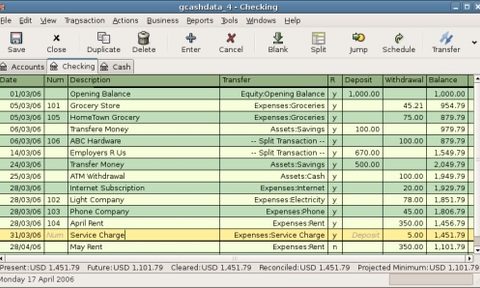
If you like spreadsheet-style accounting and only deal with a handful of transactions each week, GnuCash is a good tool. You can also use it to run a variety of reports, generate invoices and set payment reminders. To give you a better idea of its user interface, here’s what it looks like when you add new transactions:
GnuCash checking account transactions.
If you don’t like the idea of spreadsheets and manual data entry, however, you won’t like GnuCash. For most businesses, it’s an unnecessarily time-consuming and outdated way to track finances. The software is missing the automation tools you’ll find in other accounting software solutions’ most rudimentary plans. This is why we only give it two stars.
For example, GnuCash doesn’t automatically import new bank transactions. Instead, you need to import the file yourself or add each transaction manually. Xero includes automated bank feeds in its least expensive plan.
GnuCash also doesn’t let you create bank rules for automatically categorizing transactions. Zoho Books’ free plan, on the other hand, does. This can be a huge time-saver.
GnuCash lacks other key features too. One big example is online payment processing. In a world full of credit card payments and other digital transactions, this isn’t practical for most businesses. GnuCash is missing business software integrations as well. This is problematic for businesses that use payroll software or POS systems.
GnuCash is best for:
✔️ Tracking just a handful of transactions.
✔️ Manual accounting.
✔️ Free reporting.
GnuCash pricing and features
As long as you have a computer, you can download, install and use GnuCash at no cost. However, depending on your technical experience, you may need professional assistance to update and maintain the software. If so, there will be costs associated with that.
Reports (e.g., profit and loss statement, cash flow statement, balance sheet, portfolio valuation).
Ability to record transactions in different currencies.
Check printing.
Online user forums.
What users say about GnuCash
NerdWallet checked online forums like Reddit and reviews from sites like TrustPilot and G2 to gauge how users feel about GnuCash. We used an AI tool to help analyze this feedback. Here are the major trends we spotted.
👍 Good Excel alternative
When it comes to GnuCash versus Excel for basic recordkeeping, Reddit users seem to agree that GnuCash is better. One user recommends making the switch before your spreadsheets become too complex, though. This makes sense. Switching accounting solutions takes time — the less data you need to migrate, the better.
👎 User interface
Online users acknowledge it took them a while to get the hang of GnuCash’s interface. There’s definitely a learning curve — you can tell just by looking at the transactions page (pictured above). This is likely because GnuCash is so manual.
More automated competitors, like QuickBooks Online, do a lot behind the scenes. For example, they automatically import new bank transactions (along with many of the corresponding details) for you. GnuCash doesn’t automatically update your transactions. Instead, you have to import each new transaction yourself or enter it manually.
👎 Multi-user support
GnuCash says multiple users can make changes to the program simultaneously if they’re using Postgres to store backend data. But Reddit commenters tend to use a shared drive to collaborate on their GnuCash files instead. From what I can tell, this isn’t ideal.
For one, users need to remember to close the file when they’re finished. That way, other people can make changes. Other users mention that certain versions of the GnuCash file disappear after they make changes in OneDrive.
This criticism isn’t surprising, since the program is desktop based. That makes it inherently more difficult to collaborate, especially when users are on different devices. Using shared drives is a workaround, but it can be messy.
Our experience testing GnuCash
👋 I'm Hillary Crawford, a lead writer and content strategist for NerdWallet. I've been covering small-business accounting software since 2021 and am QuickBooks certified. I did the testing for GnuCash.
To do that, I downloaded GnuCash and walked through its manual in March 2026. Here’s what stood out.
My take: Outdated layout makes it difficult to gauge business health at a glance.
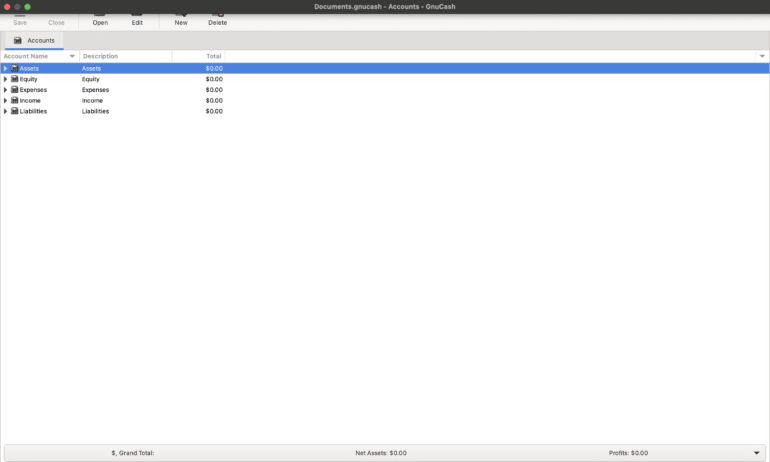
GnuCash doesn’t have a dashboard. Instead, your accounts appear when you first open the desktop app.
Most competitors offer some sort of bird’s eye view of your business’s performance instead. For instance, homepage dashboards might flag overdue invoices or uncategorized transactions. GnuCash doesn’t do this. You need to keep your own list of what needs to be done and when. If you’re new to accounting, that’s going to be tough.
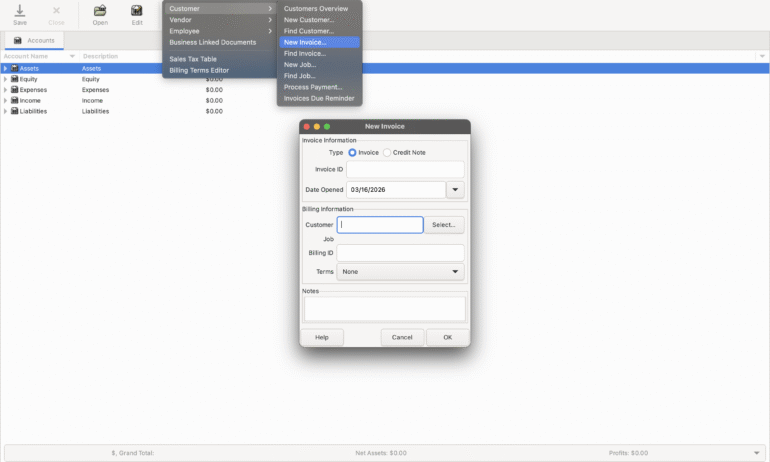
GnuCash is also missing a main menu. Instead, it has a toolbar up top. It’s not the easiest to navigate. I had to hover my mouse over each option, for example, to figure out how to create an invoice. This adds to the learning curve.
My take: Rudimentary invoicing without the usual design options.
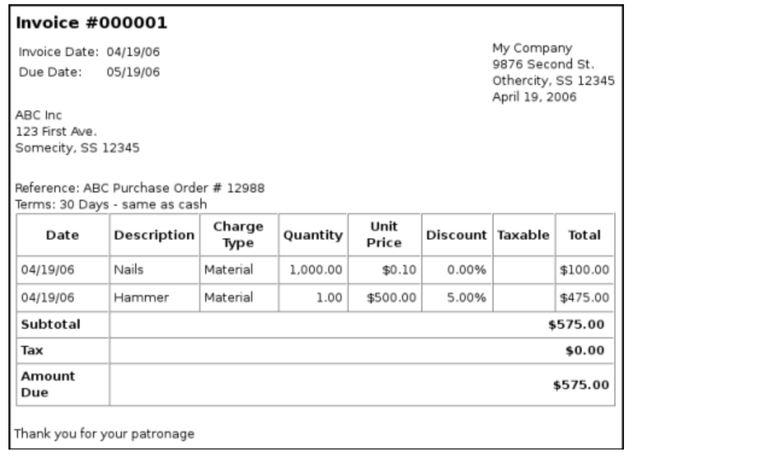
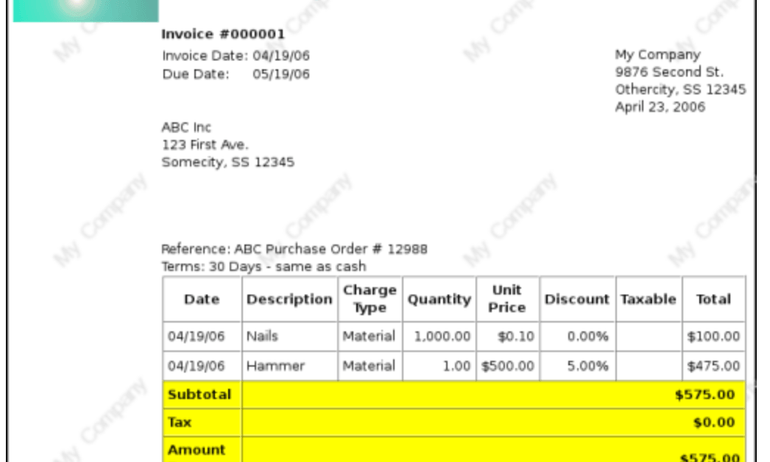
GnuCash’s invoicing options can get the job done. But they’re pretty bare bones. After selecting the customer and job, you can add line items to the invoice.
Once it’s finished, you can print it. Here’s how it will look:
If you want to customize your invoice further, you can use HTML style sheets. This feature allows you to upload background images and a logo. But it’s not much better than the original version. Even the GnuCash guide describes the result as “hideous.”
When you receive payment for the invoice, you need to manually add it to GnuCash. You can do that using the “process payment” option. This is something I could see lots of people (including myself) forgetting to do. And unfortunately, that’s a great way to throw off your books.
It perhaps goes without saying that GnuCash is also missing online payment processing capabilities. Competitors often let you email invoices with a “pay now” button attached. From there, they can choose to pay via bank transfer or credit card. That’s much easier for clients to use versus mailing a check. Plus, it usually means you get paid quicker.
My take: Perhaps the most straightforward part about GnuCash.
Thankfully, GnuCash’s reports tab is easy to find up top on the toolbar. And I like that you can choose from a variety of display options, like chart or pie chart.
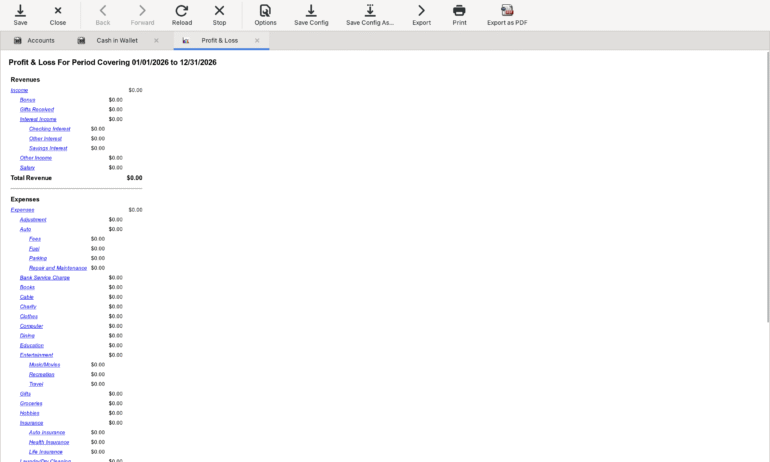
I tested out the profit and loss statement, and it’s basically what I expected.
There are no values because I didn’t have any mock transactions to enter. But you can see that the report lists the time period as well as revenue and expenses. This gets the necessary information across without being distracting. Sticking to the basics when it comes to reporting can be a good thing.
My take: As manual as it gets.
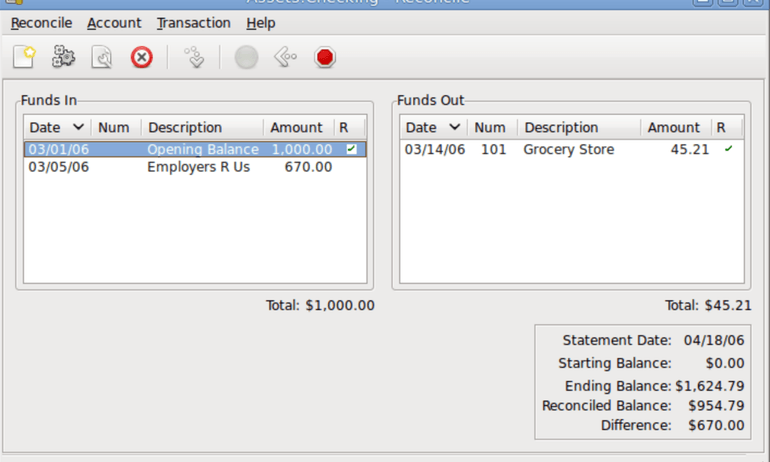
The GnuCash download doesn’t come with mock transactions, so I couldn’t test this at scale. The screenshot below is from the product manual.
The reconciliation process involves entering a statement ending balance and marking “r” for each transaction that appears in your bank statement.
Unlike many of its competitors, GnuCash doesn’t show which account each transaction belongs to. This can make it harder to catch mistakes like miscategorized transactions. I’d make sure the “description” field, in this case, matches what’s in the “transfer” column. That way, you’ll be able to see which account was affected.
I also personally don’t like how GnuCash splits “funds in” and “funds out” transactions between two windows. I’d rather them be one long list with withdrawal and deposit columns.
My take: Similar to using a checkbook register.
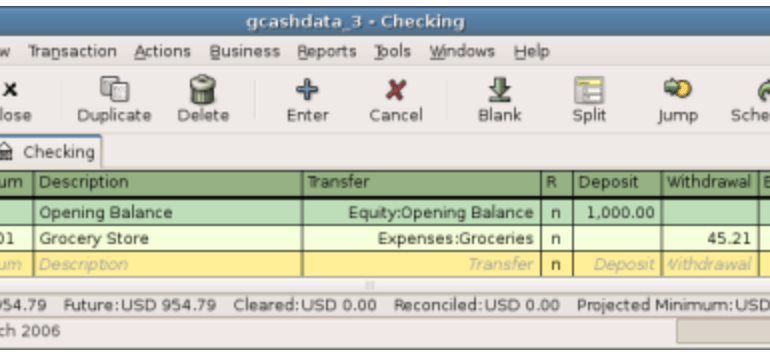
This screenshot from GnuCash’s manual illustrates how you’d enter a simple expense transaction. First, you go to the accounts pages and double click on the account you used to pay for the expense. Let’s say it’s your checking account. From there, you enter the expense like you would in a checkbook-style register.
If the transaction was related to income, you’d enter the amount in the deposit column as opposed to the withdrawal column.
Honestly, this isn’t as tedious as I expected. You don’t actually have to create two entries for each transaction to use double-entry accounting. You just have to understand which accounts money is being transferred to/from.
That said, I do think this layout makes reviewing transactions tedious. Plus, the lack of bank feeds means you either need to import your bank transactions or enter each one manually. Competitors typically import and categorize them for you.
My take: Developers seem ready to help.
GnuCash doesn’t have dedicated representatives, because it’s not a money-making endeavor. Fortunately, it seems like there are lots of developers willing to answer users’ questions.
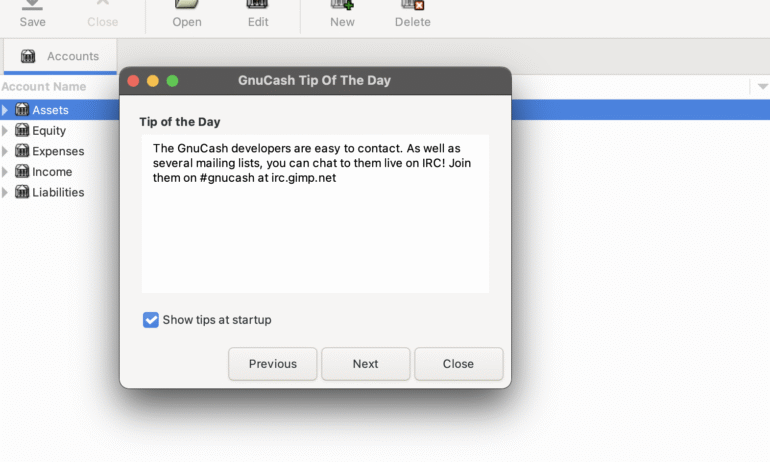
When I opened GnuCash for the first time, it displayed this “tip of the day” regarding support:
You can reach volunteers at irc.gimp.net. I’ve also noticed users post questions on Reddit. This obviously isn’t as quick as dedicated live chat or phone support. But it’s nice to know people care enough about the product that they will help users for free.
How we evaluated GnuCash
NerdWallet independently reviews accounting software products, like GnuCash, across 10 categories and more than 30 subcategories. We collected the data from GnuCash’s public-facing website and from online forums.
Our accounting software ratings range from one to five stars overall. But we also score individual features to help business owners understand a product's strengths and weaknesses. Here’s how GnuCash stacks up:
GnuCash stands out in the following:
Monthly pricing: $0.
Double-entry accounting: Yes.
Chart of accounts customization: Yes.
Cash- and accrual-basis accounting: Yes.
Pricing listed on website: Yes.
Free trial period: There is no free trial, but the software is free.
GnuCash is good, but no the best, in the following:
Audit trails: Yes, if you’re using Postgres to store backend data.
Bookkeeper certification: No.
Accountant access: You can send GnuCash files to whomever you’d like, including your accountant. But it will be more difficult for them to make changes since the software is desktop based.
GnuCash is decent in the following:
User limits: None. But since the software is desktop based, it can be difficult to accommodate multiple users at a time.
Capacity to support larger small businesses: No. GnuCash’s lack of automation tools, bank feeds and integrations limit its scalability.
(or below)
GnuCash is subpar in the following:
Bank reconciliation: You can compare GnuCash transactions to your bank statement and mark them as reconciled. This process is not automated, though.
Bank feeds: No.
Dashboard customization: Since GnuCash is an open-source platform, you could technically create your own dashboard. However, this isn’t feasible for users who aren’t familiar with coding.
Reporting: GnuCash includes more than 20 reports. You can edit dates, but there are no built-in tags for more granular filtering.
Invoicing: You can create invoices using GnuCash and customize them with your business’s logo. However, you cannot set up payment reminders for customers or process online payments.
Inventory: No.
Accounts payable: GnuCash lets you set up transaction reminders for yourself and record bills. However, you cannot pay them through the software itself.
Mobile app: GnuCash does not have a native mobile app. But developers have independently created ones for iOS and Android devices.
Transaction categorization: GnuCash lets you assign transactions to specific accounts. But there’s no native transaction tagging feature.
Industry-specific reports: No.
Phone support: None.
Online support: None.
Help library: Support is limited to user/developer forums and mailing lists.
Payroll: None.
POS: None.
Bookkeeping services: None.
Additional integrations: None.
Our evaluations also take user sentiment into account. This involves looking through individual reviews and feedback on sites like Trustpilot, G2 and Reddit. Then, we use AI tools to help spot larger trends within those comments. Since we cannot verify each user’s individual experience, we don’t incorporate user reviews in our star ratings.
However, we do test the product ourselves to evaluate commonly mentioned pain points and develop our own objective assessment. For more information on how we score accounting software products, see our full methodology.
Methodology
NerdWallet independently reviews accounting software products before determining our top picks. We collect the data for our software ratings from products’ public-facing websites and from company representatives. Our editorial team reviews information on a regular basis for consistency and accuracy.
We also periodically update our scoring system to reflect changing industry norms and business needs. For instance, in 2026, we stopped factoring in whether mobile apps work for both Android and iOS smartphones. If an accounting software product has its own mobile app, it’s almost always available for both operating systems.
NerdWallet’s accounting software ratings favor products that are easy to use, reasonably priced, have a robust feature set and can grow with your business. The best accounting software received top marks when evaluated across 10 categories and more than 30 subcategories. Learn more about how we rate small-business accounting software.
These ratings are meant to provide clarity in the decision-making process, but what’s best for your business will depend on its size, growth trajectory and which features you need most. We encourage you to research and compare multiple accounting software products before choosing one.
NerdWallet does not receive compensation for any reviews. Read our editorial guidelines.











 Learn more