Editor/Content Strategist | Taxes, retirement, small business, Social Security, estate planning, home services, cars
Tina Orem is an editor and content strategist at NerdWallet. Prior to becoming an editor and content strategist, she covered taxes and small business at NerdWallet. She has a degree in finance, as well as a master's degree in journalism and an MBA. Her work has appeared in a variety of local and national media outlets. Email: <a href="mailto:torem@nerdwallet.com">torem@nerdwallet.com</a>.
Hillary Crawford writes about small-business software at NerdWallet and is certified in QuickBooks Online and web design. Her previous roles include news writer and associate West Coast editor at Bustle Digital Group, where she helped shape news and tech coverage. She's appeared on Cheddar News and also worked as a policy contributor for GenFKD. Hillary earned a bachelor's degree with high honors in political science from the University of Michigan.
Email: <a href="mailto:hcrawford@nerdwallet.com">hcrawford@nerdwallet.com</a>.
Editor/Content Strategist | Taxes, retirement, small business, Social Security, estate planning, home services, cars
Tina Orem is an editor and content strategist at NerdWallet. Prior to becoming an editor and content strategist, she covered taxes and small business at NerdWallet. She has a degree in finance, as well as a master's degree in journalism and an MBA. Her work has appeared in a variety of local and national media outlets. Email: <a href="mailto:torem@nerdwallet.com">torem@nerdwallet.com</a>.
Hillary Crawford writes about small-business software at NerdWallet and is certified in QuickBooks Online and web design. Her previous roles include news writer and associate West Coast editor at Bustle Digital Group, where she helped shape news and tech coverage. She's appeared on Cheddar News and also worked as a policy contributor for GenFKD. Hillary earned a bachelor's degree with high honors in political science from the University of Michigan.
Email: <a href="mailto:hcrawford@nerdwallet.com">hcrawford@nerdwallet.com</a>.
Ryan Lane is an editor on the small-business team and a NerdWallet authority on student loans. He spent more than a decade as a writer and editor for student loan guarantor American Student Assistance and was a managing editor for publisher Cell Press. Ryan’s work has been featured by The Associated Press, USA Today and MarketWatch, and he previously co-authored the U.S. News & World Report Student Loan Ranger blog. Email: <a href="mailto:rlane@nerdwallet.com”">rlane@nerdwallet.com</a>.
NerdWallet's content is
fact-checked for accuracy, timeliness, and relevance by humans.
It undergoes a thorough review process involving writers and editors to ensure
the information is as clear and complete as possible. Learn more by checking
our
Editorial Guidelines.
Content was accurate at the time of publication.
Why trust NerdWallet
250+ small-business products reviewed and rated by our team of experts.
80+ years of combined experience covering small business and personal finance.
75+ categories of best business software selections.
NerdWallet's small-business software content, including ratings, recommendations and reviews, is overseen by a team of writers and editors who specialize in business software, including payment processing, accounting and payroll. Their work has appeared in The Associated Press, The Washington Post, Nasdaq, Entrepreneur, ABC News, Yahoo Finance and other national and local media outlets. Each writer and editor follows NerdWallet's strict guidelines for editorial integrity to ensure accuracy and fairness in our coverage.
Advertiser disclosure
You're our first priority.
Every time.
We believe everyone should be able to make financial decisions with
confidence. While we don’t cover every company or financial product on
the market, we work hard to share a wide range of offers and objective
editorial perspectives.
So how do we make money? Our partners compensate us for advertisements
that appear on our site. This compensation helps us provide tools and
services - like free credit score access and monitoring. With the
exception of mortgage, home equity and other home-lending products or
services, partner compensation is one of several factors that may affect
which products we highlight and where they appear on our site. Other
factors include your credit profile, product availability and
proprietary website methodologies.
However, these factors do not influence our editors’ opinions or ratings, which are based on independent research and analysis. Our partners cannot
pay us to guarantee favorable reviews.
Here is a list of our partners.
Editor/Content Strategist | Taxes, retirement, small business, Social Security, estate planning, home services, cars
Tina Orem is an editor and content strategist at NerdWallet. Prior to becoming an editor and content strategist, she covered taxes and small business at NerdWallet. She has a degree in finance, as well as a master's degree in journalism and an MBA. Her work has appeared in a variety of local and national media outlets. Email: <a href="mailto:torem@nerdwallet.com">torem@nerdwallet.com</a>.
Hillary Crawford writes about small-business software at NerdWallet and is certified in QuickBooks Online and web design. Her previous roles include news writer and associate West Coast editor at Bustle Digital Group, where she helped shape news and tech coverage. She's appeared on Cheddar News and also worked as a policy contributor for GenFKD. Hillary earned a bachelor's degree with high honors in political science from the University of Michigan.
Email: <a href="mailto:hcrawford@nerdwallet.com">hcrawford@nerdwallet.com</a>.
Editor/Content Strategist | Taxes, retirement, small business, Social Security, estate planning, home services, cars
Tina Orem is an editor and content strategist at NerdWallet. Prior to becoming an editor and content strategist, she covered taxes and small business at NerdWallet. She has a degree in finance, as well as a master's degree in journalism and an MBA. Her work has appeared in a variety of local and national media outlets. Email: <a href="mailto:torem@nerdwallet.com">torem@nerdwallet.com</a>.
Hillary Crawford writes about small-business software at NerdWallet and is certified in QuickBooks Online and web design. Her previous roles include news writer and associate West Coast editor at Bustle Digital Group, where she helped shape news and tech coverage. She's appeared on Cheddar News and also worked as a policy contributor for GenFKD. Hillary earned a bachelor's degree with high honors in political science from the University of Michigan.
Email: <a href="mailto:hcrawford@nerdwallet.com">hcrawford@nerdwallet.com</a>.
Ryan Lane is an editor on the small-business team and a NerdWallet authority on student loans. He spent more than a decade as a writer and editor for student loan guarantor American Student Assistance and was a managing editor for publisher Cell Press. Ryan’s work has been featured by The Associated Press, USA Today and MarketWatch, and he previously co-authored the U.S. News & World Report Student Loan Ranger blog. Email: <a href="mailto:rlane@nerdwallet.com”">rlane@nerdwallet.com</a>.
NerdWallet's content is
fact-checked for accuracy, timeliness, and relevance by humans.
It undergoes a thorough review process involving writers and editors to ensure
the information is as clear and complete as possible. Learn more by checking
our
Editorial Guidelines.
Content was accurate at the time of publication.
Why trust NerdWallet
250+ small-business products reviewed and rated by our team of experts.
80+ years of combined experience covering small business and personal finance.
75+ categories of best business software selections.
NerdWallet's small-business software content, including ratings, recommendations and reviews, is overseen by a team of writers and editors who specialize in business software, including payment processing, accounting and payroll. Their work has appeared in The Associated Press, The Washington Post, Nasdaq, Entrepreneur, ABC News, Yahoo Finance and other national and local media outlets. Each writer and editor follows NerdWallet's strict guidelines for editorial integrity to ensure accuracy and fairness in our coverage.
Advertiser disclosure
You're our first priority.
Every time.
We believe everyone should be able to make financial decisions with
confidence. While we don’t cover every company or financial product on
the market, we work hard to share a wide range of offers and objective
editorial perspectives.
So how do we make money? Our partners compensate us for advertisements
that appear on our site. This compensation helps us provide tools and
services - like free credit score access and monitoring. With the
exception of mortgage, home equity and other home-lending products or
services, partner compensation is one of several factors that may affect
which products we highlight and where they appear on our site. Other
factors include your credit profile, product availability and
proprietary website methodologies.
However, these factors do not influence our editors’ opinions or ratings, which are based on independent research and analysis. Our partners cannot
pay us to guarantee favorable reviews.
Here is a list of our partners.
Many or all of the products on this page are from partners who compensate us
when you click to or take an action on their website, but this does not
influence our evaluations or ratings. Our opinions are our own.
Shop Pay
The bottom line:
Shop Pay, an accelerated checkout function for Shopify storefronts, is a great solution for online businesses trying to reduce cart abandonment and make the checkout process as convenient as possible. Customers can use it to securely store their payment information and finish shopping in one to two clicks. It lets them complete purchases from a Shopify store, social media or the Shop app.
Software details
Payment processing fees
In-person: 2.6% + $0.10
Online: 2.9% + $0.30
Monthly fee
$39
and up for Shopify’s e-commerce plans.
Pros & Cons
Pros
Included if you use Shopify Payments as your processor.
Accelerated checkout may help decrease cart abandonment rates.
Shop Pay Installments lets you offer buy now, pay later options.
Cons
Limited to business owners already using Shopify’s POS system.
PayPal Checkout: Best accelerated checkout alternative. PayPal Checkout is another accelerated checkout option that functions a lot like Shop Pay. It lets customers use their PayPal information to complete transactions using a variety of methods, including PayPal, Venmo and other payment types that include buy now, pay later options. You will need a PayPal Business account to use Checkout. Read our full PayPal Business review.
Square: Best POS system alternative. Square is an all-in-one product that offers POS hardware for in-person sales, a website for selling online, POS software and payment processing under the same roof. This makes it a good solution for businesses that do both in-person and online sales. You can also use it to send abandoned cart email nudges to customers who didn’t complete a transaction. Read our full Square POS review.
Stripe: Best for customizing online checkout flows. Like Shopify, Stripe is mostly intended for online transactions, though it’s more focused on processing transactions than building out your website. Its key feature is its customizability. Unlike Shop Pay or even Shopify Payments, for example, Stripe can be integrated with your existing website to process a variety of payment types. Read our full Stripe review.
Are you a shopper who came across Shop Pay during checkout?
Shop Pay streamlines the checkout process by allowing you to save your credit card and billing information for next time. You can also use it to purchase items straight from Instagram or Facebook without leaving the site. While NerdWallet doesn’t have a specific article dedicated to how customers use Shop Pay, we do have resources on buy now, pay later options (which Shop Pay offers).
How does Shop Pay work?
Shop Pay is an accelerated checkout service offered by Shopify.
Shopify
Shopify POS
NerdWallet Rating
5.0
Monthly Fee
$39
and up for e-commerce plans with POS Lite; Can upgrade to POS Pro for an extra $89.
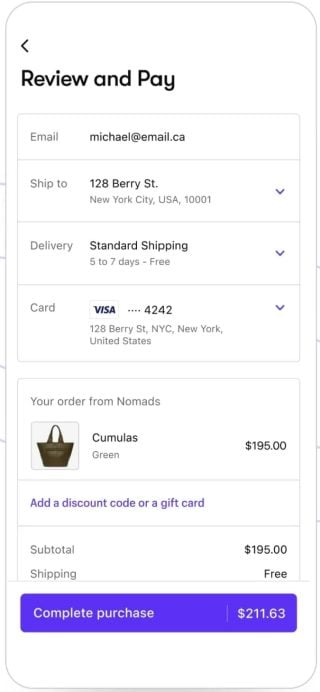
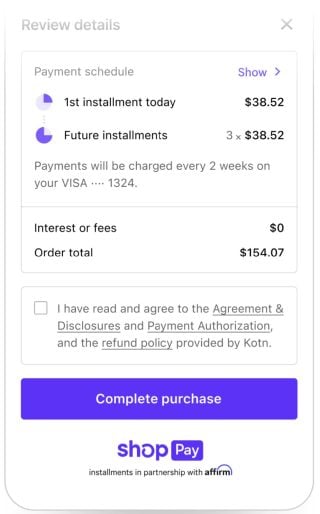
If you already have a Shopify storefront, you can enable the feature from your admin page. It lets customers store credit card, email, shipping and billing information. Then, when they return to your store, the checkout fields are automatically filled out. Shop Pay allows customers to pay in installments, too.
Images courtesy of Shopify.
Aside from making the checkout process almost instantaneous, Shop Pay also lets you sell directly from your business’s Instagram and Facebook pages. That means customers don’t have to leave social media to complete their purchases. To activate this feature, you’ll need to install the Facebook and Instagram channel from Shopify’s app store and go through the onboarding process to begin marketing your products on social media.
Shop Pay vs. Shopify Payments
Shopify Payments is an integrated payment processing service that lets Shopify merchants accept credit cards and other methods of payments. Shop Pay, on the other hand, is an accelerated checkout feature used to speed up the checkout process, and it needs to be paired with a payment processor to work correctly. You can use Shop Pay with Shopify Payments or a third-party payment processor, as long as you have a Shopify storefront.
Shopify follows standard security protocols by encrypting customer payment details and storing them on its PCI-compliant servers. The data is only available to stores when an order is placed. NerdWallet’s article on PCI compliance provides more details on these security standards and what they mean for your business.
Deciding factors
Payment processing model
Flat rate.
Payment processing fees
Shop Pay is included as part of Shopify Payments, which charges the following rates for upfront payments:
2.5%, 2.7% or 2.9% plus 30 cents for online payments for Advanced, Shopify or Basic plan, respectively.
2.4%, 2.5% or 2.6% plus 10 cents for in-person payments for Advanced, Shopify or Basic plan, respectively.
If you use Shop Pay to offer buy now, pay later options, rates typically range between 5% and 6% of the purchase price.
Monthly fee
You must have a Shopify POS plan to enable Shop Pay. Here’s Shopify’s POS plan pricing:
Shopify e-commerce plans:
$29 for Shopify Basic when billed annually (or $39 when paid monthly).
$79 for regular Shopify when billed annually (or $105 when paid monthly).
$299 for Shopify Advanced when billed annually (or $399 when paid monthly).
$2,300 per month and up for Shopify Plus.
All e-commerce plans come with POS Lite for selling in-person. Upgrading to POS Pro for brick-and-mortar businesses costs an extra $89 per location.
Shopify’s alternative solutions for mainly selling in-person:
$5 for Starter plan, which includes one POS Lite location.
$79 (when billed annually) for Retail plan, or $89 when paid monthly; includes one POS Pro location.
Contract length
Shopify does not require a contract. Plans are paid month to month unless you sign up for an annual, two-year or three-year plan.
You should be able to enable Shop Pay in just a couple of clicks if you already have a Shopify account and opted to use Shopify Payments (the company’s integrated payment processing service). And since Shop Pay uses Shopify Payments’ transaction rates, your transaction fees will decrease as you subscribe to higher-tier plans.
👍 May decrease cart abandonment rates
When you’re shopping online, it’s tempting to just click over to the next tab in your browser when you see how much information you need to fill out to complete a purchase. Since Shop Pay streamlines the checkout process, it has the potential to decrease your online shop’s cart abandonment rates and give your customers instant gratification.
👍 Enables buy now, pay later options
To qualify for Shop Pay Installments — a buy now, pay later option from Affirm — your business must be located in the U.S., sell in USD and use Shopify Payments. Additionally, customers’ purchases must be at least $35 to $50.
Merchants who qualify for the Standard version of Shop Pay can typically offer the following customer payment options for $50 to $1,000 purchases:
Two or four interest-free payments every two weeks.
Monthly installments for up to 12 months.
Merchants who qualify for the Premium version of Shop Pay can offer the following customer payment options for $35 to $30,000 purchases:
Two or four interest-free payments every two weeks.
Interest-free monthly installments for up to 12 months.
Monthly installments for up to 24 months.
For customers, the annual percentage rate, or APR, on these installments ranges from 0% to 36% of the purchase price. A premium option is also available to eligible merchants and allows for interest-free payments on longer repayment terms than two months. Generally, your business pays a fee of 5% to 6% for each Shop Pay Installments transaction, based on various business factors and Affirm's underwriting.
Shop Pay is built exclusively for business owners who already use Shopify. If you’re using a different POS system or e-commerce platform, switching over to Shopify just for Shop Pay is likely not worth the effort — especially since other accelerated checkout options are available (see below).
👎 Shopify costs can add up
Shopify’s base-level plan pricing is reasonable, but things get expensive when you opt to add POS Pro capabilities to your subscription. POS Pro, which costs another $89 per month, adds additional in-person selling features to your POS plan, like inventory management, staff management and omni-channel selling. Additionally, some of Shopify’s higher-end website templates cost extra upfront.
Methodology
NerdWallet’s ratings of payment processing providers rewards companies whose products and services are priced well and work in a variety of payment scenarios, among other criteria.
Ratings are based on weighted averages of scores in several categories, including overall cost, hardware and software options, system capabilities, customer service, contract requirements and integrations. Learn more about how we rate payment processing providers.
These ratings are a guide, but fees, hardware, software and contract requirements can vary widely from business to business and provider to provider. We encourage you to shop around and compare several providers.
NerdWallet does not receive compensation for any reviews. Read our editorial guidelines.