









Selecting stocks takes some consideration, so it’s best not to do it on a whim.
If you’re not sure exactly what you’re looking for, you can learn how to research stocks before you dive in.
7 best free stock screeners
Cheap is good, but free may be better. Here are some of the best free stock screeners available. Most stock screeners won't force you to create an account (though some, like Fidelity, Morningstar and Finviz, do).
1. Fidelity
You can look up individual stocks using Fidelity’s screener without an account, but you’ll need to open an account to access its advanced features. Without an account, you can see some charting and performance data. With an account, you get access to additional features like investing themes. These let you see stocks in categories such as drones, natural foods and wind energy. You also gain access to analyst opinions.
» Learn more: Read about Fidelity
While most online brokers won’t charge you to use their stock screeners, you may need to have an account with them to get access to all their tools. If you have a brokerage account, you may have access to a stock screener already. If you don’t, stock screeners may be an important factor to consider when deciding where to open one.
» Compare brokers: Best brokers for stock trading
2. Finviz
Finviz is often included in roundups of the best stock screeners, and for good reason. Finviz’s user interface may feel a little crowded at first, but once your eyes adjust it’s easy to find all the filters you need. Finviz can filter some data that’s hard to find on other screeners, such as IPO date and outstanding shares. It also allows users to save preset screens, making it easy to come back to a filtered search you’ve already saved. You’ll only be able to use that functionality if you create an account on the site, which is free.
3. Yahoo Finance
Yahoo Finance’s stock screener is a great tool that combines a clean interface with lots of filters. This screener is one of the few free resources that allows you to screen for sustainable stocks. It also gives users access to screeners for mutual funds, ETFs and futures.
4. TradingView
TradingView’s stock screener has one of the friendlier user interfaces and a clean appearance. This may be a good pick for beginners who don’t want to be overwhelmed by too much information. Advanced traders will still find plenty of technical data. TradingView also has forex (or foreign exchange) and cryptocurrency screeners.
5. StockFetcher
If you’re looking for a powerful stock screener, StockFetcher may be the one for you. You can use over 125 indicators to build unique stock filters. StockFetcher's data may feel overwhelming, but the site has a convenient User Guide to help you get comfortable. There are also several example filters if you need some inspiration.
6. Stock Analysis
Stock Analysis's platform is less crowded than other sites, and is particularly user-friendly. The platform has tool tips that explain complex financial terms to help you learn. Unfortunately, the ten-year financial data is locked behind a paywall. If you make a free account you can save your screeners. The Pro version ($6.58 per month when billed annually) offers access to tools, file downloads, financial history and ETF holdings.
7. Investing.com
Investing.com's stock screener has an impressively clean format with several pre-made screens (such as "Under $10/share" and "Technical Titans") showcased right at the top. Flag emojis show what country the screens are focused on, and popular filters are easy to find and use. Creating a custom table view is only available with Investing.com Pro, but the free version does allow you to save your screens as long as you have an account.
How to use a stock screener
1. Click around and get to know the controls
Most of the stock screeners above are purely research tools, which means that there's no risk of accidentally buying or selling something by misclicking. With that in mind, if you're learning how to use a new stock screener, it's a good idea to click around a little bit and explore its capabilities.
(Fidelity is one exception, since it's also a brokerage. If you have a Fidelity account and you're logged into it while exploring their stock screener, just make sure you don't accidentally click any buttons that say "buy" or "trade" or something similar.)
Stock screeners generally let you select various stock metrics — for example, returns, earnings per share (EPS) growth rate, or price-to-earnings (P/E) ratio — and set a minimum and/or maximum number for each of those metrics. They also frequently allow you to sort stocks by category — for example, industry, country of origin, stock exchange or index. Then they spit out a list of stocks that match the criteria you've selected.
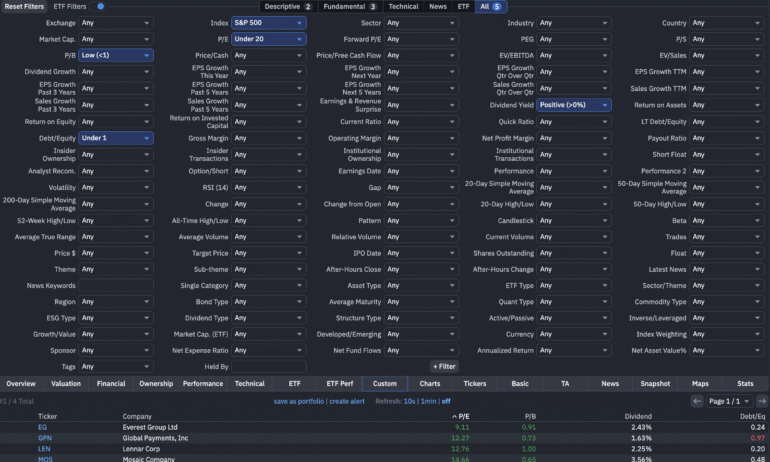
Below is an example of what a typical stock screener looks like. It's a picture of a Finviz screen for undervalued S&P 500 stocks, showing various valuation criteria and a list of stocks that match those criteria.
2. Select the right metrics for your search
Which metrics should you use? That depends on your investing style and what kind of stock you're looking for. Below are a few different investing strategies, and some common metrics that you can use in stock screeners for them.
Growth stocks: High EPS growth, high revenue growth, high volume.
Undervalued stocks: Low P/E ratio, low price-to-book ratio, low debt-to-equity ratio.
Dividend stocks: High dividend yield, low payout ratio, high dividend growth rate.
3. Set some guardrails to screen out risky companies
If you're just screening by numbers like price-to-earnings ratio or annual returns, you're likely to run into a problem: Many of the top companies in these kinds of simple numerical screens tend to be a little sketchy, for lack of a better word.
For example, screens that look for growth or momentum often turn up small fledgling companies that are prone to wild price swings, while screens that look for undervaluation often turn up companies that are low-priced because they're in financial distress and can barely keep the lights on. One way to remedy this problem is to set some guardrails that limit your screen to more established companies.
Setting a minimum market capitalization is one common approach. Adding a minimum market cap of, say, $1 billion to your screen will take volatile micro-cap stocks off the table and limit your search to more substantial companies.
Some screeners allow you to filter stocks by how many years have passed since their initial public offering. This is another way to weed out new, unproven stocks and limit your screen to those that have some history. Another way to filter for mature stocks is to limit your screen to stocks with positive EPS, to remove upstart companies that haven't turned a profit yet.
Finally, if you really want to limit your screen to very well-established companies, you can filter for stocks that are part of a major stock market index such as the S&P 500, Dow Jones Industrial Average or Nasdaq 100. This may really narrow down your results, because these indexes generally consist of blue-chip stocks with very large market capitalizations and years of profitability.
4. Research the stocks
Now, with your narrowed list, it's time to research the stocks individually before buying them. For each you consider, you’ll want to figure out:
If this is such an attractive stock, why isn't the price higher?
What does the company do? And does the industry have a future?
How is the management, and is it aligned with shareholders?
How do the company’s balance sheet and other financials appear?
Answering these fundamental questions is a big task, especially if you’re aiming to have a well-diversified portfolio. Plus, after you’ve purchased your stocks, you’ll want to keep up with the companies by analyzing at least the quarterly earnings reports.
If you’re looking to dig into investing in stocks, open an account with a broker that provides good screening and research, including the work of professional analysts that can help you get started. Our roundup of the best brokers for stock trading is a good place to start.