





Points Path is a browser extension for people who shop for flights on Google Flights. Turn it on, and it’ll show you whether the flights you’re viewing on Google Flights are a better deal to book with points (or miles) than cash.
“A lot of people assume that maybe booking on points is always better or booking on cash might be always better,” founder Julian Kheel said in an interview for the Smart Travel podcast. “This tool makes it so easy to clarify that.”
Points Path comes in both a free and a paid version (more on that later), but the free version is surprisingly robust, offering everyone from points pros to casual travelers a simple yes-or-no answer on whether to book with their points.

Yes
$79.99
per year for the Pro planAirlines

By signing up, you will receive newsletters and promotional content and agree to our Terms of Use and acknowledge the data practices in our Privacy Policy. You may unsubscribe at any time.
How Points Path works
Points Path is an extension available for web browsers, including Chrome, Safari and Microsoft Edge. Once installed and turned on, it’ll appear whenever you search for flights on Google Flights.
You start by searching for a flight as you normally would on Google Flights. Within seconds, Points Path retrieves live award pricing from airline loyalty programs and displays it alongside the cash prices. An arrow indicator tells you which option — cash or points — offers better value based on Points Path’s own points-and-miles valuations, which you can find on the Points Path website.

What Points Path does well
Helps you with points vs. cash decisions
If you already have a flight in mind, and need to decide whether to pay for it in rewards or cash, Points Path is the right tool to use.
"People can't figure out how to find flights to use their miles on,” Kheel said. "And then even when they do, they can't figure out if they're getting a good deal or not. Should they use their points or should they use cash and save the points for later? And that is the problem that Points Path is trying to solve…right where you already searched."
Saves you time
Points Path searches the airline websites behind the scenes and displays the points prices directly on Google Flights.
Doing that process manually would likely take several minutes — or more — as you log in to that airline’s website, then calculate the points value based on either your own valuations of what a point is worth (or using other point valuations, including NerdWallet’s points and miles valuations).
Points Path can save minutes per flight search, which can turn into hours over the course of a year for frequent travelers.
Where Points Path falls short
You must use Google Flights
Points Path is a plugin, meaning it adds a new feature to an existing program (in this case, Google Flights) rather than being its own standalone tool. Because of that, you must use Google Flights to use Points Path. That might be a drawback if you prefer comparing flights elsewhere, such as on Expedia.
But it’s not a bad thing for most people. Google Flights is one of the best flight comparison tools out there, allowing you to compare flights across different airlines and dates, almost instantaneously. You can even compare across multiple airports simultaneously, as well as sort by robust filters such as only certain airlines or fare classes.
The free version has some limitations
It’s tough to complain about free, but the free version of Points Path is limited to just five airlines. The paid version unlocks more airlines, but some notable ones are still missing, such as Air Canada, which is a key American Express and Capital One transfer partner. However, Points Path says it will add more frequent flyer programs “very soon.”
How to get started with Points Path
Setting up Points Path is easy:
Download the browser extension.
A pop-up button will prompt you to add the extension to your browser.
Then, search for flights as you usually would on Google Flights, and you’ll see the new Points Path feature to the left of the airfare.
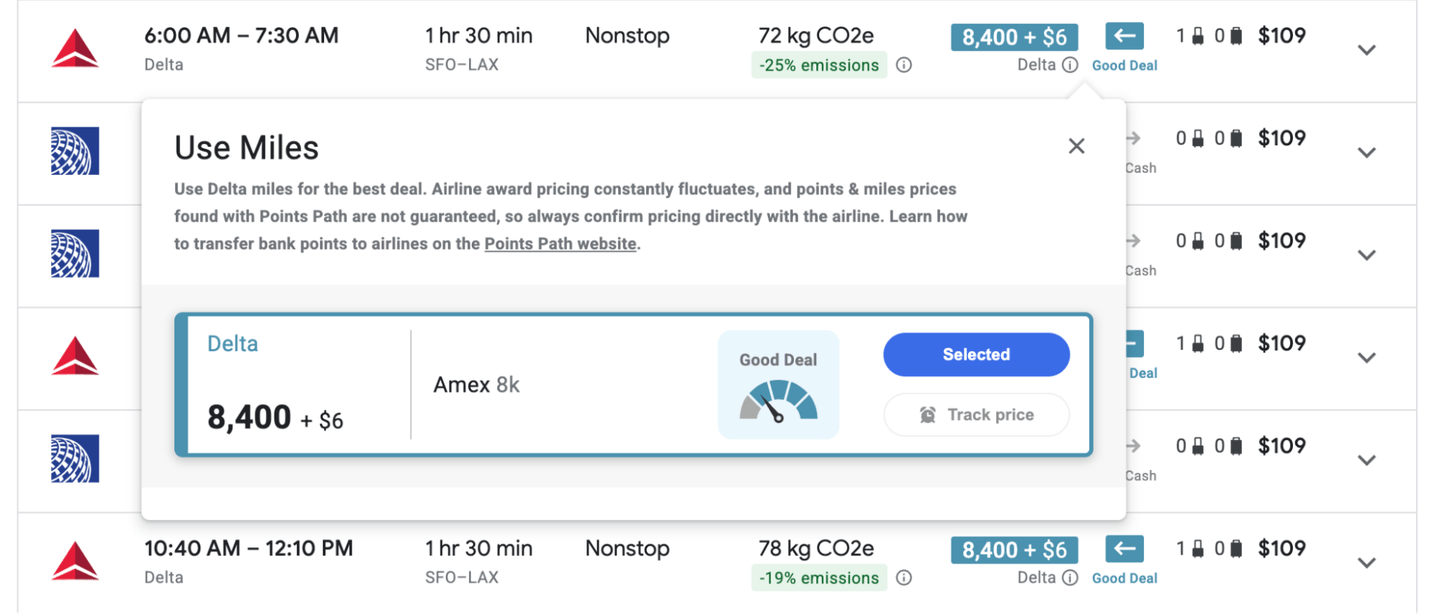
Click on the “i” icon for even more details. When you do, Points Path displays transfer partners. Even if you don’t have, say, Delta miles, you could transfer AmEx Membership Rewards points. Points Path makes that clear by displaying which of the major bank currencies are transfer partners. It also displays a scale that shows just how good a deal you’re getting.
Is it worth upgrading to a paid subscription?
For most travelers, the free version of Points Path is more than enough. But paying $80 per year for Points Path Pro could be worth it if you:
Frequently book international award travel.
Have flexibility in your travel dates, and can use the calendar view to find cheaper flights.
Want to monitor specific routes for award price drops.
Value your time highly enough that automated alerts justify the cost.
Here are some key differences between the paid and free versions:
Points Path Pro | Points Path (free version) | |
|---|---|---|
Price | $7.99 (billed monthly) or $79.99 (billed annually). | $0. |
Airline programs | Alaska, American, Delta, JetBlue, United, Air Canada, Virgin Atlantic, Qantas, Virgin Australia, Emirates, Air France/KLM, Etihad, Avianca. | Alaska, American, Delta, JetBlue, United. |
Price tracking alerts | 30 active flight alerts at a time. | None. |
7-day points calendar | Yes. | No. |
User-adjustable points valuations | Yes. | No. |
The primary reason to upgrade is that the Pro version covers more airlines than the free version, which only covers Alaska Airlines, American Airlines, Delta Air Lines, JetBlue Airways and United Airlines. Plus, it offers some other bells and whistles like price tracking alerts, including:
A 7-day points calendar: This makes Points Path function more like other paid tools, such as PointsYeah, displaying points rates across multiple airlines and dates over the span of a week.
Adjustable points valuations: This feature allows you to tell Points Path what you think a point or mile is worth rather than relying on their valuations. That could be useful if you, say, bought airline miles and have a fixed value per mile you’re targeting.
Since the free tier covers the airlines that make up most flights for U.S.-based travelers, it’s likely not necessary to buy the paid version right out of the gate. Should you want to compare more airlines or days, consider upgrading.
How Points Path compares to other award search tools
Points Path occupies its own niche in the crowded points-and-miles tools landscape. Most award search tools like PointsYeah or Point.me help you discover award availability across multiple programs or craft complex international routings. They're designed for deal hunters who want to identify sweet spots and maximize redemption values. If you’ve got, say, Chase Ultimate Rewards® points or AmEx Membership Rewards and want to know which airlines are best to transfer those points to for flights between particular airports, Points Path is not your tool.
Points Path serves a different purpose entirely. It assumes you've already found the specific flight you want on Google Flights and simply need to know whether it’s a better deal in points — or if it’s better to save those points and pay with cash.
Considering how many competing tools gate their most useful features behind paywalls or offer limited free trials, Points Path's free version feels unusually generous.
Points Path: Is it worth downloading?
I’m ruthless about which extensions I install, doing my best to avoid plug-ins that trigger annoying pop-ups and add extra code that can slow down a page.
Points Path doesn’t come with any pop-ups, and I’ve never noticed any reduction in page loading speed.
For me, the extension has been enormously valuable in helping me spend my points at the right time. Points Path makes it clear which currency will get you the most bang for your buck. Sometimes it’s a long, international trip in business class that’s “cheaper” on points, but sometimes it’s one of those more everyday flights. If it’s the latter, then you can spend down those points balances and save your cash.
If you're already someone who compares prices on Google Flights and you occasionally book travel with points, adding Points Path to your browser costs nothing and can save you both time and money. And if you decide you need even more features, the upgraded version might even save you far more than the $80 per year you paid for it.
How to maximize your rewards
You want a travel credit card that prioritizes what’s important to you. Here are some of the best travel credit cards of 2026:
Flexibility, point transfers and a large bonus: Chase Sapphire Preferred® Card
No annual fee: Wells Fargo Autograph® Card
Flat-rate travel rewards: Capital One Venture Rewards Credit Card
Bonus travel rewards and high-end perks: Chase Sapphire Reserve®
Luxury perks: American Express Platinum Card®
Business travelers: Ink Business Preferred® Credit Card