Free Budget Spreadsheets and Tools
These free online spreadsheets let you skip the setup and start tracking your money right away.
Many, or all, of the products featured on this page are from our advertising partners who compensate us when you take certain actions on our website or click to take an action on their website. However, this does not influence our evaluations. Our opinions are our own. Here is a list of our partners and here's how we make money.
Updated · 3 min read

Written by
Lead Writer & Content Strategist 


Edited by
Managing Editor 
Co-written by
Senior Writer 

Creating a budget spreadsheet from scratch takes time, and maintaining it takes discipline and consistency. But there are free online spreadsheets that can simplify the process of managing your money and reaching your financial goals.
We rounded up some you can use from trusted sources, including our 50/30/20 budget template, to help you sort through the internet noise.
How we made our list:
While there are tons of budgeting templates on the internet, we narrowed our list to those that are free, widely available and come from trusted sources.
Microsoft 365 Excel budget spreadsheet
How it works: Save yourself the hassle of setting up rows, columns and formulas by using a pre-made Excel budget spreadsheet from Microsoft. There are budgets for households, holidays, events and businesses.
What we like: There’s a budget for just about every situation. Some lay out each month’s income side by side, which can be especially useful if you have a fluctuating income. Access Excel online and collaborate with others in the same document at the same time.
Where to get it: Visit create.microsoft.com and type “budgets” in the search box to find an Excel file to download. Or sign in to Microsoft and edit in your desktop browser.
Tip: You need Microsoft 365 software to open the file with Excel on your computer, which you’ll have to purchase if you don’t already have it. You might be able to open the file with another program, such as Google Sheets, but the formatting or certain features might work differently.
» LEARN: How to budget money in 5 steps
Meet MoneyNerd, your weekly news decoder
So much news. So little time. NerdWallet's new weekly newsletter makes sense of the headlines that affect your wallet.
Google Sheets budget templates
How it works: Google Sheets is a part of the Google Workspace suite. Google Sheets has pre-made templates, such as an annual and monthly budgets. There are also business budgets for entrepreneurs who want to track their expenses. You can access Sheets for free with a Google account, which includes 15GB of free storage. If that’s not enough, you can pay to upgrade.
What we like: You can bring your budget anywhere by logging in to your Google account from your smartphone, tablet or computer. You can also share access to a household budget with other members of your family.
Where to get it: Sign in at google.com/sheets, then browse the template gallery at the top right of the page. The template titled “Monthly budget” might be a good place to start.
NerdWallet budget spreadsheet
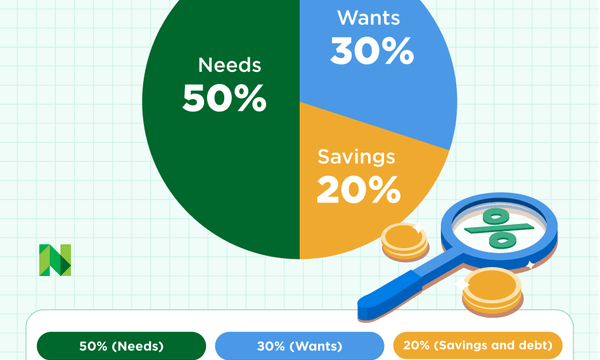
How it works: The NerdWallet budget spreadsheet lets you input your monthly income and expenses and shows how your finances compare with the 50/30/20 budget breakdown: 50% of your income goes toward needs, 30% toward wants and 20% toward savings and debt repayment.
It's OK if your budget doesn’t perfectly align with the 50/30/20 breakdown. Living in a high cost of living are, family size and large debt loads, like student loans, could be reasons to reconfigure your breakdown. Something as simple as adding an extra 10% to your "needs" category (60/30/10 budget) could better account for your expenses.
What we like: The planner prompts you to consider a wide range of expenses — from life insurance premiums to travel expenses to credit card payments — so you don’t miss anything.
Where to get it: You can read the story about our free budget template first, then use it directly on NerdWallet. You can also just download the spreadsheet, which is compatible with Microsoft Excel and Apple Numbers.
NerdWallet budget planner
FTC budget worksheet
How it works: The Federal Trade Commission offers a website to educate consumers about money, including how to budget. Download and complete the budget worksheet PDF to see how your money is allocated each month and what changes you may want to make.
What we like: Numbers and formulas can make budgeting a turnoff, but this simple worksheet is the furthest thing from intimidating. It’s a great jumping-off point if you’ve never budgeted before.
Where to get it: On Consumer.gov, click the “Your Money” tab, then "Making a Budget” to download the budget worksheet PDF.
Canva printable budgeting tools
Canva is an online design tool with ready-made templates, including budgeting worksheets you can download or customize.
How it works: It offers two main kinds of budgeting tools: printable PDF templates and spreadsheet-style templates compatible with Google Sheets and Excel. You’ll find free options, but those with a Canva Pro membership ($15 per month) will have a far better selection.
PDF templates let you track monthly budgets, expenses, sinking funds and debt payoff, but they don’t support sorting or auto-calculations. Spreadsheet templates look like Canva designs but include tables that support formulas found in Google Sheets and Excel.
What we like: A visually appealing way to organize and track your money.
Where to find it: Create a free account at canva.com and search for “budget templates” or “budget tracker.”
Tools from personal finance influencers
Many personal finance experts and influencers offer their own suite of tools. While some come with a fee, others are free — often only requiring your email information to gain access.
Ramit Sethi’s Conscious Spending Plan is free once you provide your name and email address. The download calculates your net work, income, fixed costs, investments, savings goals and guilt-free spending. The file can be used in Excel or imported into Google Sheets.
Dave Ramsey also has a free printable budgeting template that uses the zero-based budgeting method — if that’s not a style you prefer, this template might not be for you.
Taylor Price, also known as @pricelesstay, has loads of free tools. While these are geared mostly toward a younger audience, there’s plenty for everyone, including a budget planner and money tracker that you can complete online.
Others, like the Money Guy, offer detailed free templates that drill down into other aspects of your personal finances, like net worth calculators, a new child checklist, tax guides and more.
The best budget spreadsheets according to Reddit
We sifted through Reddit forums to get a pulse check on what users say about the best budget spreadsheets. We used an AI tool to help analyze the feedback. Here's a summary of our analysis. People post anonymously, so we cannot confirm their individual experiences or circumstances.
Excel and Google sheets rank high on Redditors' list of budgeting templates. They cite customization and flexibility as key features.
Some users pair these spreadsheets with expense tracking through their banking apps. However, some technical skills are required to build and maintain these spreadsheets.
A middle ground is Tiller, which connects your bank information to spreadsheets in Excel or Google Sheets, and updates daily. Templates are customizable and the company boasts data privacy as a key feature. Because Tiller isn't free (it costs $79 per year after a 30-day free trial), we didn’t add it to our list of free spreadsheets. But it could be a viable option for those looking for more automation.
What to consider before you make your budget
Find a budget spreadsheet you like? Do your research before downloading.
Only download tools from trusted websites
Taking the steps to make sure the budgeting tool comes from a reliable source can help you avoid phishing viruses and scams. While the four options on our list come from trusted sources, check online reviews for unfamiliar tools, apps and websites before downloading.
Don’t settle for something that doesn’t fit your needs
If the tools above aren’t a good fit, you’ve got other options. Maybe you're looking for an app-based experience rather than a spreadsheet.
Many budgeting apps link with your bank accounts and categorize spending to create a more hands-off, automated approach. Check out some of the best budget apps. YNAB was frequently mentioned by Redditors as a popular option.
Step back and get clarity
Maybe looking at all the budgeting spreadsheets has made you realize that your budget isn’t working. Maybe the budget is outdated, not detailed enough or not inclusive of your priorities and goals.
If that's the case, now is the time to back up and learn more about different budgeting strategies.
Budget maintenance and review checklist
Once you have a budget template or spreadsheet you like, it’s important to check in and review it as you make progress on your goals. Here’s a checklist of what you want to look for weekly, monthly, quarterly and yearly.
Weekly checklist
- Log your spending. Look at recent transactions and write down cash purchases.
- Check for surprises. Be on the lookout for double charges, price increases on subscriptions or anything else unusual.
Monthly checklist
- Update your income. This is especially important if your income isn’t the same each week or if you have a side hustle that brings in extra money.
- Adjust category totals. If you came under budget in one area, you can move extra funds to another category or to savings.
- Check debt payments. Make sure your payments went through and note the new balances.
Quarterly checklist (every three months)
- Look for spending patterns. Which categories go over budget every month? Are there categories that are no longer relevant to you?
- Review subscriptions. Cancel, pause or downgrade anything you’re not using.
- Plan for events. Planning early for vacations, holidays, school expenses and medical costs can help you stick to your budget.
- Revisit financial goals. Update your timeline for paying off debt, building an emergency fund or making a big purchase, like a car.
Yearly checklist
- Reset your budget. Revisit your categories and make sure they’re based on your life now, not the previous year.
- Review big changes. Did you move? Have a baby? Get a promotion or a new job? These life changes will impact your spending and savings plan.
- Check insurance and benefits. Adjust for any changes you made to health insurance coverage and retirement savings.
- Update long-term goals. Check in with your emergency fund, debt balances and retirement savings. Consider building sinking funds for holiday shopping, vacations, kids’ summer camps — anything that created a financial pain point for you in the previous year.
Article sources
NerdWallet writers are subject matter authorities who use primary,
trustworthy sources to inform their work, including peer-reviewed
studies, government websites, academic research and interviews with
industry experts. All content is fact-checked for accuracy, timeliness
and relevance. You can learn more about NerdWallet's high
standards for journalism by reading our
editorial guidelines.
On this page
- How we made our list:
- Microsoft 365 Excel budget spreadsheet
- Google Sheets budget templates
- NerdWallet budget spreadsheet
- FTC budget worksheet
- Canva printable budgeting tools
- Tools from personal finance influencers
- The best budget spreadsheets according to Reddit
- What to consider before you make your budget
- Budget maintenance and review checklist
Related articles